617
DP-C405/C305/C265
FEB 2008Ver. 1.1
Note:
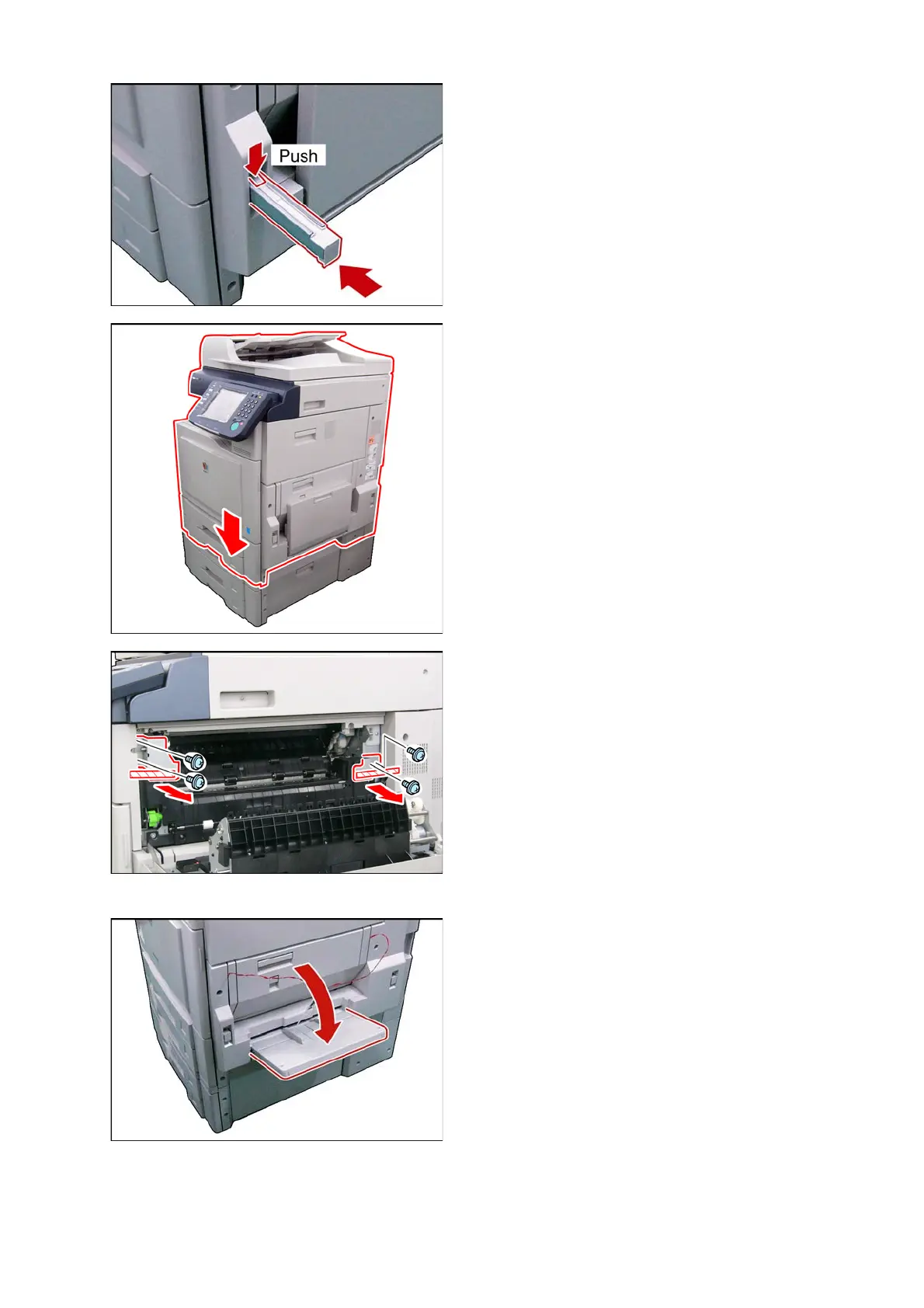
To release the Handle, push the Release Latch
and push the Handle into the machine.
(2) Lift and place the machine on a suitable
Stand / Paper Tray, aligning with a Guide-Pin,
and the Front and Side Covers.
For DP-C405 / C305 / C265
System Console 1/2: (DA-DS320 / DS321)
Stand : (DA1D322 : USA /
Canada only)
Caution:
The machine weights approximately 360.8 lb
(164 kg). To prevent injuries, use the appropriate
number of personnel, and the proper equipment to
lift, or move the machine.
<Removing the Protective Shipping Materials>
Caution:
If the Shipping Materials (Blue Screws, and
Shipping Brackets) are not removed as instructed,
the machine may get damaged when the Power
Switches are turned ON.
(3) Open the Right Side Cover.
(4) Remove 2 Tapes.
(5) Remove 4 Blue Screws.
(6) Remove 2 Shipping Brackets.
(7) Close the Right Side Cover.
(8) Open the Sheet Bypass.



 To Next Page