Type a PIN code to log in
Select the account to track
postage
Tracks postage by Ac-
count/Department
Controls access to system
and to accounts
'Accounts, with Access
Control'
(same as modes with ac-
counts listed above)
Postage tracking and access
control managed from the PC
'Remote Account Manage-
ment'
How to Display and Change the Account Mode
To display and change the Account mode:
1. As supervisor (see How to Log in as Supervisor on page 154):
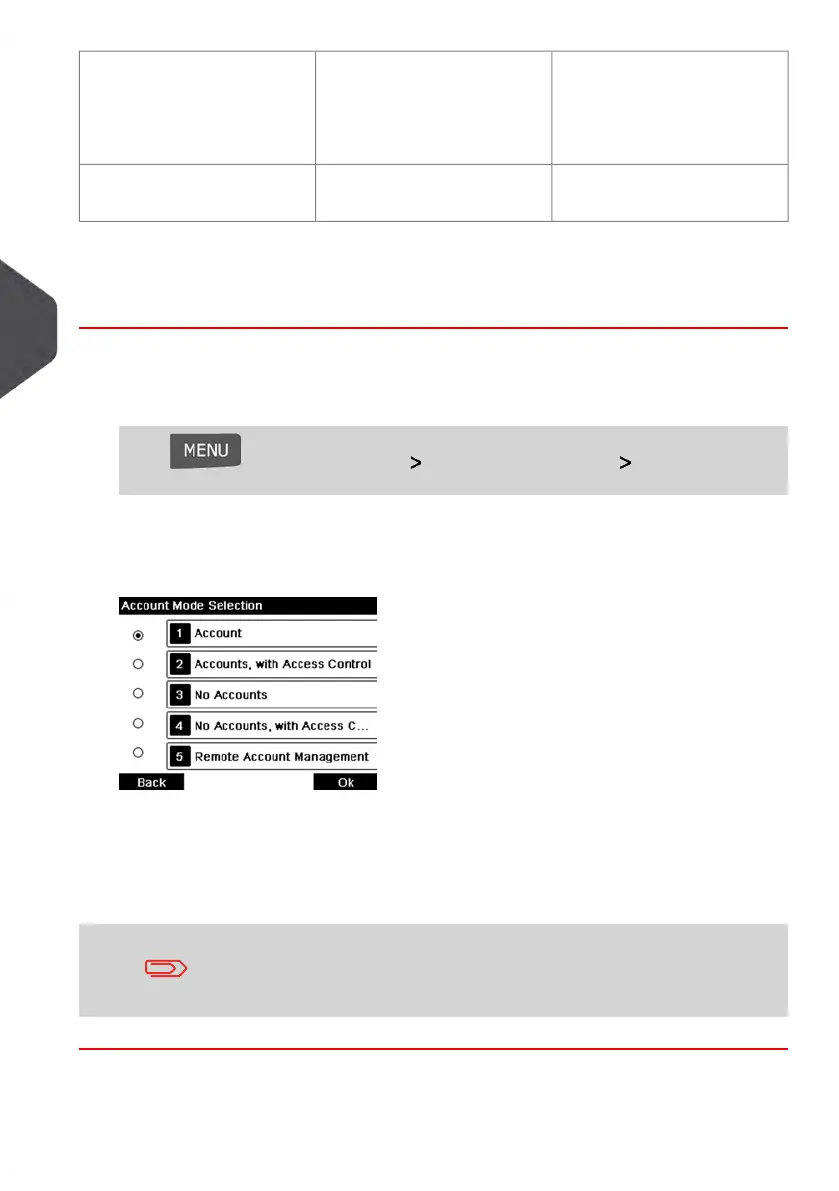
Press and select the path: Account Management Account Mode
Selection
The Account Mode Selection screen is displayed with the current Account Mode
shown.
2. Select another Account mode.
3. Press [OK] to confirm.
4. If required, enter the PIN code and press [OK].
The Mailing System then confirms that the Account Mode has been changed.
If you have selected the 'Remote Account Management' mode, a
connection process to the MAS begins. If the connection fails, the
previous account mode remains active.
98
| Page 98 | Jan-13-2017 10:45 |
5
Managing Accounts and Assigning Rights















 To Next Page