Model 8210/8250 Maintenance Manual Section 7. Component Procedures
Drive and Brake Electromagnetic Brake Assembly
Publication: 1146945/001, Revised: 25 Sep 2018 7-37
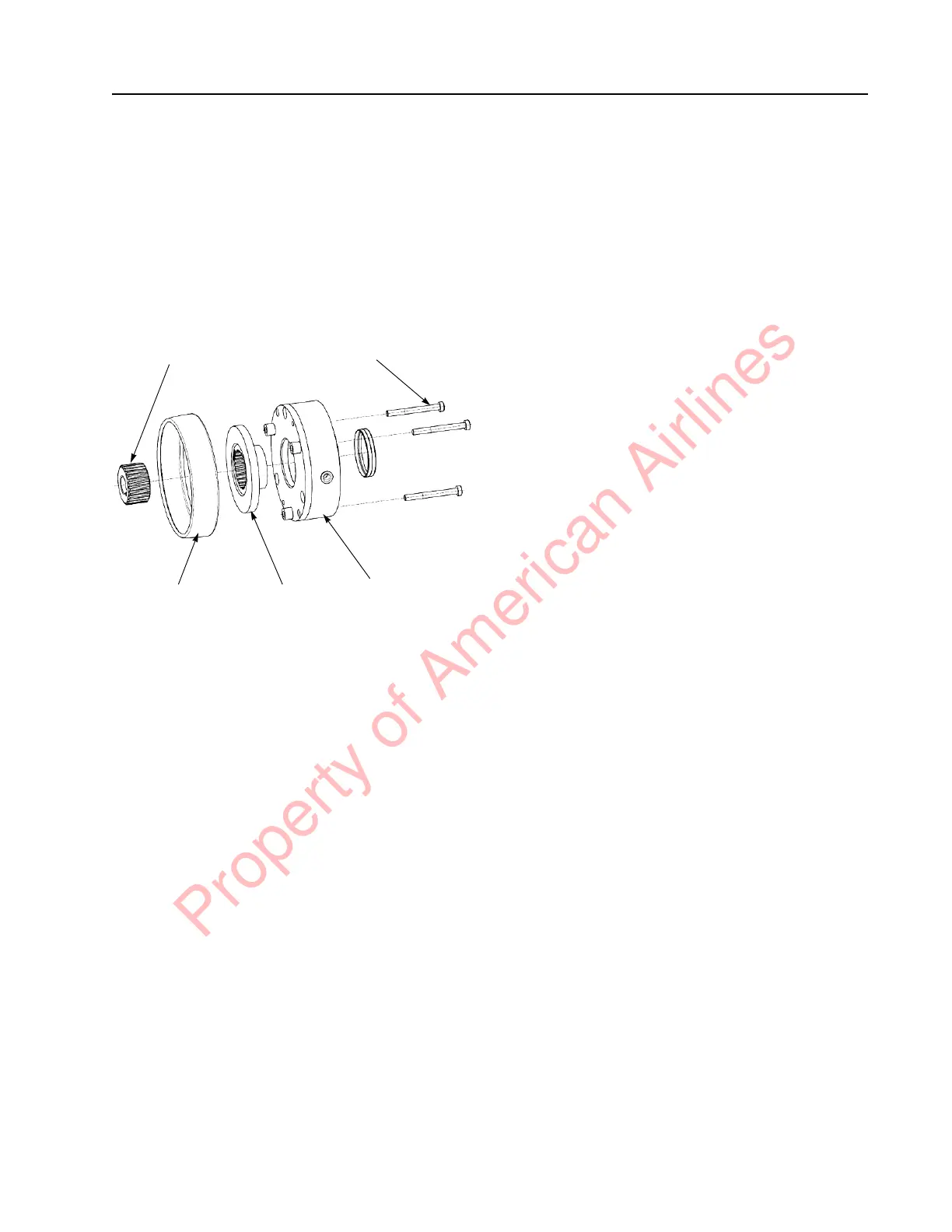
5. Loosen and remove the three 4 mm
mounting bolts and remove the brake coil
assembly. See Figure 7-48.
6. Replace the friction disc on the hub.
Inspect friction plate for wear.
7. Install the brake coil assembly on the
motor end. Torque mounting bolts to 47.8
in. lb. (5.4 Nm).
Figure 7-48. Friction Disc Replacement
8. Install the rubber brake boot to protect the
brake from moisture and dirt.
9. Install the lower and grille covers.
10. Reconnect the battery connector. Place the
Main ON/OFF Switch in the ON position.
If equipped with the optional keypad, enter
your PIN-key code and then press the
green ON ( | ) key.
11. Test the operation of the truck.
Electric Brake Release
An Electric Brake Release is standard
equipment on these trucks. The switch to
activate the brake release is located in the
console cover to the left of the operator manual.
When the switch is activated, the Traction
Amplifier releases the brake.
Mechanical Brake Release
If the brake cannot be electrically released,
perform the following:
1. Remove the lower and grille covers.
2. Remove the rubber brake boot to access
the brake.
3. Loosen the three 4 mm Allen head
mounting bolts evenly until the clamping
force on the friction disc is low enough to
allow the truck to roll.
4. Move the truck to the desired location.
5. Inspect the gap and torque mounting bolts
to 47.8 in. lb. (5.4 Nm). See “Air Gap
Inspection” on page 7-36.
6. Install the rubber brake boot to protect the
brake from moisture and dirt.
7. Install the lower and grille covers.
Mounting Bolt (x3)
Brake Coil
Assembly
Friction
Disc
Hub
Brake
Boot
Property of American Airlines



 To Next Page