Model 8210/8250 Maintenance Manual Section 7. Component Procedures
Options Accessory Bar
Publication: 1146945/001, Revised: 25 Sep 2018 7-123
Accessory Bar
A side plate mounted accessory bar is offered as
optional equipment and may be added in the
field to lift trucks originally manufactured
without one. The accessory bar provides a
mounting location and power for operator fans,
auxiliary lights, or the iWAREHOUSE system
operator display unit. Factory authorization
must be granted before the addition of any
equipment on the lift truck.
1. If equipped with the optional keypad,
press the red OFF ( O ) key. Place the Main
ON/OFF Switch in the OFF position.
Disconnect the battery connector from the
truck.
2. Remove the battery to access the tractor
frame bulkhead.
3. Remove the lower, grille, and upper covers.
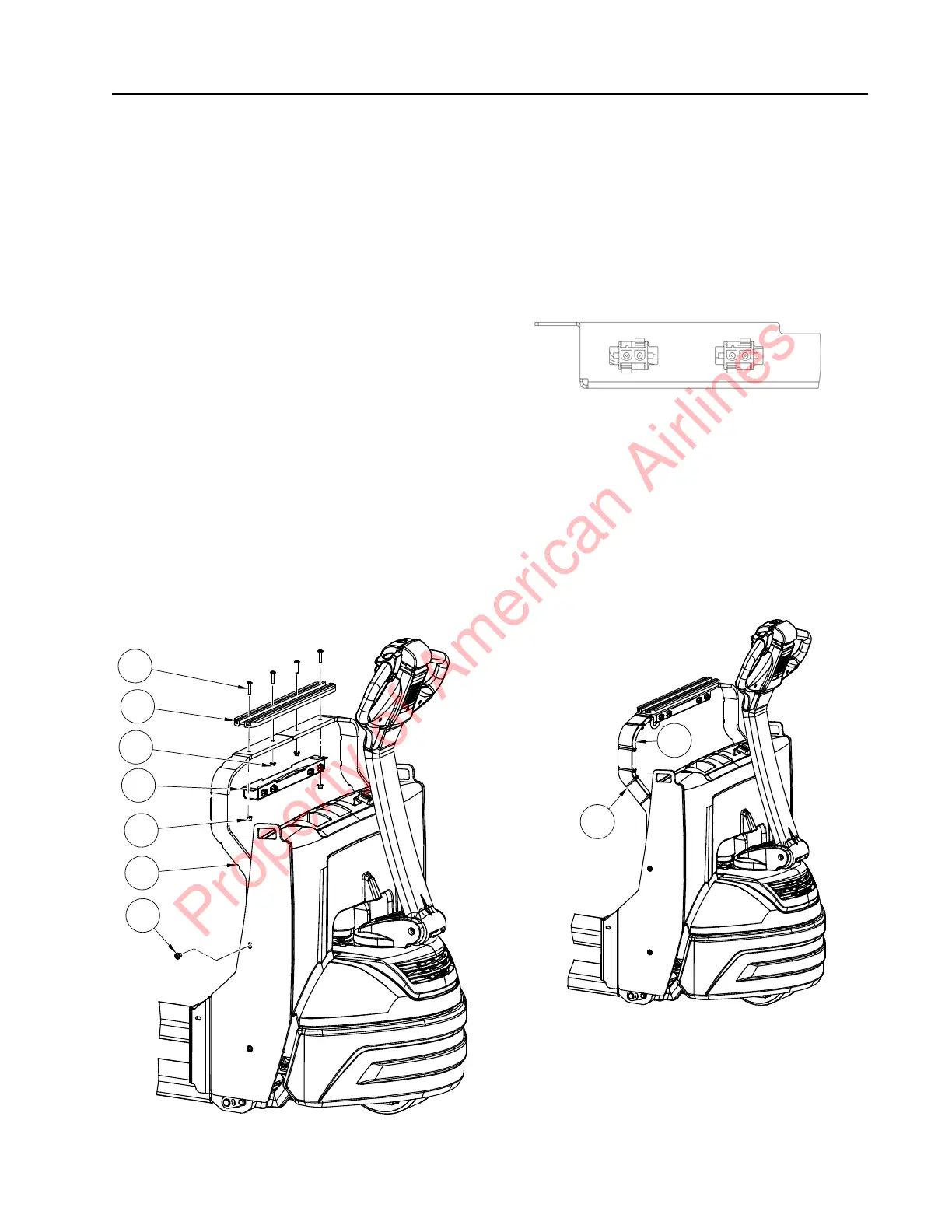
4. Install accessory bar frame [8] to the truck
side plates with button head screws [5]
(see Figure 7-138). Torque screws to
27 ft. lb. (37 Nm).
Figure 7-138.
5. Route the accessory bar harness [10]
through the left hole in the connector
bracket [9]. Install the connectors in the
connector bracket. Make sure the
connectors are oriented with the flat
surfaces facing towards the opening of the
connector bracket (see Figure 7-139).
Figure 7-139. Connector Orientation
6. Install the accessory bar [6] and the
connector bracket [9] to the accessory bar
frame [8] using bolts [4] and nuts [7] as
shown in Figure 7-138. Torque the bolts
[4] to 11 ft. lb. (15.1 Nm).
7. Route the accessory bar harness [10]
down the accessory bar frame and into the
tractor frame as shown in Figure 7-137.
Secure using cable ties [2].
Figure 7-140. Wire Harness Routing
Property of American Airlines



 To Next Page