Section 7. Component Procedures Model 8210/8250 Maintenance Manual
Operator Fan Installation Options
7-126 Publication: 1146945/001, Revised: 25 Sep 2018
Operator Fan
Installation
An operator fan is offered as optional
equipment. Operator fans may be added in the
field to lift trucks originally manufactured
without one. Factory authorization must be
granted before the addition of any equipment on
the lift truck.
N
OTE: The operator fan requires the use of an
accessory bar. See “Accessory Bar, Load
Backrest Mounted” on page 7-121 or
“Accessory Bar” on page 7-123.
1. If equipped with the optional keypad,
press the red OFF ( O ) key. Place the Main
ON/OFF Switch in the OFF position.
Disconnect the battery connector from the
truck.
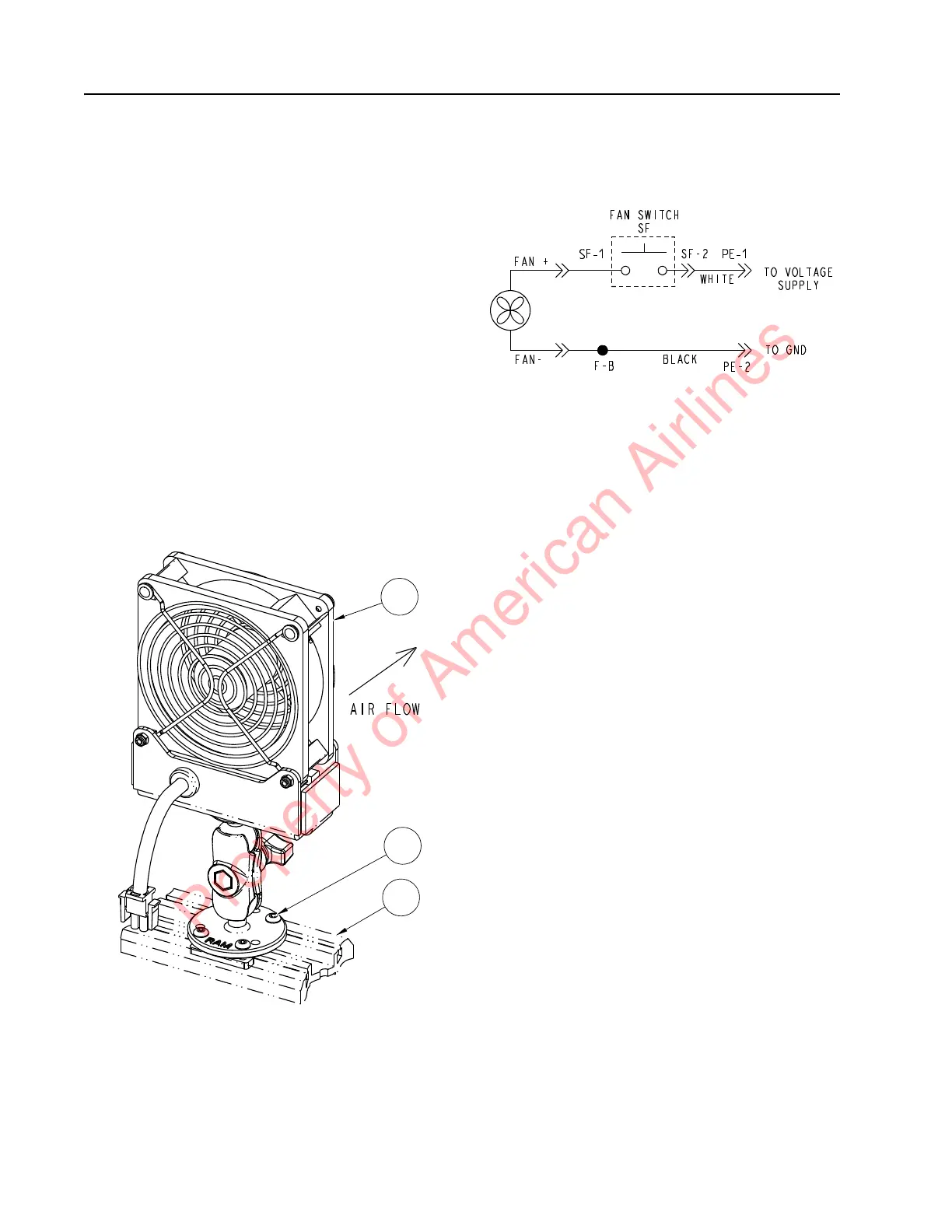
Figure 7-143.
2. Slide the operator fan [1] into the
accessory bar [3]. Tighten the screws [2] to
secure the ram mount to the accessory
bar.
3. Attach the fan cable to the connector on
the accessory bar.
Figure 7-144.
4. Reconnect the battery connector. Place the
Main ON/OFF Switch in the ON position.
If equipped with the optional keypad, enter
your PIN-key code and then press the
green ON ( | ) key. Test the functions of
the lift truck and options.
Property of American Airlines



 To Next Page