Model 8210/8250 Maintenance Manual Section 3. Systems Overview
Operator Display and Programming
Publication:1146945/001, Revised: 25 Sep 2018 3-5
Operator Display and
Programming
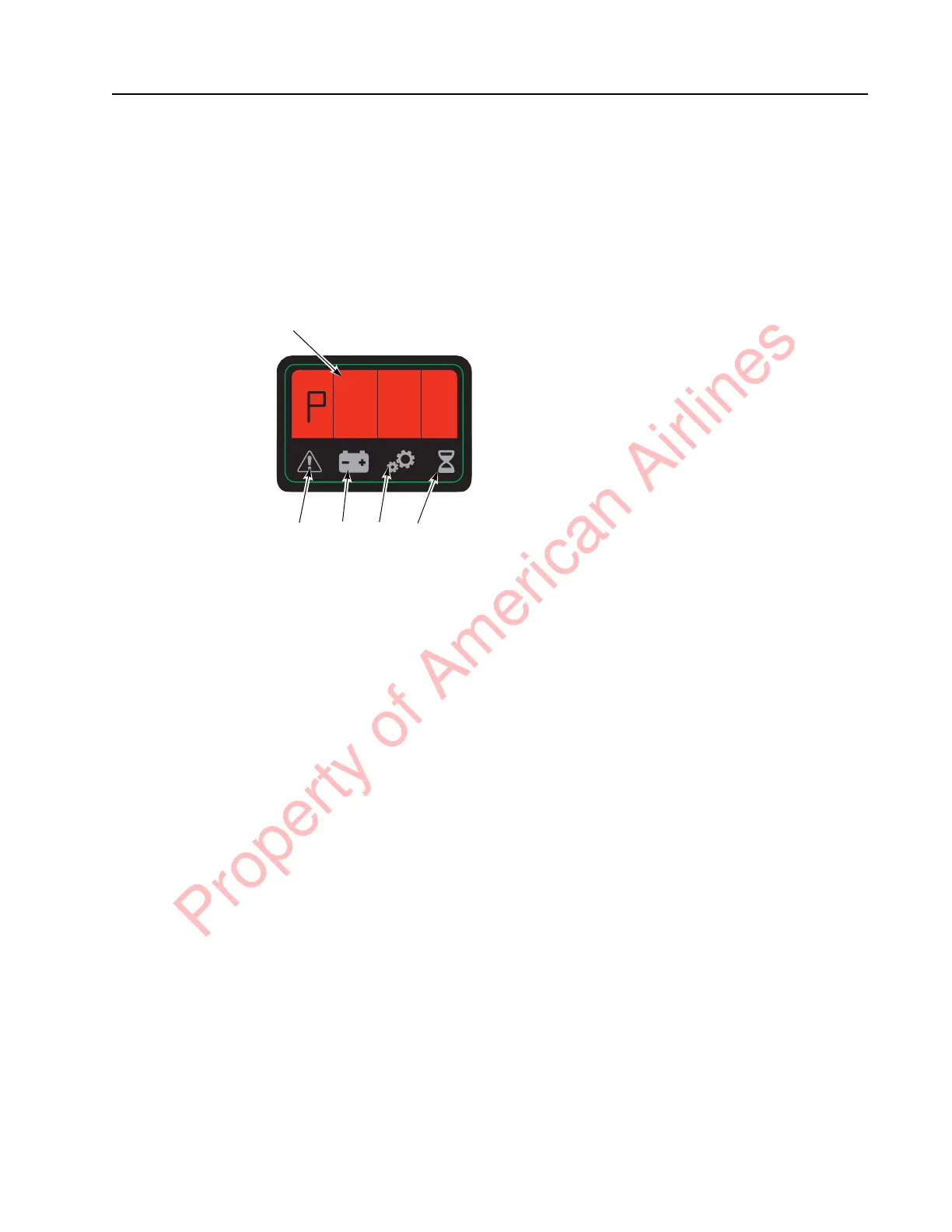
The Operator Display is installed on the top of
the control handle and displays operational and
servicing information.
Figure 3-4. Operator Display
P0010517.png
Special Truck Mode
NOTE: Installation of a Service Key is required
to make some changes. See
“Programming Service Parameters” on
page 3-8.
To enter a Special Truck Mode:
1. Press and hold the horn button (S18). At
the same time, place the Main ON/OFF
Switch in the ON position. If equipped with
the optional keypad, enter your PIN-key
code and then press the green ON ( | ) key.
2. Continue to hold the horn button while
the display (see Figure 3-4) cycles through
the following functions:
• (H)our meters: use the speed control to
choose. See parameter 20 on page 3-10
for hour meter options (hours shown
are rounded down, for example, 3
hours and 50 minutes will display as
3).
• (E)rror codes log: the most recent error
code will be displayed, followed by the
hour meter (activity time) it occurred.
Use the speed control to scroll through
the last 25 error codes (if no error code
is logged, dashes will be displayed).
• (P)arameters: use the speed control to
choose, and the horn button to access a
parameter. The parameter light blinks
(a service key is required to change
some parameters). See page 3-6. When
the service key is used to change driver
parameters and parameter 10, the
driver number appears to the right of
the normal parameter number display.
All driver parameters and drivers are
cycled through before Service
Parameters, 1 - 9, 0 (0 = 10th driver).
• (P)art (n)umbers: use the speed control
to scroll through the following:
• (S)oftware (P)art (n)umber (of VM)
• (H)ardware (P)art (n)umber (of VM)
• (H)ardware (S)erial (n)umber (of VM)
• Type = Model number
• PA = Curtis Power Amplifier
Operating System
• IPT = iPORT / RDP capable
• bnc = Battery Management
Controller
• bnu = Battery Management Unit
• LiUi = Lithium User Interface (HUD)
• (d)isplay Test: use the horn button to
access the display test. See page 3-16.
This test verifies that all display
segments and icons are functioning.
• Lib: Lithium-ion battery: use the speed
control to scroll through the following:
• CCnt: Lithium-ion battery Cycle
count
• SOH: Lithium-ion battery State of
Health
• r ct: number of times the
Lithium-ion battery has entered
Reserve Mode
• b ct: number of times the
Lithium-ion battery has entered
Manual Mode
• d ct: number of times the
Lithium-ion battery has entered
Dormant Mode
• bHrS: number of warranty hours
accrued on the Lithium-ion battery
A
C
E
D B
Explanation of
Symbols:
A = Alpha-Numeric
Field
B = Hour Meter
Indicator
C = Parameter
Indicator
D = Battery
Indicator
E = Error Indicator
Property of American Airlines



 To Next Page