21 August 2006
3-90
BOOKLET QUALITY ADJUSTMENT
Staple Adjustment:
1. Check/adjust Paper size reset (
5.4 ).
2. Set up the Booklet maker for 297x420 mm / 11x17” in Custom size.
NOTE: Do NOT use the preset A3 or 11x17” paper sizes.
3. Hand feed a 2-sheet set, using 297x420 mm / 11x17” paper.
4. Run a few sets.
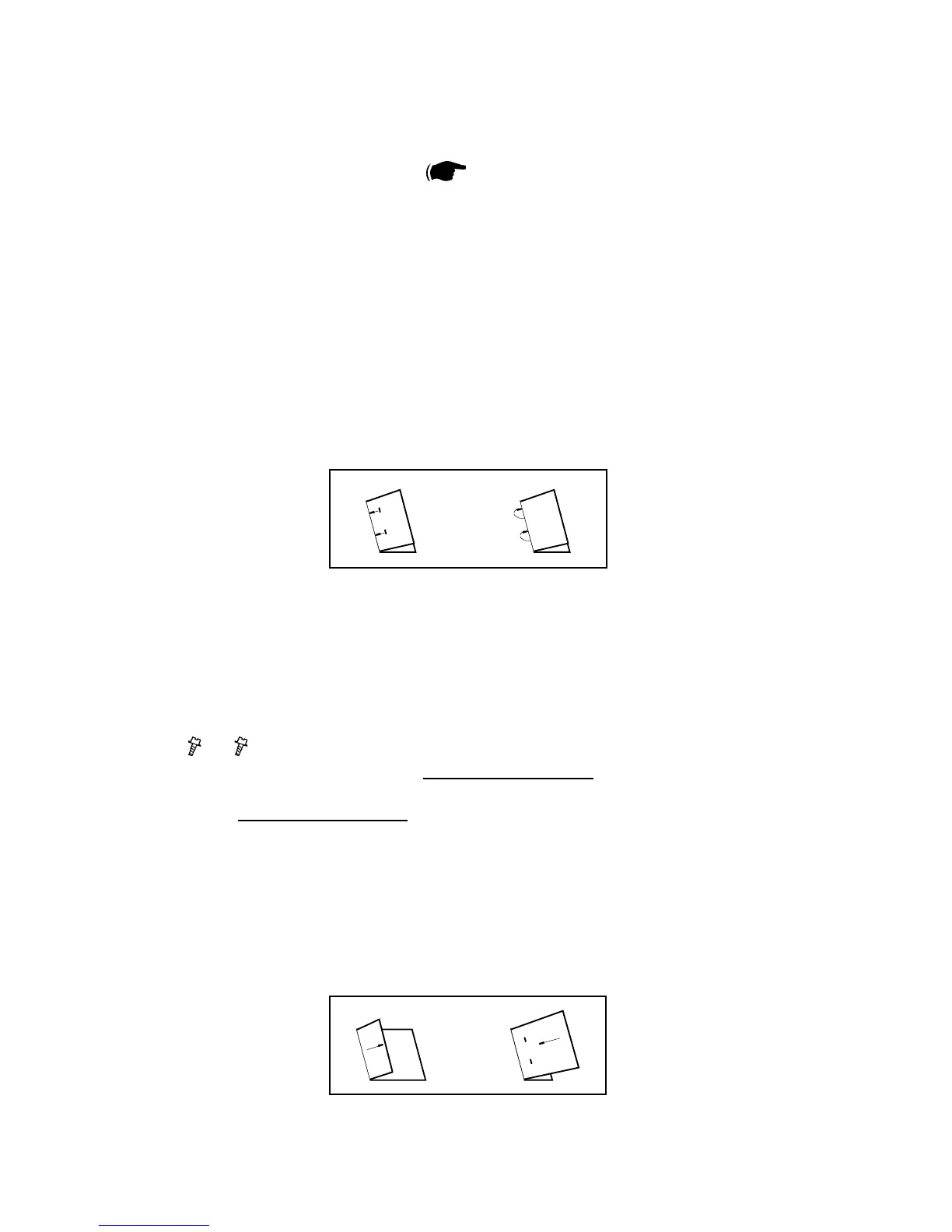
5. Check that the staples are in the middle of the set (½ of the input paper size,
210 mm / 8.5”)
6. If the staple position is incorrect, ne adjust by changing ”Index3, Rear jogger
offset” in EEPROM values.
Fold Adjustment:
1. Staple Adjustment must be performed before performing the Fold Adjustment.
2. Loosen screws [A], and rotate screws [B] to adjust the staples to the fold
(
x2, x2 ).
NOTE: Rotate both screws [B], same amount of turns, clockwise if the sta-
ples are located on the bottom side of the set. Rotate both screws [B],
same amount of turns, counterclockwise if the staples are located on
the top side of the set.
3. Tighten screws [A].
4. Hand feed a 2-sheet set, using 297x420 mm / 11x17” paper.
5. Run a few sets.
6. Check that the staples are aligned with fold. If not, go to step 2.



 To Next Page