DRIVE UNITS 10 February 2005
3-56
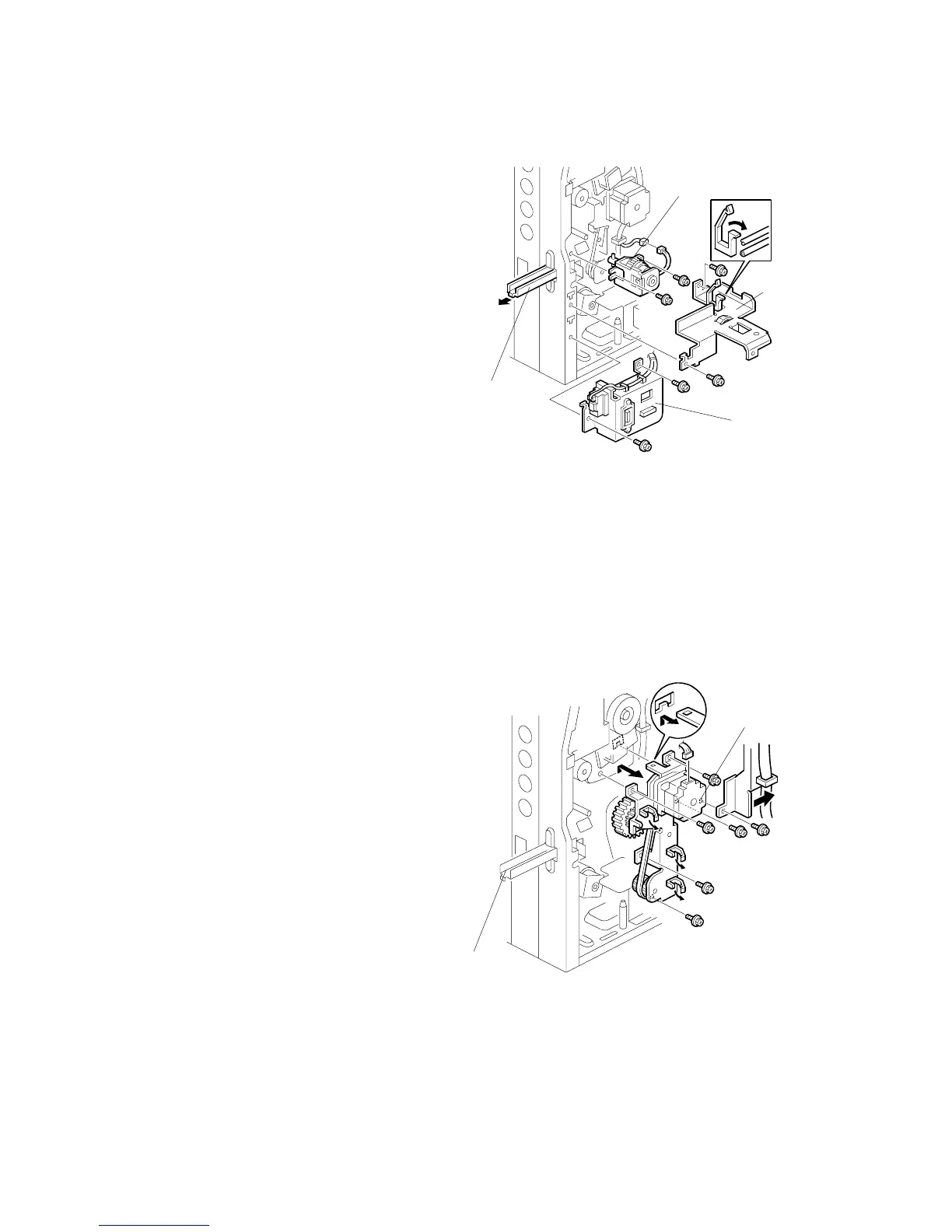
3.11.6 PAPER FEED CLUTCH 1
1. Move the controller box, on its hinge,
away from the machine (3.10.1).
2. Pull out the handle [A].
3. Connector bracket [B] ( x 2, x 1)
4. Handle guard [C] ( x 2)
5. Paper feed clutch bracket [D]
( x 1, bushing x 2)
3.11.7 PAPER FEED MOTOR
1. Rear cover ( 3.4.2)
2. Move the controller box, on its
hinge, away from the machine
(3.10.1).
3. Pull out the handle [A].
4. Connector bracket ( 3.11.6)
5. Handle guard ( 3.11.6)
6. Paper feed motor [B] with gears
( x 1, x 6)
NOTE: When reassembling, make
sure the vertical transport
clutch is in position.
B156R811.WMF
B156R810.WMF
[A]
[B]
[C]
[A]
[B]
[D]



 To Next Page