PAPER FEED 10 February 2005
6-60
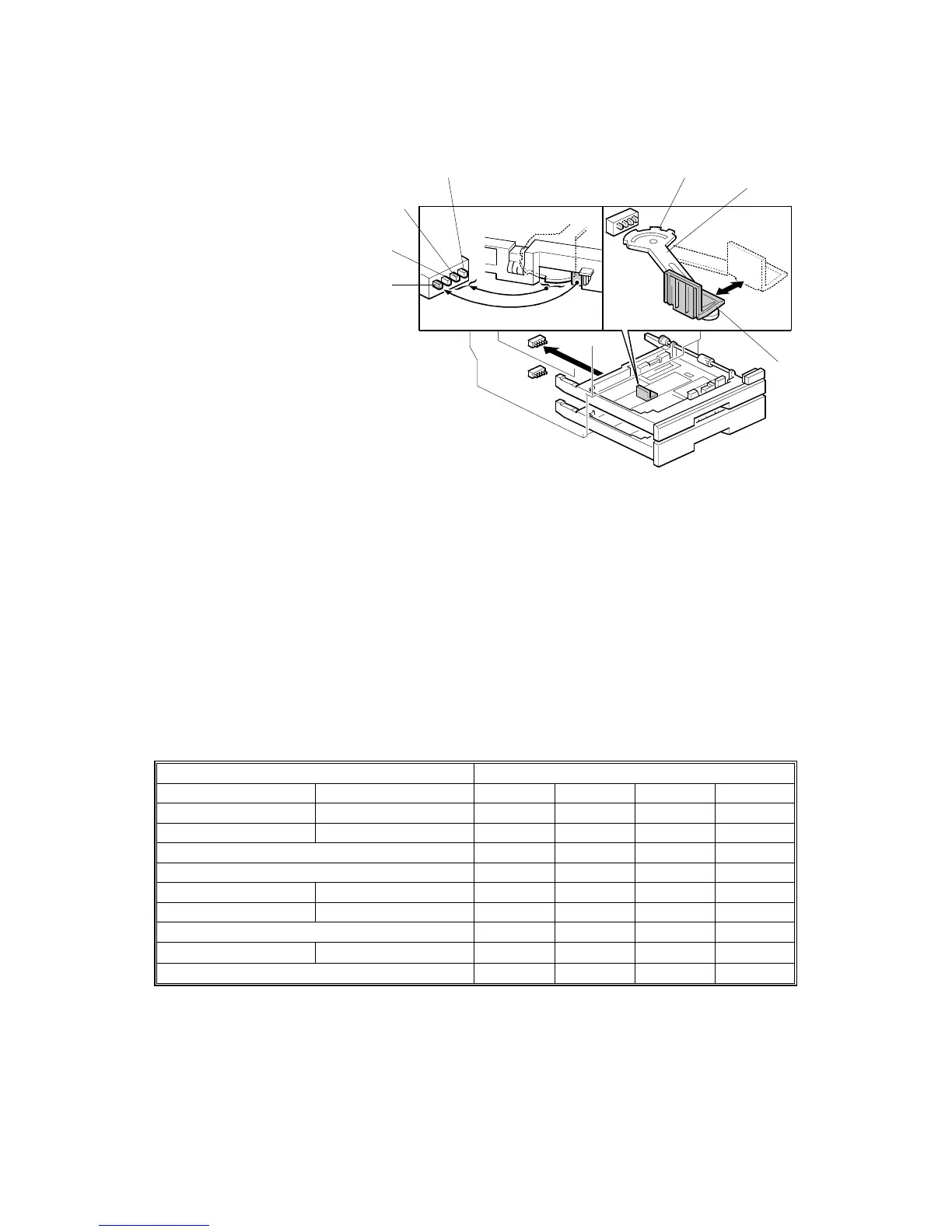
6.10.4 PAPER SIZE DETECTION
Mechanism
[A]: Tray set switch
[B]: Paper size switch
[C]: Paper size switch
[D]: Paper size switch
[E]: Actuator
[F]: Lever
[G]: End fence
The end fence [G] moves the lever [F], which moves a different set of notches on
the actuator [E] into contact with the paper size switches [B]∼[D].
When you put the tray in the main unit, the rear fence of the tray and the actuator
activate the switches; from this the machine detects the presence of the tray, and
the paper size.
Switch Pattern
When the tray is pushed into the machine, the leftmost switch [A] is always
activated by the rear fence of the tray; this switch detects the presence of the tray.
The combination of the other 3 switches [B]∼[D] detects the paper size.
Auto Detection Switch*
North America Europe/Asia [A] [B] [C] [D]
DLT SEF A3 SEF On Off On On
LG SEF B4 SEF On On On On
A4 SEF On On Off Off
LT SEF On Off Off Off
B5 SEF 10.5" x 7.25" SEF On Off Off On
LT LEF A4 LEF On On On Off
B5 LEF On On Off On
A5 LEF On Off On Off
(No tray) Off Off Off Off
* On: Pushed Off: Not pushed
NOTE: 1) For the input check table, ☛ 5.1.4.
2) Other paper sizes are not detected. Use the System Settings - Tray
Paper Settings - Tray Paper Size user tool to set paper sizes.
B156D046.WMF
[E]
[F]
[G]
[D]
[C]
[B]
[A]



 To Next Page