10 February 2005 SERVICE PROGRAM MODE
5-103
Service
Tables
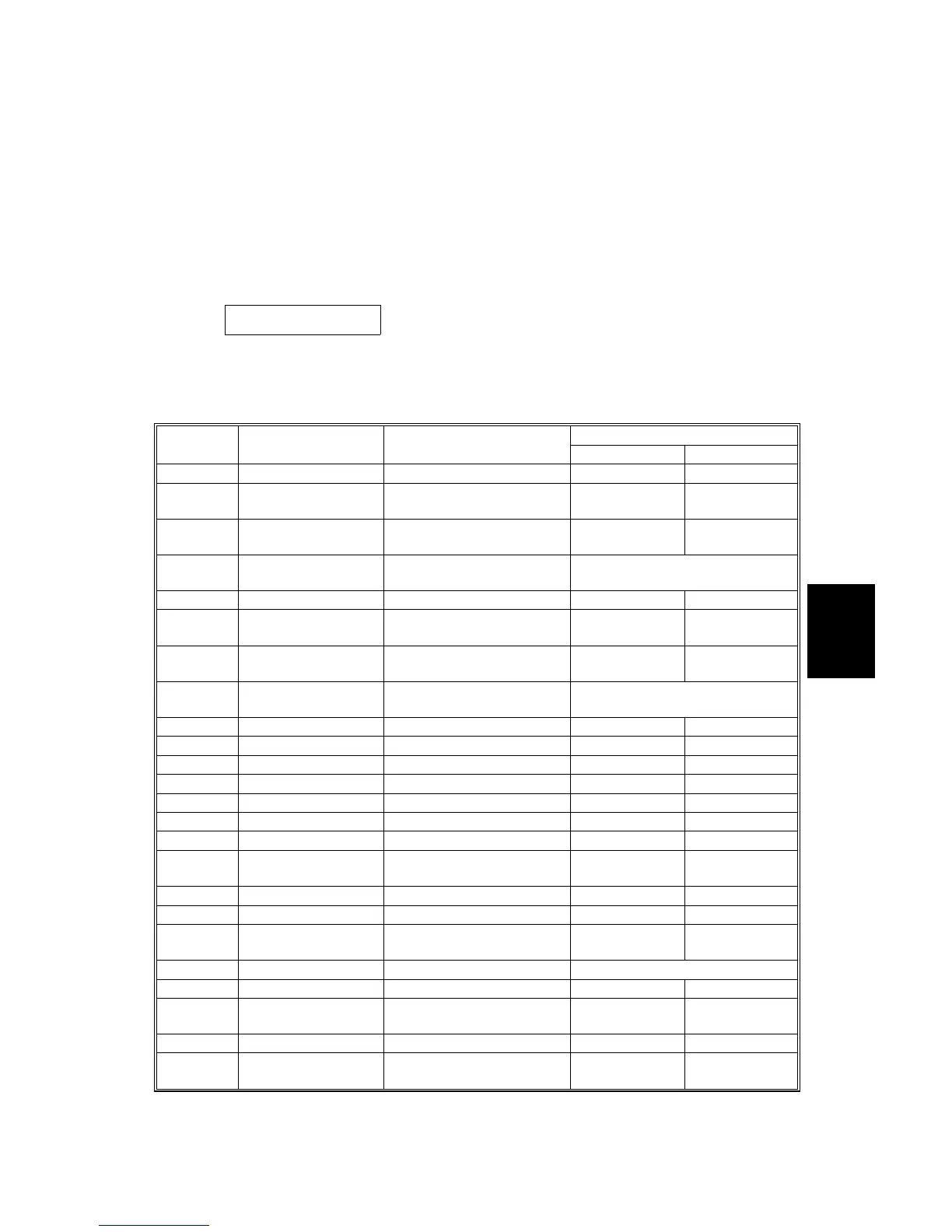
5.1.4 INPUT CHECK
Main Machine Input Check (SP5-803)
1. Enter the SP mode and select SP5-803.
2. Select an item that you want to check. A small box will be displayed on the SP
mode screen with a series of 0’s and 1’s.
The meaning of the display is as follows.
0 0 0 0 0 0 0 0
Bit 7 6 5 4 3 2 1 0
3. Check the status of each item against the corresponding bit numbers listed in
the table below.
Reading SP5-803
-XXX
Description
0 1
1 Tray 1 Set Tray 1 set (standard tray) Set Not set
2
Tray 1 Paper End Tray 1 paper end sensor
(standard tray)
Paper End
Paper is
present
3
Tray 1 Paper
Height
Tray 1 paper near-end
sensor (standard tray)
Not near end Near end
4
Tray 1 Paper Size Tray 1 paper size sensor
(standard tray)
(See table 1.)
5 Tray 2 Set Tray 2 set (standard tray) Set Not set
6
Tray 2 Paper End Tray 2 paper end sensor
(standard tray)
Paper End
Paper is
present
7
Tray 2 Paper
Height
Tray 2 paper near-end
sensor (standard tray)
Not near end Near end
8
Tray 2 Paper Size Tray 2 paper size sensor
(standard tray)
(See table 1.)
9 Registration Sensor Detected Not detected
10 Upper Relay Paper feed sensor Detected Not detected
11 Lower Relay Paper feed sensor Detected Not detected
12 Right Cover SW Closed Open
13 Exit Sensor Detected Not detected
14 Paper Overflow Full Not full
15 Exit Cover Switch Closed Open
16
Interchange Unit
Set
Set Not set
17 Interchange Exit Detected Not detected
18 By-pass Tray Set Not set Set
19
By-pass Paper End
Paper End
Paper is
present
20 By-pass Paper Size (See table 2.)
21 Fusing Unit Set Set Not set
22
Fusing Exit
Paper End
Paper is
present
23 Fusing Oil End Not End End
24
Fusing High
Temperature
Detected Not detected



 To Next Page