ANTI-CONDENSATION HEATER 10 February 2005
1-66
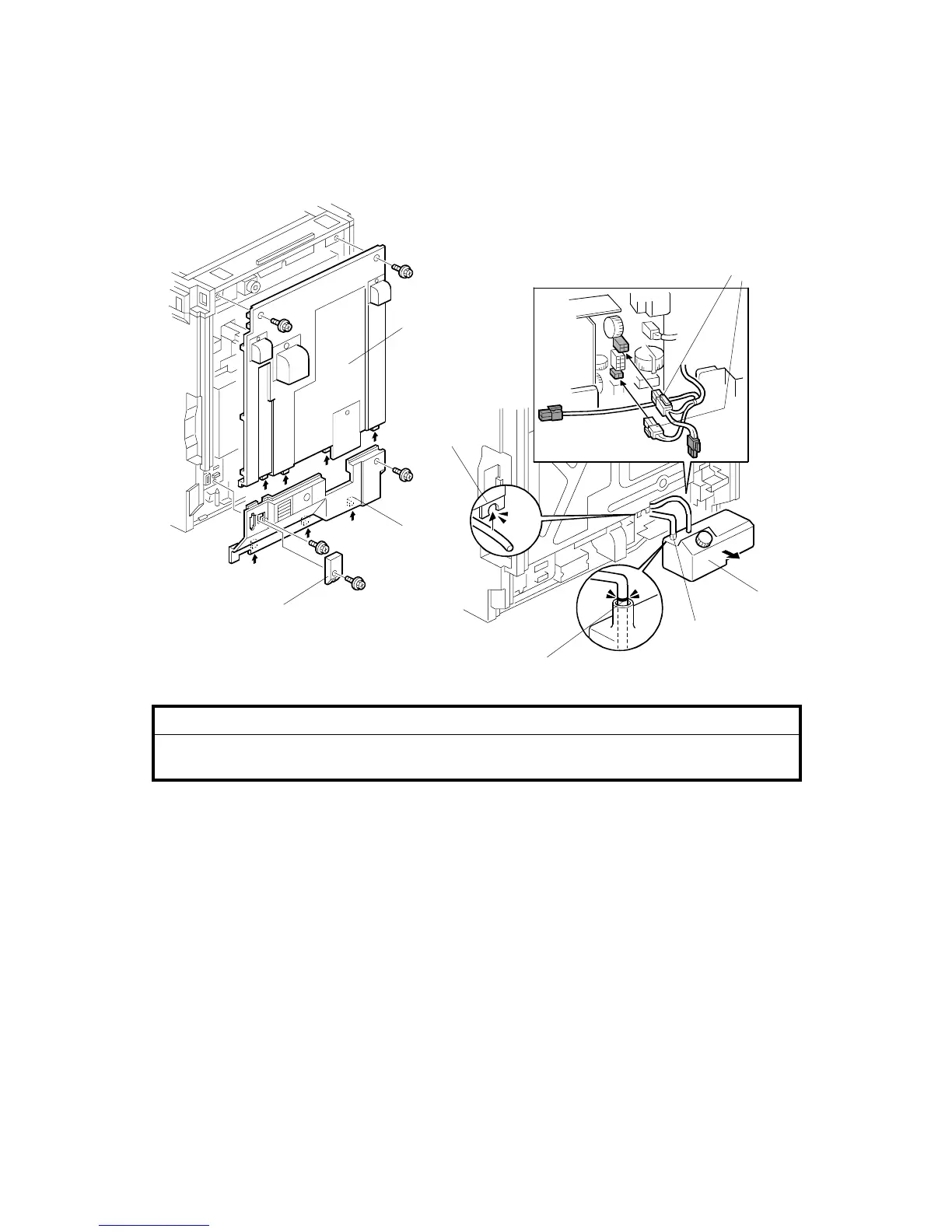
1.18 ANTI-CONDENSATION HEATER
!CAUTION
Unplug the main machine power cord before starting the following
procedure.
1. Remove the connector cover [A] (! x 1).
2. Remove the rear cover [B] (! x 2).
3. Remove the lower rear cover [C] (! x 2).
4. Remove the oil tank [D].
NOTE: Hang the left oil pipe [E] in the notch [F] in the controller box. Then, oil
does not fall from the pipe to the floor.
5. Connect the two connectors [G].
6. Install the oil tank at its initial position.
NOTE: When you install the oil tank, make sure that the position of the mark
[H] on the oil pipe is as shown in the diagram above. If you do not do
this, the oil is not correctly supplied to the fusing unit.
B156I620.WMF
B156I531.WMF
[B]
[A]
[C]
[D]
[G]
[H]
[F]
[E]



 To Next Page