10 February 2005 COPY ADJUSTMENT
3-59
Replacement
Adjustment
3.12 COPY ADJUSTMENT
3.12.1 PRINTING
NOTE:
1) Make sure the paper is installed correctly in each paper tray before you
start these adjustments.
2) Use the Trimming Area Pattern (SP5-955-1, No.11) to print the test
pattern for the following procedures.
3) Set SP 5-955-1 to 0 again after completing these printing adjustments.
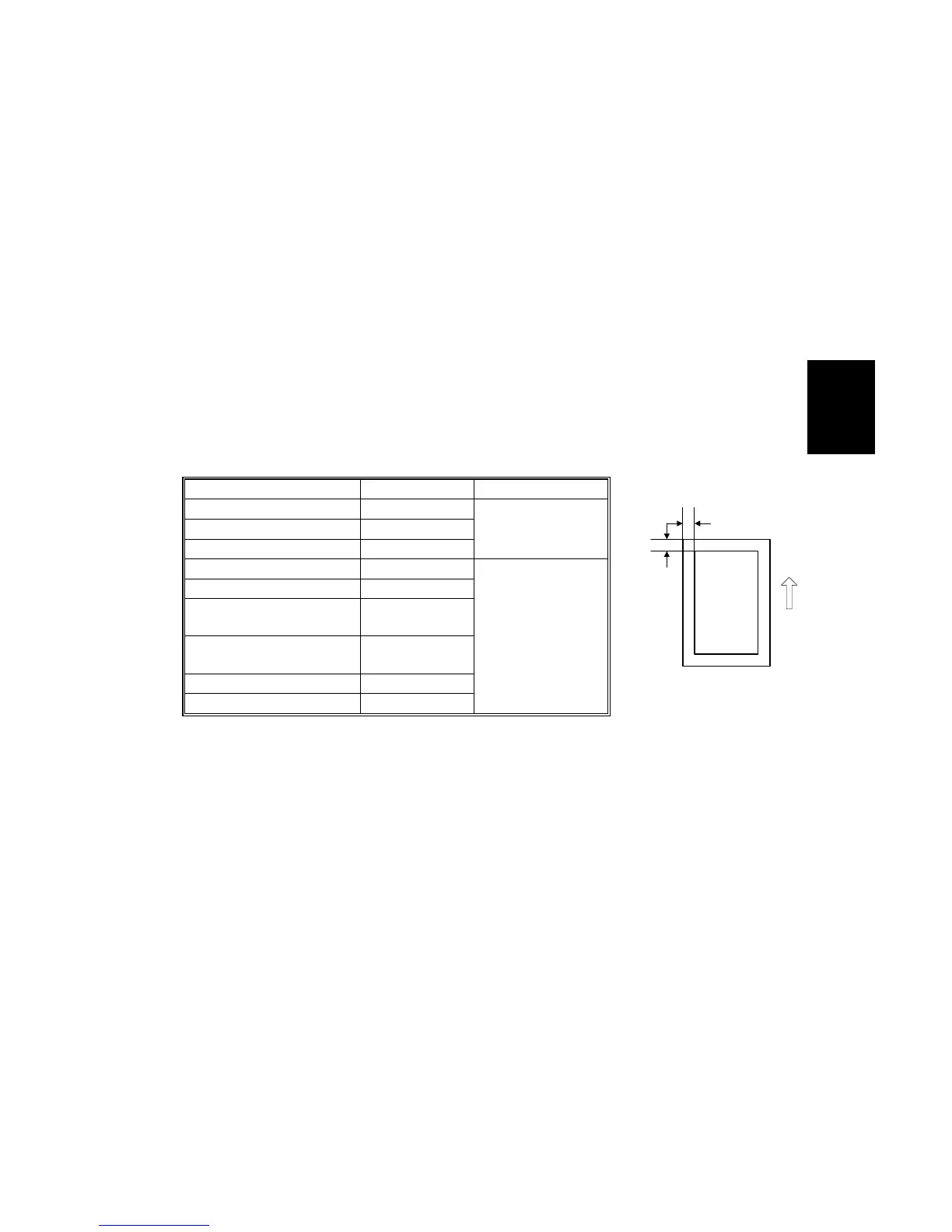
Registration - Leading Edge/Side-to-Side
1. Check the leading edge registration for each paper feed station, and adjust
them using SP1-001.
2. Check the side-to-side registration for each paper feed station, and adjust them
using SP1-002.
Tray SP mode Specification
Any paper tray SP1-001-1
By-pass feed SP1-001-9
Duplex SP1-001-12
3 ± 2 mm
1st paper tray SP1-002-2
2nd paper tray SP1-002-3
3rd paper tray (optional
paper tray 1), or LCT
SP1-002-4
2 ± 1.5 mm
4th paper tray (optional
paper tray 2)
SP1-002-5
By-pass feed SP1-002-1
Duplex, side 2 SP1-002-6
A: Leading Edge Registration
B: Side-to-side Registration
B
A
B156R291.WMF



 To Next Page