10 February 2005 PROGRAM DOWNLOAD
5-125
Service
Tables
Downloading NVRAM Data (SP5-825)
SP5-825 downloads data from an SD card to the NVRAM inside the machine.
1. Turn off the main switch.
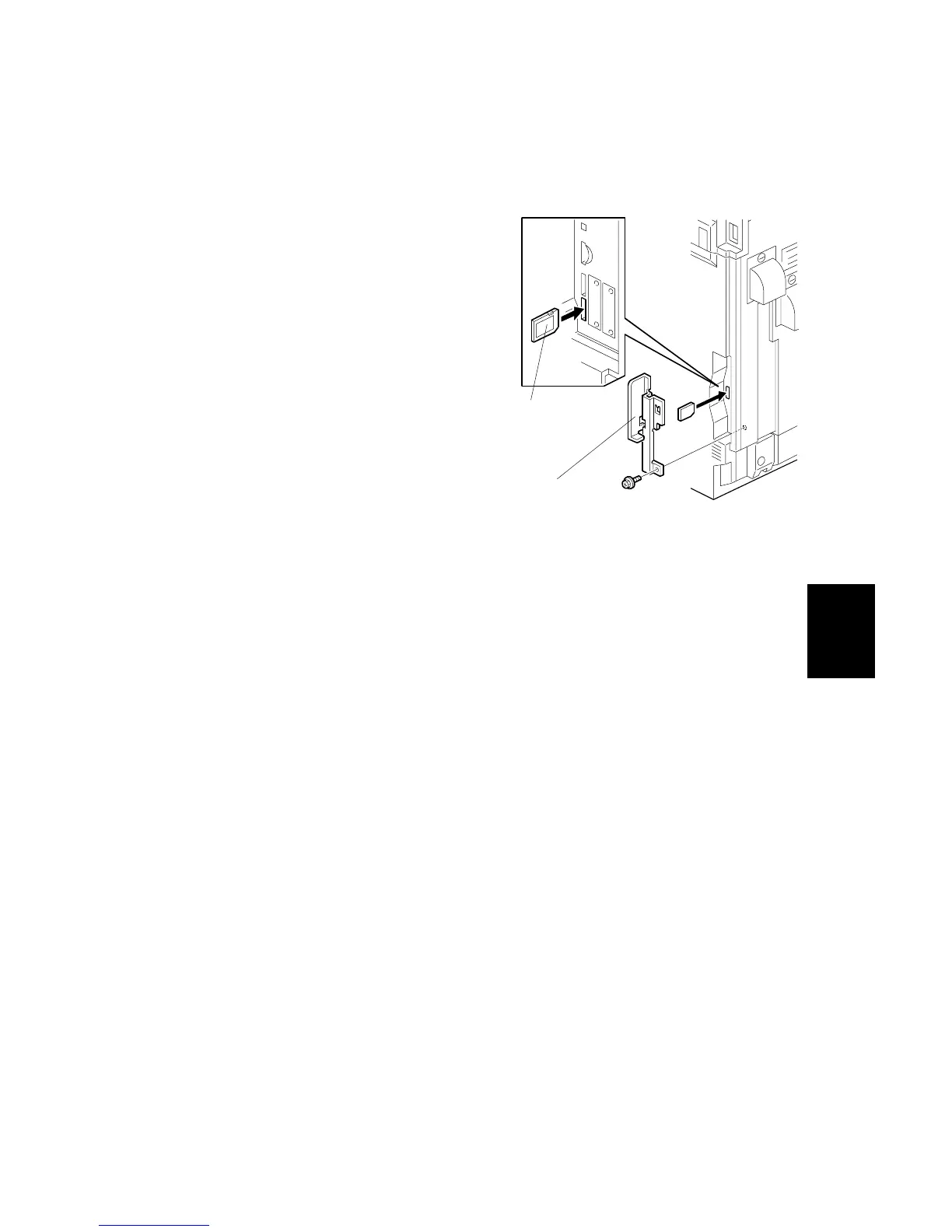
2. Remove the cover [A] ( x 1).
3. Insert the SD card [B] into SD card
slot 3.
4. Turn on the main switch.
8. Open SP5-825.
5. Touch EXECUTE to start
download the NVRAM data.
6. Turn off the main switch, and then
remove the SD card.
Note that the following errors may occur during downloading:
• If an SD card is not installed in the SD card slot and a message tells you that
downloading cannot proceed, you cannot execute downloading, even by
pressing EXECUTE.
• If the correct card for the NVRAM data is not inserted in the card slot, after you
press EXECUTE a message will tell you that downloading cannot proceed
because the card is abnormal and the execution halts.
B156I451.WMF
[A]
[B]



 To Next Page