10 February 2005 PRINTER SERVICE MODE
5-117
Service
Tables
5.2 PRINTER SERVICE MODE
5.2.1 SERVICE MODE TABLE
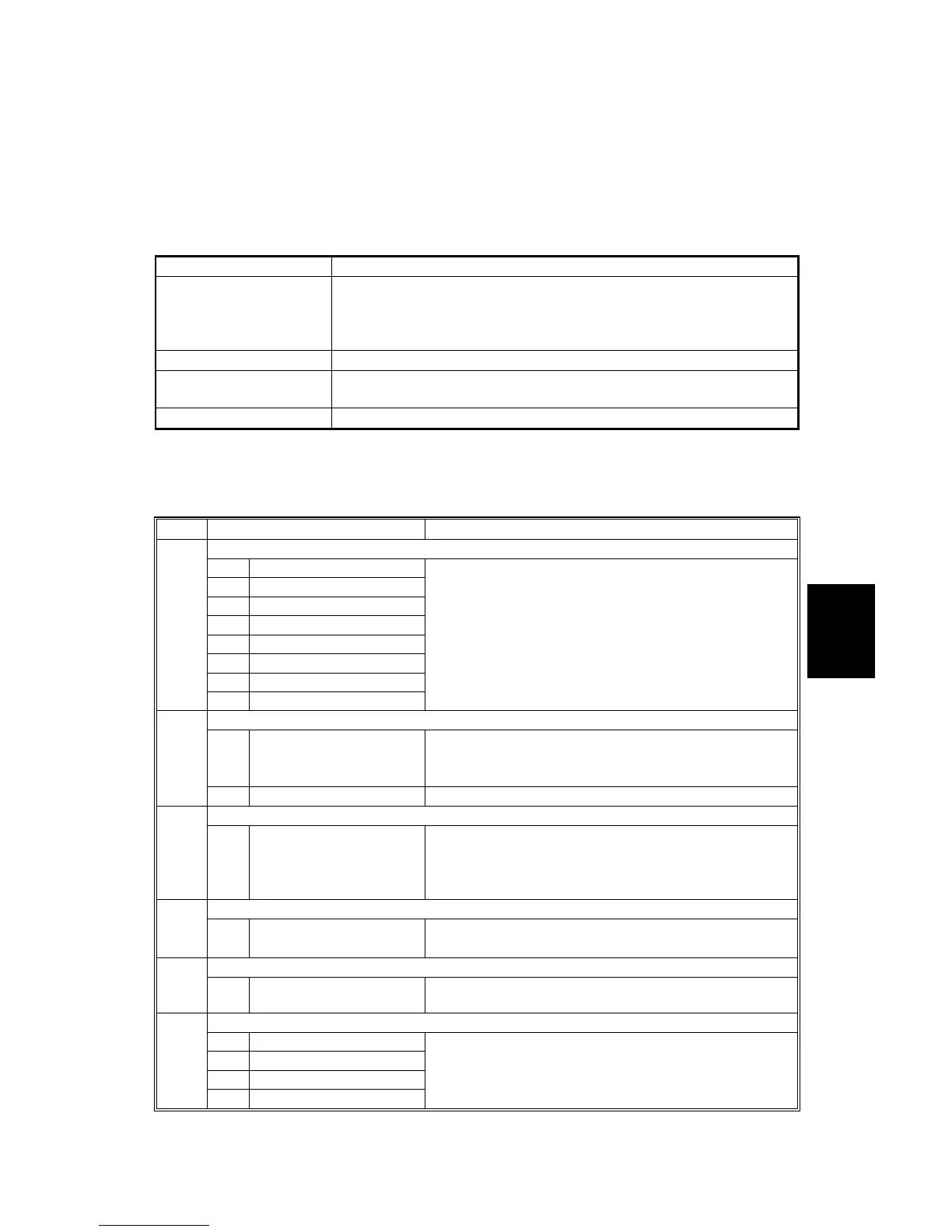
Service Table Key
Notation What it means
[range / default / step]
Example: [-9 ~ +9 / +3.0 / 0.1 mm step]. The setting can be
adjusted in the range ±9, value reset to +3.0 after an NVRAM
reset, and the value can be changed in 0.1 mm steps with each
key press.
italics Comments added for your reference.
*
This value is stored in NVRAM. After a RAM reset, the default
value (factory setting) is restored.
DFU Denotes “Design or Factory Use”. Do not change this value
SP1 Mode Number Function / [Setting]
Bit Switch
1 Bit Switch 1 Settings
2 Bit Switch 2 Settings
3 Bit Switch 3 Settings
4 Bit Switch 4 Settings
5 Bit Switch 5 Settings
6 Bit Switch 6 Settings
7 Bit Switch 7 Settings
001
8 Bit Switch 8 Settings
Adjusts bit switch settings.
Note: Currently the bit switches are not being used.
Clear Setting
1 Initialize Printer System
Initializes settings in the “System” menu of the user
mode.
003
3 Delete Program
DFU
Print Summary 004
1 Print Printer Summary
Prints the printer summary sheet
(An error log is printed in addition to the
configuration page).
Display Version 005
1
Displays the version of the controller firmware.
Sample/ Locked Print
006
1 0:Link with Doc. Srv
1:Enable
[0 ~ 1 / 0 / 1 /step]
Data Recall
1 Factory
2 Previous
3 Current
101
4 ACC
Recalls a set of gamma settings.



 To Next Page