SKEWED, TRAPEZOID, AND PARALELLOGRAM IMAGES 10 February 2005
4-32
Action 2 (parallelogram image of trimming pattern)
Adjust the position of the laser unit as described in section 3.4.2 of the Service
Manual.
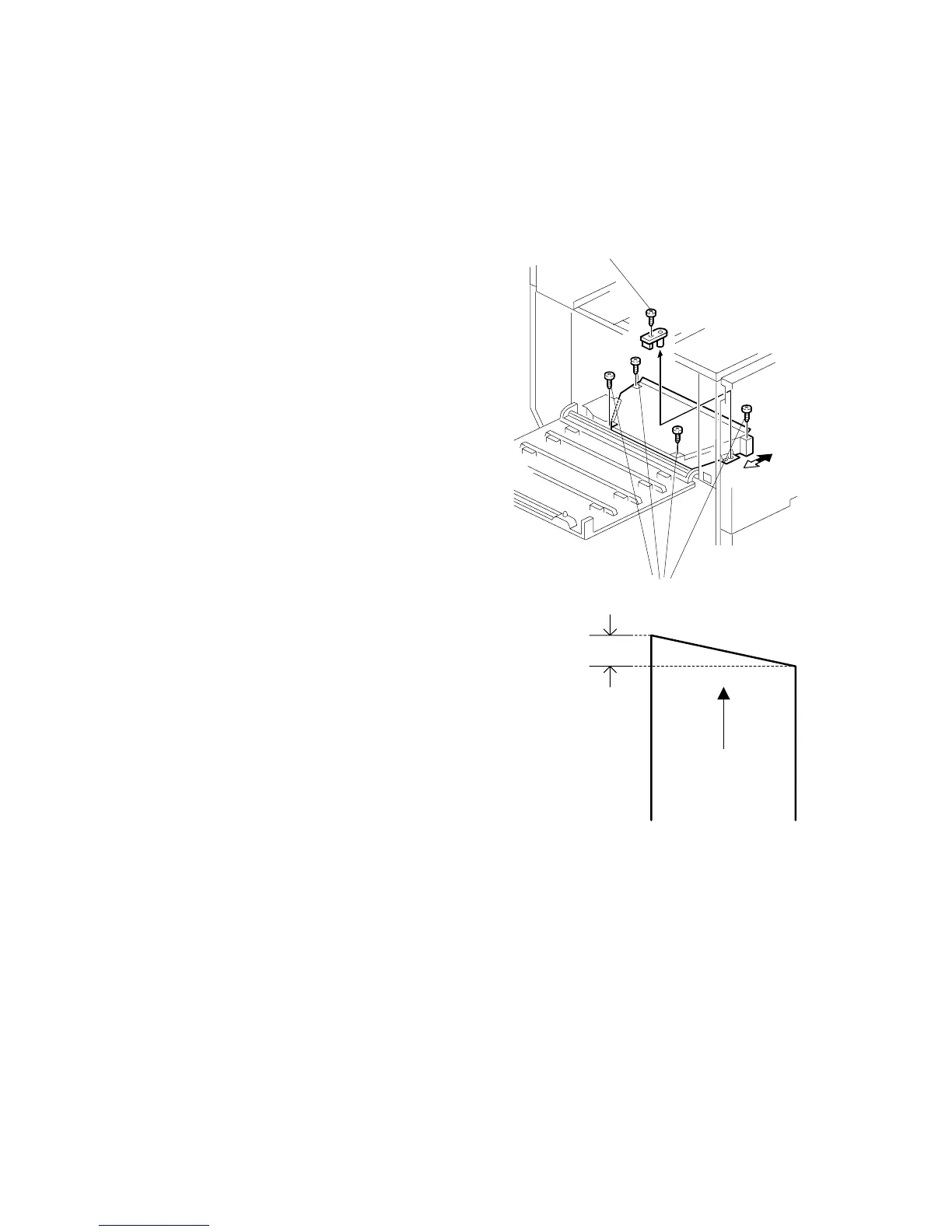
Adjusting for Image Skew
1. Positioning pin [A] ( x 1)
2. Loosen (x 4) [B].
3. Adjust the position of the laser optics
housing unit ( Adjustment).
4. Fasten (x 4) [B].
NOTE: After changing the position of
the laser optics housing unit,
do not reinstall the positioning
pin. Keep the pin in a safe
place.
NOTE: When the image skews as shown on the
right, move the unit 0.6 mm in the direction
of the black arrow as shown in the diagram
above and to the right.
B156R221.WMF
0.6mm
Paper feed
(A3 SEF)
B156R239.WMF
[A]
[B]



 To Next Page