CHECKING THE BREAKER SWITCH 10 February 2005
3-76
3.16 CHECKING THE BREAKER SWITCH
3.16.1 BREAKER
CAUTION
Before you test the breaker, always make sure that the main power switch
is off. Do not try to test the breaker switch with the copier power turned on.
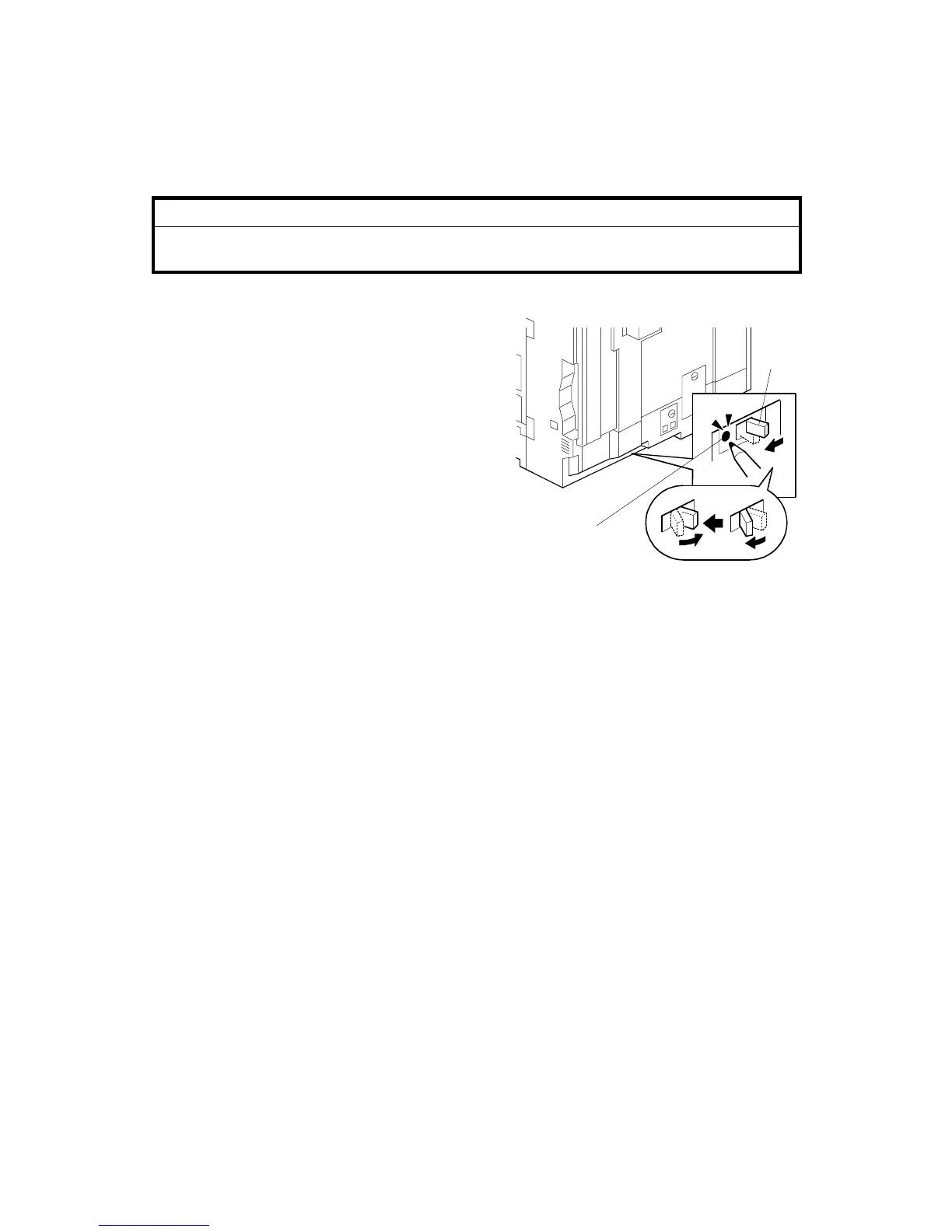
1. Make sure that the main power is
turned off.
2. Maker sure that the power cord of the
copier is connected to the power
source.
3. Check if the “–” mark on the breaker
switch [A] is shown. If “–” is shown, the
breaker switch is turned on.
4. Push the test button [B] of the breaker.
This turns off the breaker switch (it
goes from the right to the center
position).
IMPORTANT
If the breaker switch does not move to the center position:
• Make sure that the power cord of the copier is securely connected to the
power supply.
• Push the test button again. If the breaker switch does not move to the center
position, replace the breaker switch.
5. Check that the breaker switch is turned off and the “” mark on the switch is
shown.
6. Turn the breaker switch to the left position first. Then turn it to the “On” position
(right position).
B156R820.WMF
[A]
[B]



 To Next Page