10 February 2005 COLOR ADJUSTMENT
3-69
Replacement
Adjustment
- Text (Letter) Mode, Single Colour -
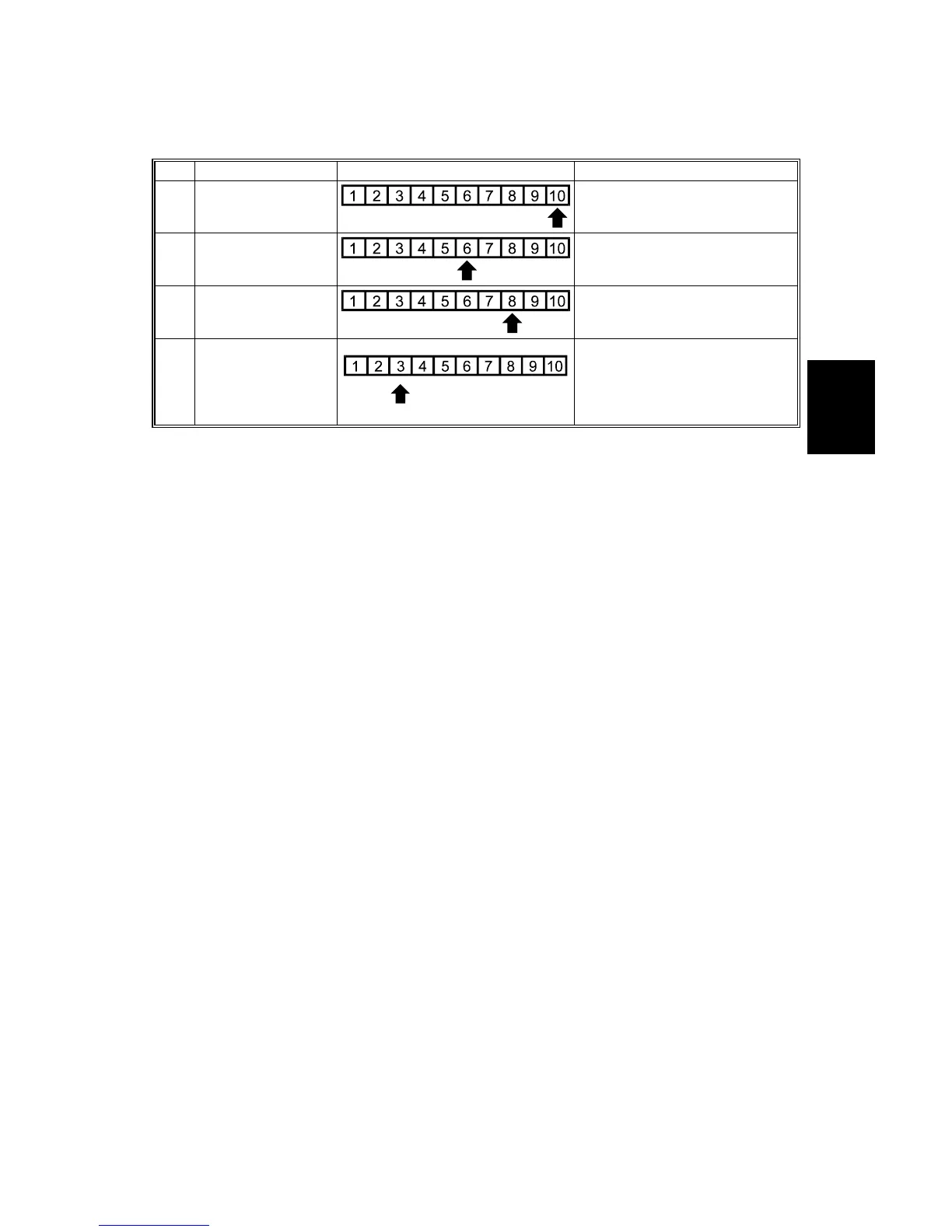
Step Item to Adjust Level on the C-4 chart (K) Adjustment Standard
1
ID max:
(K)
Adjust the offset value so that
the density of level 10 matches
that of level 10 on the C-4 chart.
2
Middle (Middle ID)
(K)
Adjust the offset value so that
the density of level 6 matches
that of level 6 on the C-4 chart.
3
Shadow (High ID)
(K)
Adjust the offset value so that
the density of level 8 matches
that of level 8 on the C-4 chart.
B05
1r93
3.w
mf
Highlight (Low ID)
(K)
Adjust the offset value so that
dirty background is not visible on
the copy and the density of level
3 is slightly lighter that of level 3
on the C-4 chart.
NOTE: After adjusting ‘shadow’ as explained above, text parts of the test pattern
may not be printed clearly. If this happens, check whether the 5 line/mm
pattern at each corner is printed clearly. If it is not, adjust the offset value of
‘shadow’ again until it is.



 To Next Page