9. Long Term Datalogger
Issue 06/15 Publication PUB059-002-00 127 of 136
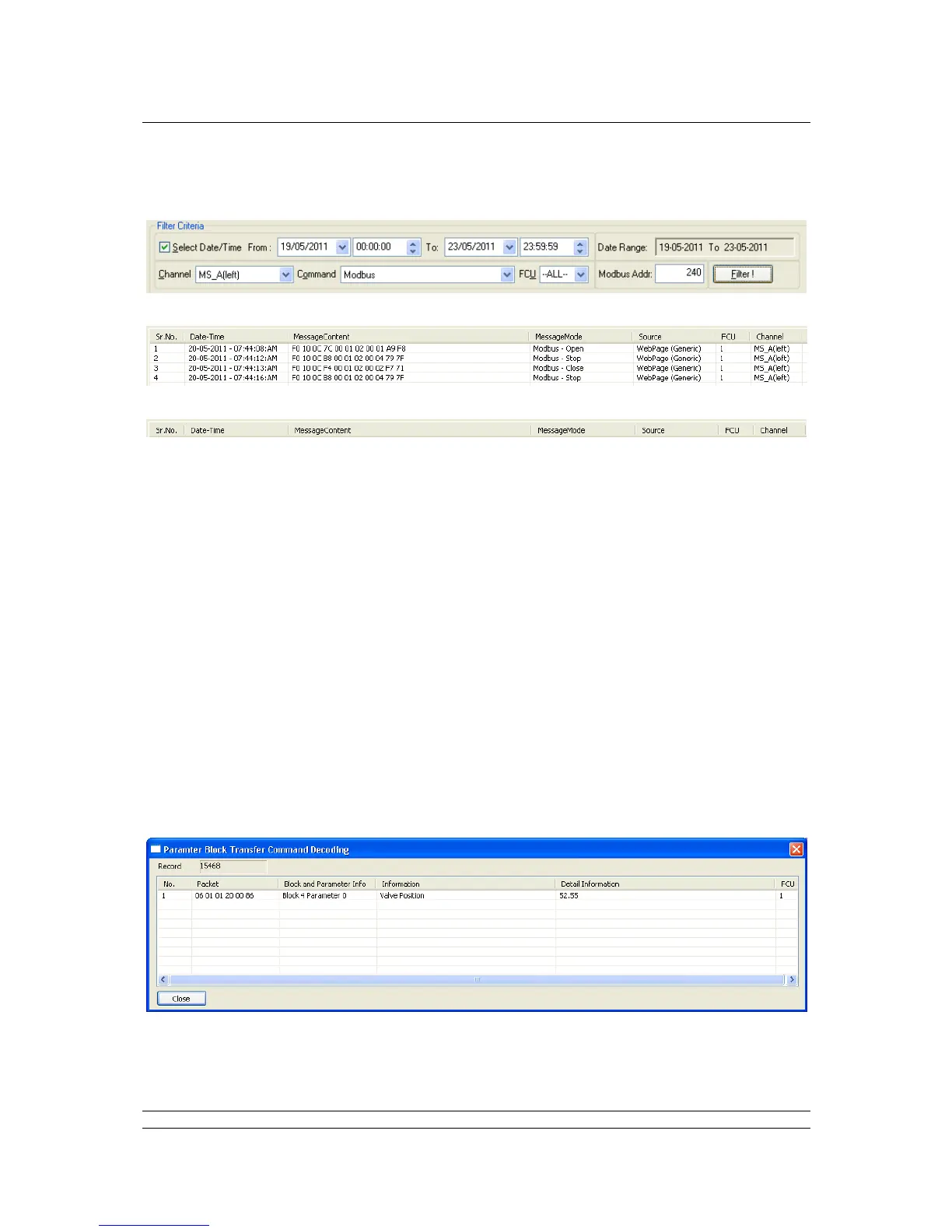
For example: to see all Modbus messages for all the FCUs on the A side of a hot standby master with
Modbus address 240 between 19
th
May and 23rd May, the following filter would be set up:
Example data:
The data is displayed in a number of columns with the following headings:
Sr.No: this is the serial number of the information within the display.
Date – Time: Date and Time of the event / message.
MessageContent: shows the complete message content i.e. complete Modbus message.
MessageMode: shows the type of message and decodes it where possible.
Source: indicates where the message came from and, for Modbus, which database is being
used.
FCU: The address of the FCU which the message is aimed for.
Channel: indicates which side of the master station the message appear on.
There is a lot of internal status data passed on the back plane which is decoded by the LTDViewer.
For example, in the command drop-down box, selection of Parameter Block Transfer and selecting
‘Filter !’ will enable these internal status messages to be seen. A lot of useful information is in there
including status of the standby master station.
In this example we can see the position of one of the FCUs being reported.



 To Next Page