6.2 The Screen Display
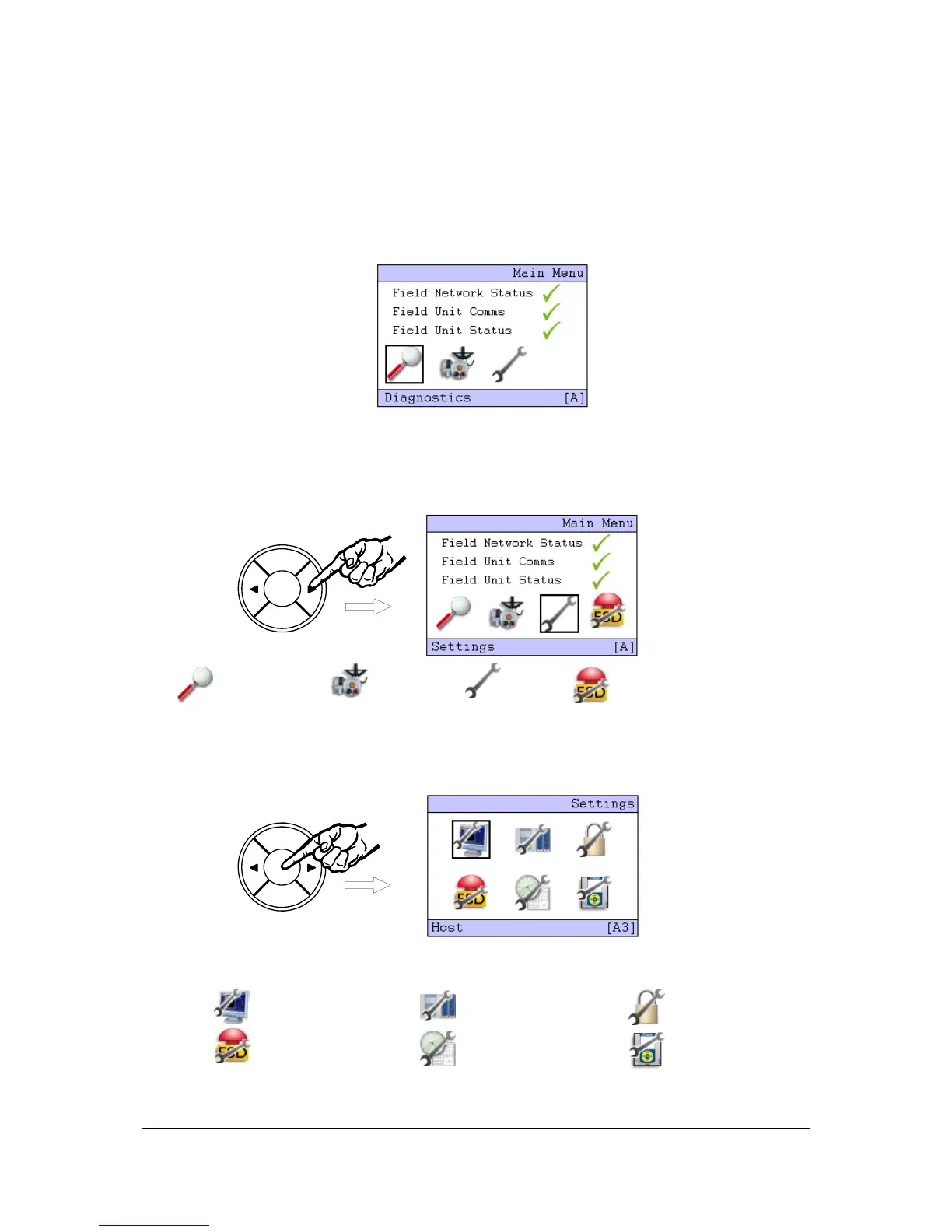
The opening, or top screen display shows the network status and three icons (four icons, if keypad
ESD is enabled – see below).
The Diagnostics icon (Magnifying Glass) will have a black square around it. The position of the square
indicates the part of the menu that will be accessed if the ENTER key is pressed. The highlighted icon
can be changed by pressing the arrow buttons ( or ) to scroll round them. The bottom bar shows
the selected function as a text message.
Diagnostics Menus Field Unit Menus Settings Menus ESD control - only visible when
“Keypad ESD” is enabled
Highlight the Spanner icon for ‘Settings’; then press ENTER. The menu location changes to A3 and
the ‘Settings’ menu screen appears with the ‘Host’ icon selected.
This screen also contains the icons used for access to all the other setting menus.
Host Option Module Security
ESD Date/Time M/S



 To Next Page