P3 - Pakscan Master Station Technical Manual
60 of 136 Publication PUB059-002-00 Issue 06/15
7.5.4 System Diagnostics
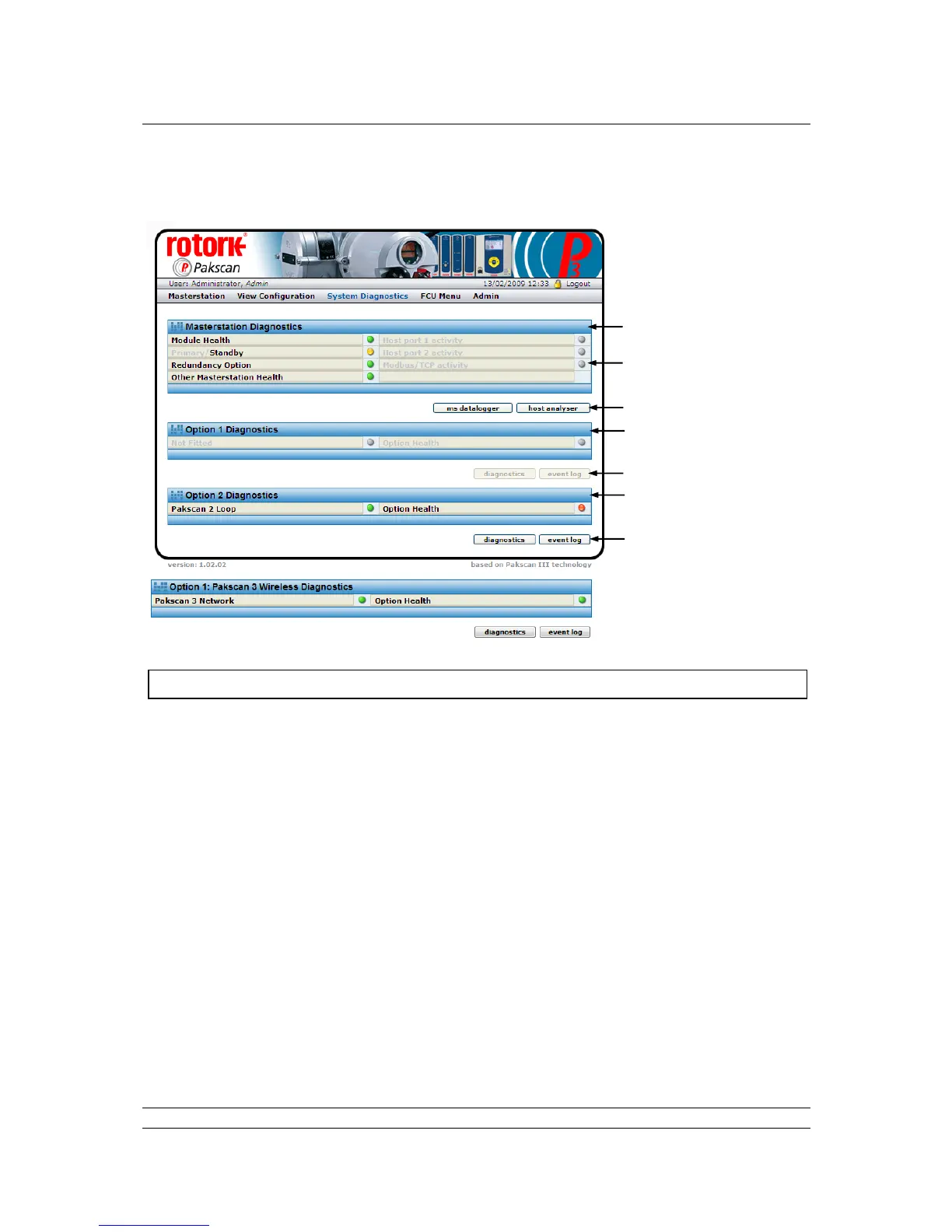
Fig 40: System Diagnostics web page wired only and option 1 data, if wireless fitted
The System Diagnostics screen shows an overview of the status of the fitted modules and also
provides access to further information.
Master Station Diagnostics
Module Health : A green light shows if the module is operating correctly, changes to red if
there is a fault.
Primary/Standby : Indicates which module is being accessed. A green light indicates Primary,
a yellow light indicates Standby and a red light indicates a fault.
Redundancy : Shows a green light if there is a partner module fitted.
Option
Other Master : Indicates the absence (green light) or presence (red light) of a fault on the
Station Health partner CPU.
Host port 1 : Indicates when there is serial communication taking place on
activity communications port 1.
Host port 2 : Indicates when there is serial communication taking place on
activity communications port 2.
Modbus/TCP : Indicates when Ethernet control using Modbus/TCP is present on either
activity Ethernet port.



 To Next Page