6.5 Setting the Master Host Communications Parameters
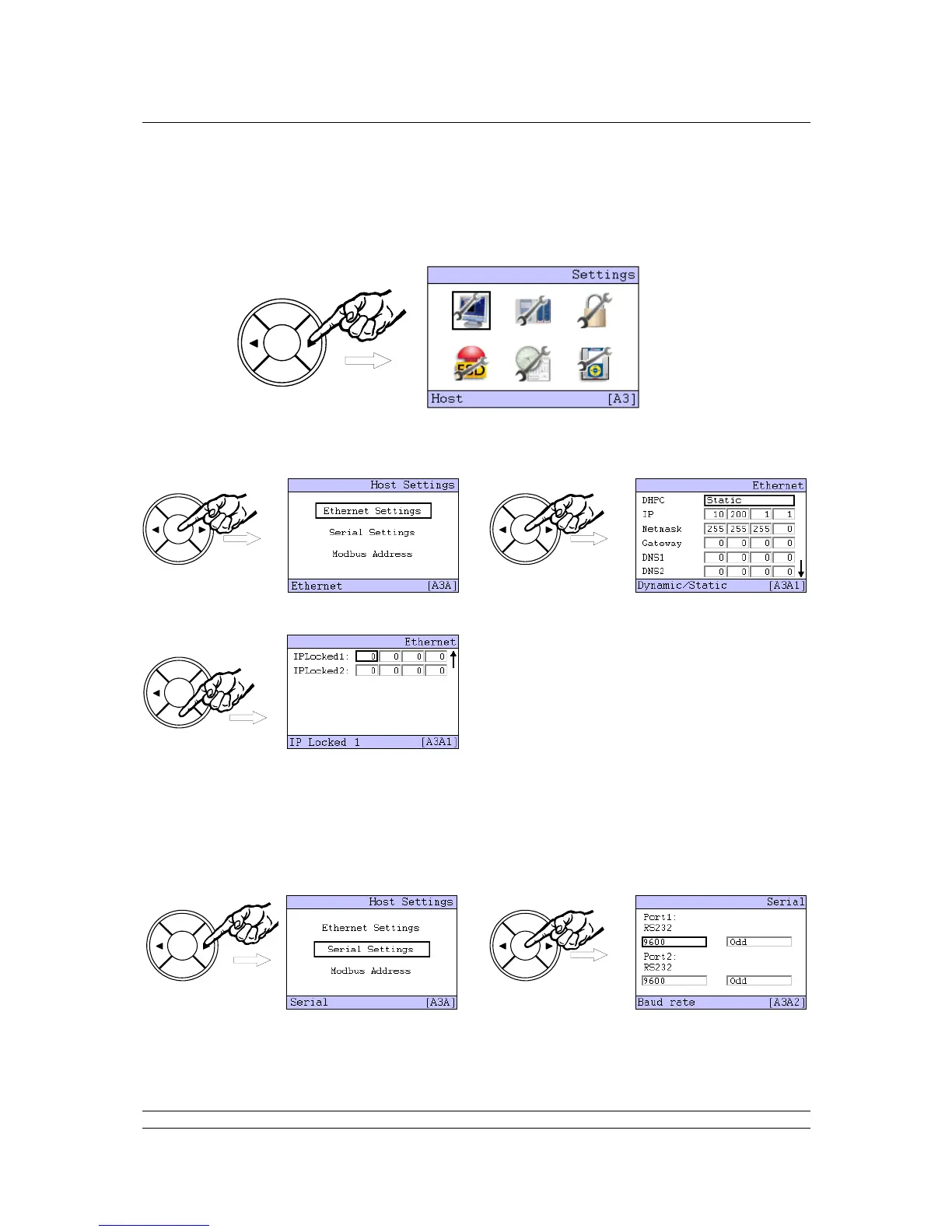
Select the Host icon using the arrow keys ( or ) and press ENTER. The Host Settings menu
choices screen appears.
Select ‘Ethernet Settings’ using the arrow keys ( or ) and press Enter once more. The Ethernet
settings screen appears, note that there are two pages to the menu as indicated by the small arrow
() on the right side of the screen.
Use the NEXT button to move to the second page, the BACK button returns to the first page.
It is usually only necessary to change the IP address and Netmask to match the requirements of the
network connected to the master station. When making any change it will be necessary to enter the
PIN number for the master station as shown in the previous section.
To return to the previous Host Settings screen, press BACK and then select the Serial Settings using
the arrow keys ( or ) and press ENTER. The communications port speed (default 9600), and parity
are changed here.



 To Next Page