MRD 3187B - User Manual
Page 198 (245)
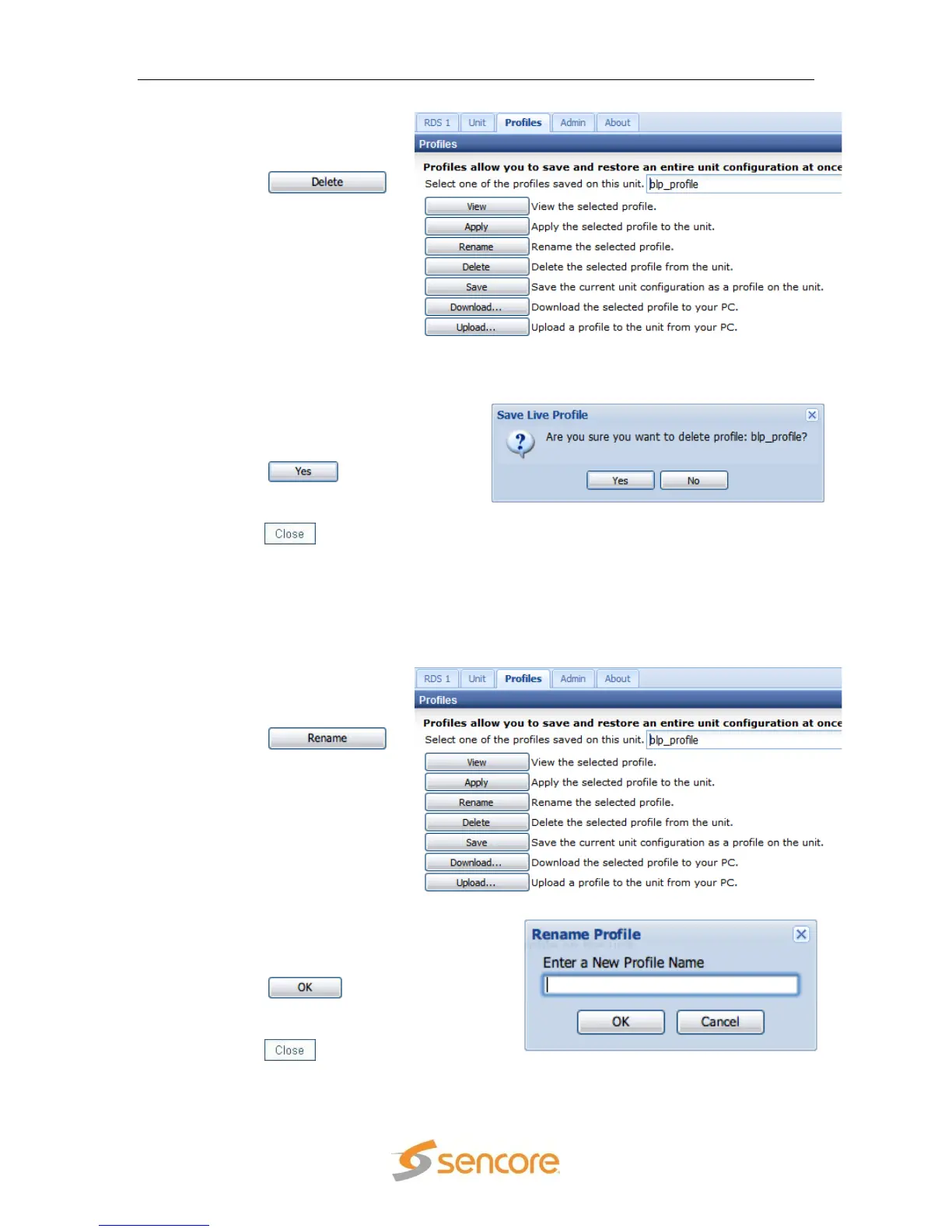
1. Use the drop down menu
to select the profile to be
deleted.
2. Click the
button.
3. A dialog box will appear and ask,
“Are you sure you want to delete
this profile?” Be sure to check the
profile name in the dropdown box
because that is the profile that will
be deleted.
4. Click the button in the
dialog box to confirm the delete.
5. After the profile has been deleted,
click the button to close the
dialog box.
5.5.3 Renaming a Profile
If a particular profile‟s name needs to be changed for one reason or another, use the
following steps to change the name of the profile:
1. Use the drop down menu
to select the profile to be
renamed.
2. Click the
button.
3. A dialog box will appear that has the
current name of the profile in it.
Type a new name for the profile in
the input box.
4. Click the button in the
dialog box to confirm the rename.
5. After the profile has been renamed,
click the button to close the
dialog box.



 To Next Page