MRD 3187B - User Manual
Page 203 (245)
processes of the MRD 3187B‟s operating system. There are no user-definable
parameters under this menu.
5.11.2 Network Interface Information
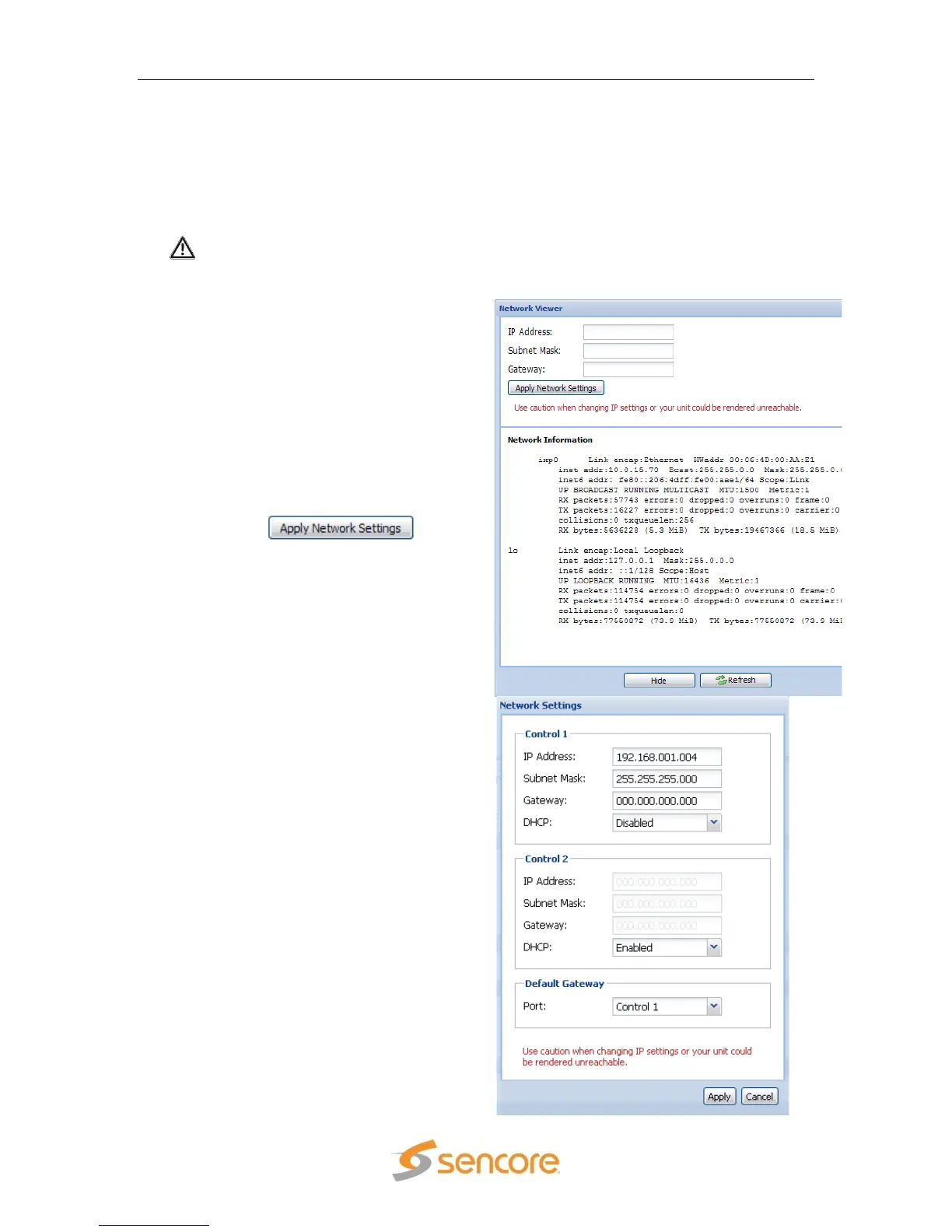
This section displays detailed information about the network portion of the MRD
3187B. It also allows a new IP address to be set in the unit. To set a new IP address,
use the following steps:
Warning: Use caution when changing IP settings or the unit may be
rendered unreachable.
1. Click the “View Network Interface
Window…” hyperlink, under the
“Diagnostics” heading.
2. A new window will appear in the
middle of the screen. This new
windows will give all of the details
for the network interface of the MRD
3187B, as well as contain three
input boxes to set a new IP address.
3. Fill in the three fields, “IP Address”,
“Subnet Mask”, and “Gateway.”
4. Click the button
to save the network settings.
Note: If the 8724 Backup Network
Conroller is installed, the Network Viewer
will be replaced with a Network Settings
window.



 To Next Page