Y070.302/EN Page 51
Operation instructions
SIPOS SEVEN: PROFITRON, HiMod
7
Commissioning
7 Commissioning
7�4 End positions– Signaling gear
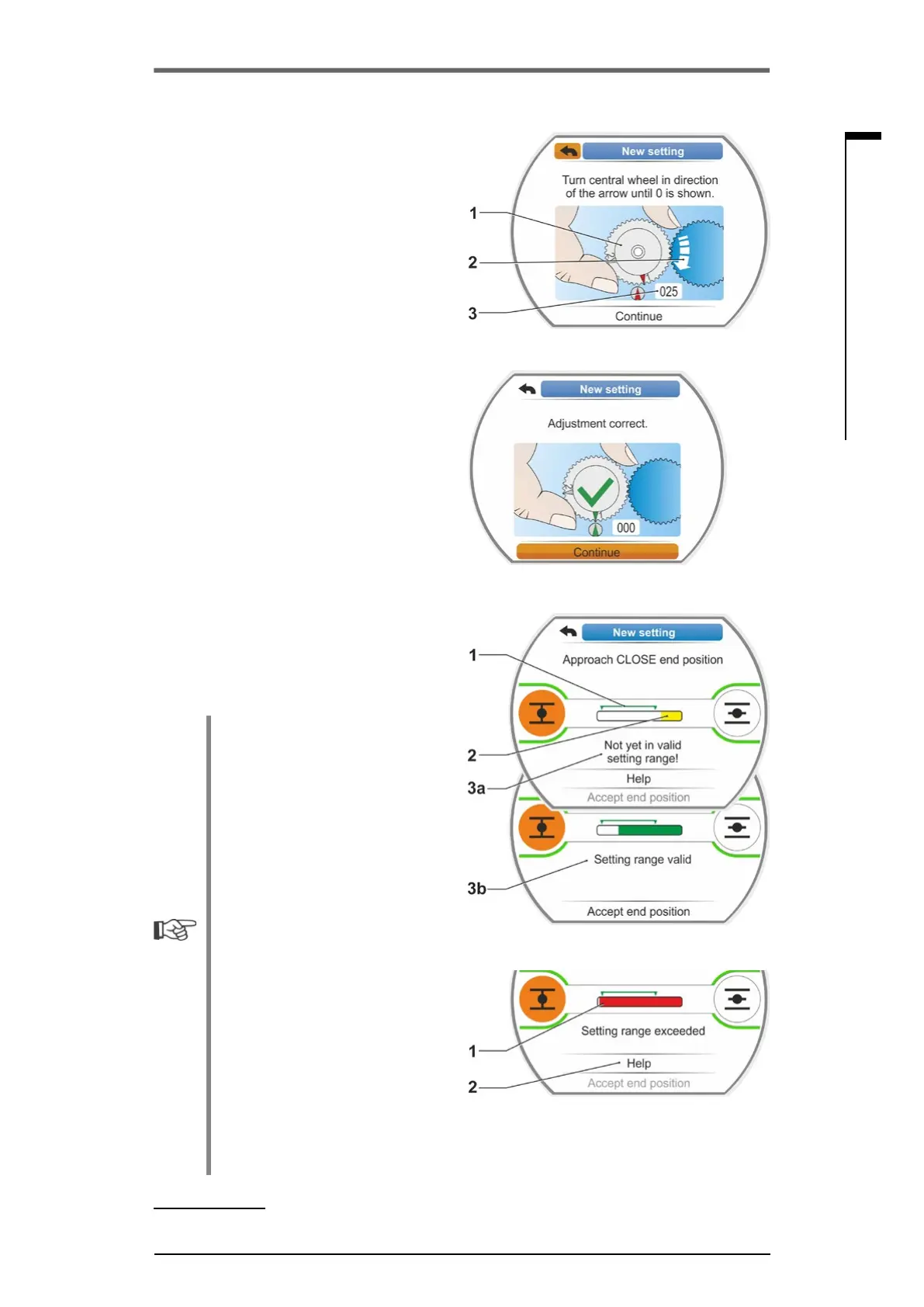
13. Turncentralwheel(g.8,item.1)inthe
indicated direction of the arrow (item 2) until
the value (item 3) is set to "000".
Thecorrectsettingoftherstendposition
isconrmedinthedisplayandtheorange
selectionmarkerjumpsto"Continue"(g.9).
14. Select ‘Continue’ in the display.
Therstendpositionisset.Thesystem
changes to setting the other end position.
The request to approach the end position
(in our example end position CLOSED) is
shown in the display.
15. If the actuator is equipped with a mechanical
position indicator, we recommend setting the
indicator at this stage. Separate approaching
of the end position can thereby be avoided.
For the setting, refer to the following chapter
„7.4.5 Adjust mechanical position indicator“
on page 55.
16. Depending on whether the cut-off mode
for the end position is travel-dependent or
torque-dependent, move the actuator ac-
cordingly to the end position.
■
Travel-dependent cut-off mode
a) Operate the actuator until the valve has
reached the end position. Pay attention
to the valve during operation!
Display indicates whether the valid
settingrange(g.10,item1)hasbeen
reached (3b) or not yet (3a) and the
progress bar (2)
* changes the color
from yellow to green.
■
If the valid setting range is exceeded,
the progress bar changes color from
greentored(g.11,item1)andthe
"Setting range exceeded" message is
displayed.
Select'Help'(g.11,item2)and
conrm.Aninformationtochange
the signaling gear ratio is displayed.
Conrmtheinfoboxandadjustthe
sliding wheel within the signaling gear
accordingly (also refer to step 7) and
repeat end position adjustment.
■
Once the end position has been
reached before the valid setting, or in
case of torque-dependent cut-off due
to a block before reaching the end
position, e.g. if the MOV is sluggish,
unfavorable torque characteristics
or approaching of a mechanical stop
(return to desired end position), this is
indicated by "Torque dependent cut-
off“ in the display.
In this case, check the following:
- Smooth valve operation;
- Set tripping torque;
- Cut-off mode.
* Progress bar is not displayed for 2SG7, 2SQ7.
Fig� 8: Adjust central wheel
Fig� 9: First end position setting is correct
Fig� 10: Approach end position CLOSED
in travel dependent cut-off mode
Fig� 11: End position range exceeded



 To Next Page