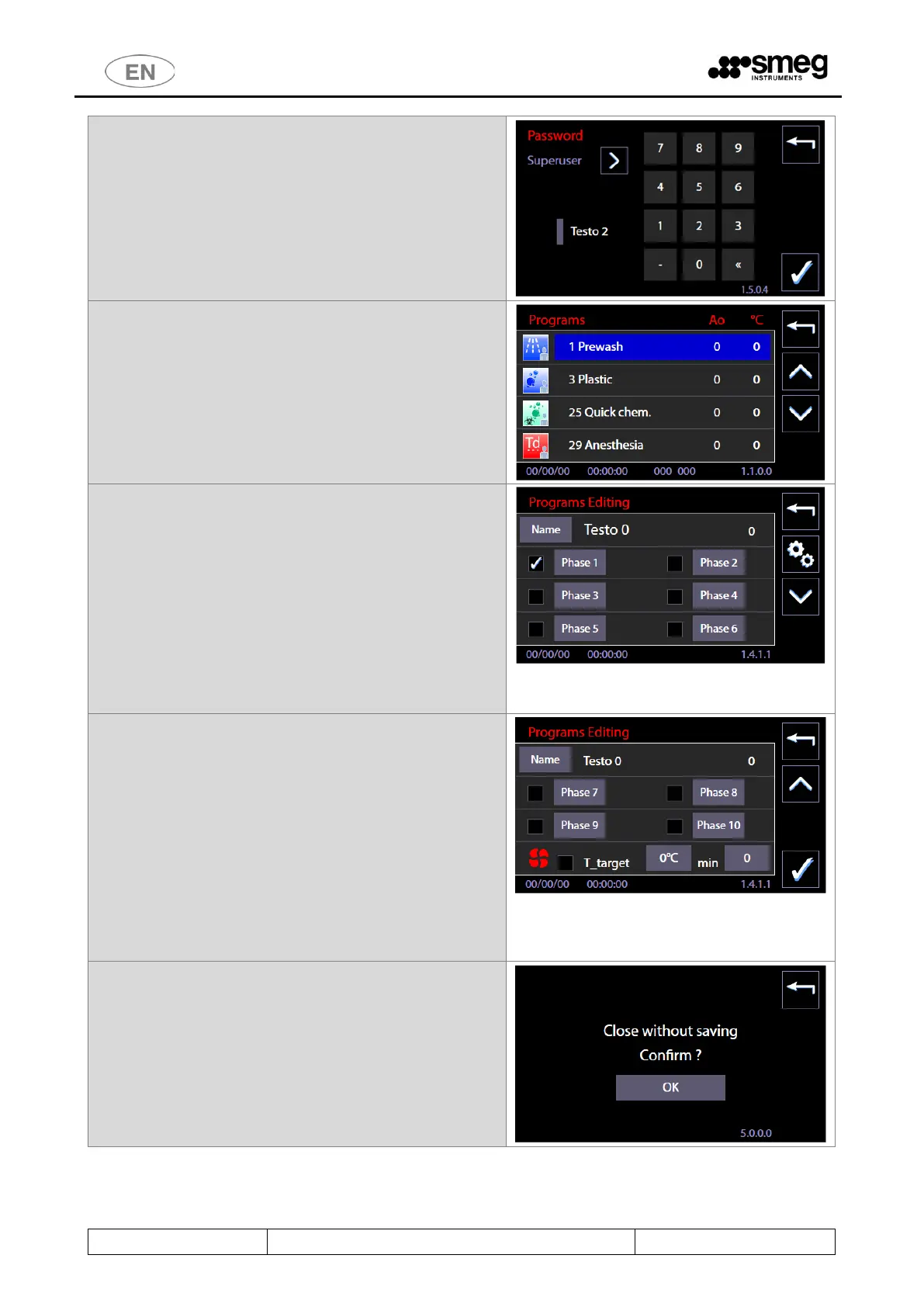
2. Insert the “Superuser” password
3. You gain access to the list of custom programs
from which you can select the specific program
you want to change.
4. “Programs Editing” starting screen (sch.1411)
from which you can activate the individual
phases using flags and, by pressing the “Phase”
buttons (eg. "Phase 1" button), move on to edit
the selected phase.
Only the phases selected through the flags are
actually executed by the program. The Phase 1
must remain always active.
To the right of the program name: the ID number
of the program "IdProg" can be seen: this
identifier cannot be changed.
5. From the previous screen, pressing the "Arrow
Down" button (right part of the screen) will give
access to the second program editing screen,
where, in addition to the phases, the drying stage
can be activated:
a. Drying presence through the flag.
b. target temperatures and holding time in
minutes entered by pressing the
appropriate buttons and acting on the
side control buttons (+ and -).
Only by pressing the "Confirmation" button at the bottom
right, the program will be saved.
6. Press the “Esc” button to exit the editing screen.
Confirmation screen request will appear.



 To Next Page