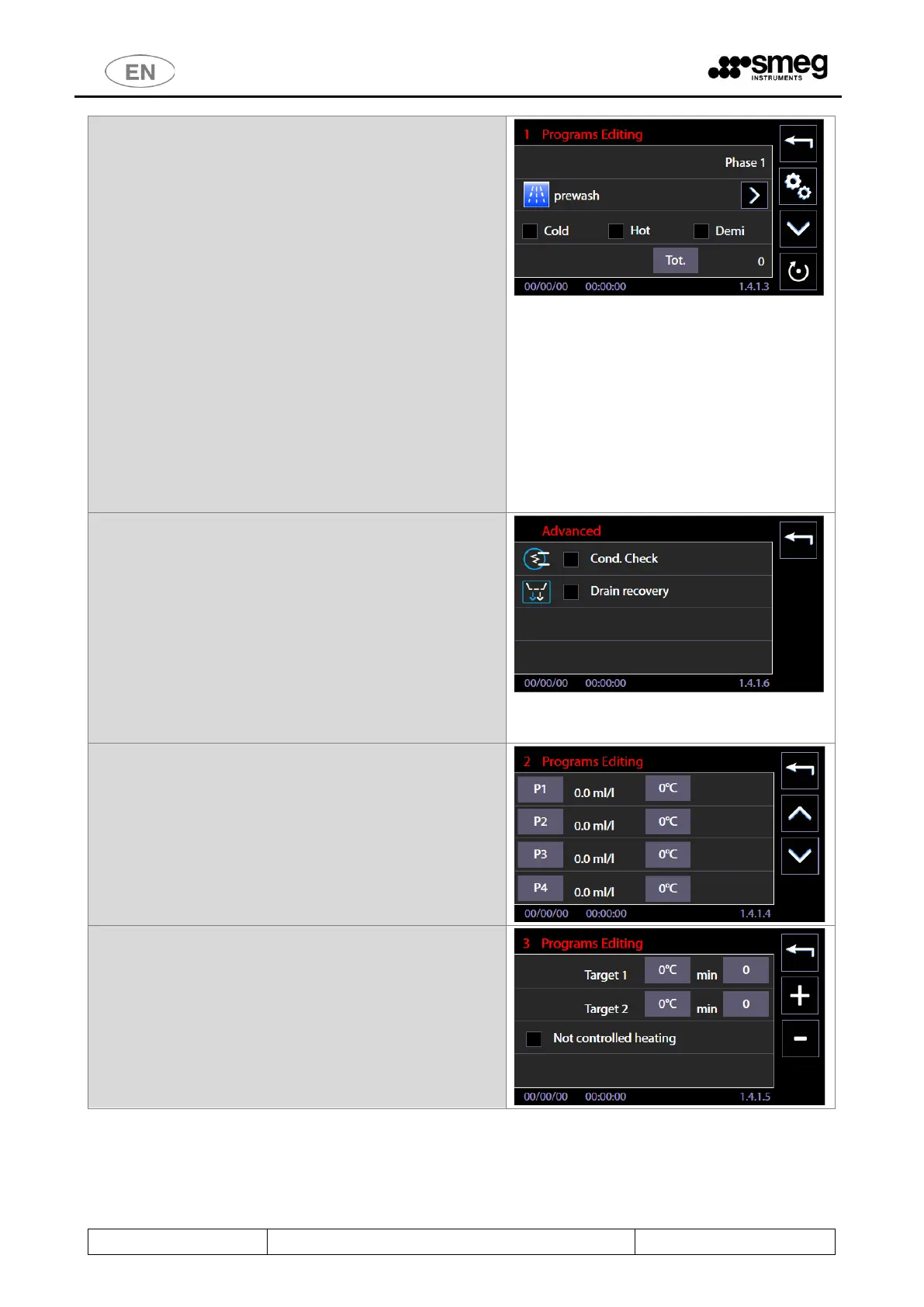
7. Pressing "Phase 1" button to enter in the editing
screens for the phase “1 Programs Editing”. It is
possible to select:
c. Phase Type (using the “right arrow”
button): pre-washing, washing, thermal
disinfection ... This information is used to
display the selected icons while the cycle
is in progress. If you select the type
“Thermodisinfection”: This information is
used to calculate and to display the Ao
value.
d. Type of water to be loaded (Cold, Hot,
Demi): Multiple selections are allowed.
e. Amount of water expressed in deciliters.
f. Using reset button (bottom right) will
reset the data entered for the stage.
g. Press the "down arrow” button to switch
to other options for the phase.
h. "Gears" button for the advanced options.
8. Among the advanced options, you can activate
for the current phase:
i. Conductivity check.
j. Drain recovery
These and other options are effective only if the related
option is installed on the device, they are otherwise
neglected during the execution of the cycle.
Optional tools and documentation references:
1. Conductivity Sensor.
2. Double drain valve "WD-VDS6010".
10. “3 Programs Editing” Target temperature settings
and holding times. There is an option (flag) for
the activation of “Not controlled heating”: if
selected, the heating will last for the holding time
set, without a target temperature value to reach.



 To Next Page