Chapter 11 DME Operations
683
DME Special Effect Operations
a) Setting for SD 4:3, SD 16:9
b) Setting for HD 4:3, HD 16:9
Circle settings
You can set the size of the circle, and make the axis of modulation vertical.
To apply the Circle effect
With the Circle menu displayed, set the following parameters.
To make the axis of modulation vertical
Press [Mod V], turning it on.
The axis of modulation when converting to the circle becomes vertical.
Panorama settings
You can set the horizontal and vertical curve ratio, and the curve center
position.
To apply the Panorama effect
With the Panorama menu displayed, set the following parameters.
a) Setting for SD 4:3, SD 16:9
b) Setting for HD 4:3, HD 16:9
Page Turn settings
There are four modes: H&V, H, V, and Off. You can select the turn position,
the radius of the turned portion, the amount and angle of turning, and the input
video for the front and back pages.
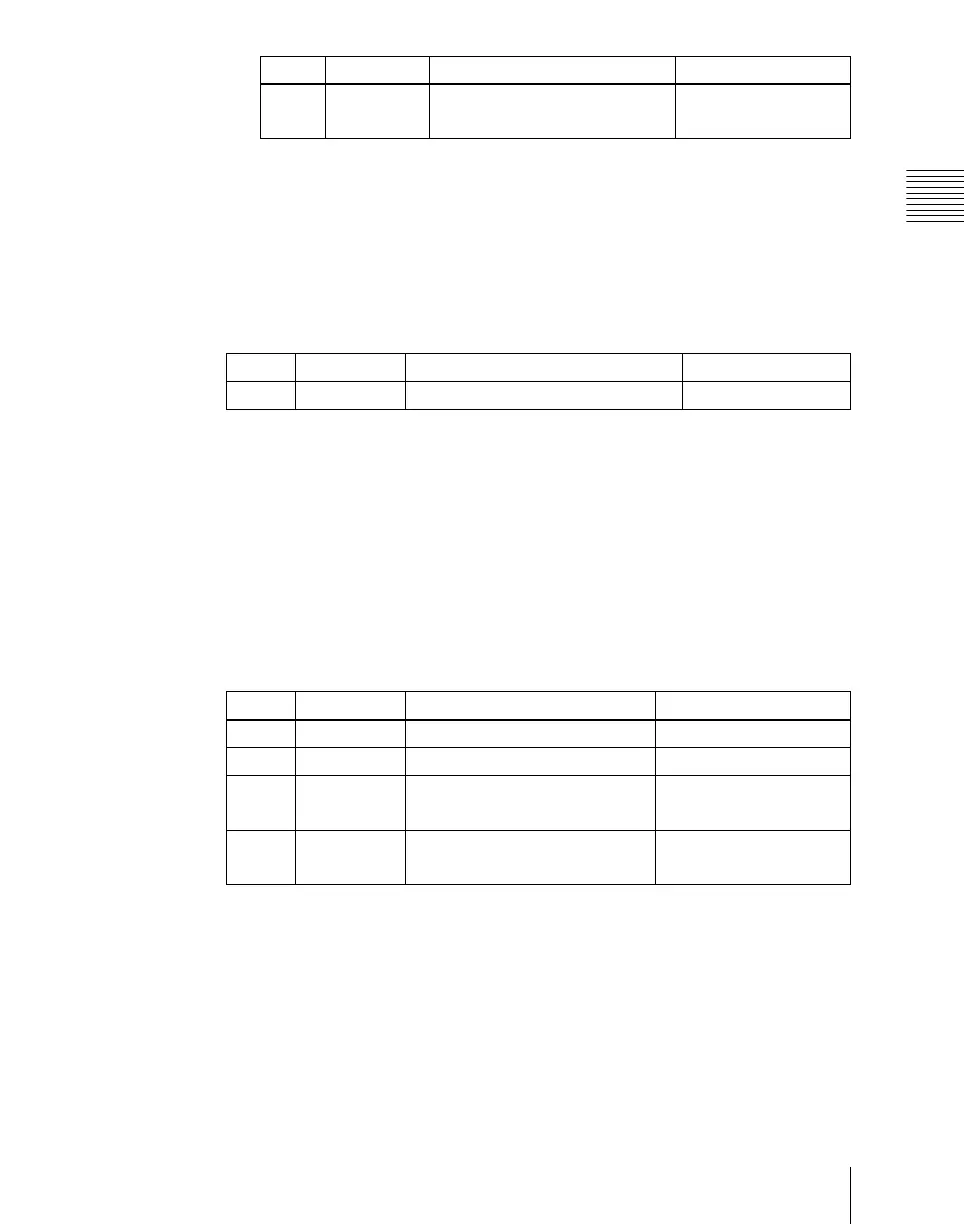
2 V Vertical lens center position
–4.000 to +4.000
a)
–16.000 to +16.000
b)
Knob Parameter Adjustment Setting values
Knob Parameter Adjustment Setting values
1 Radius Size of circle 0.00 to 100.00
Knob Parameter Adjustment Setting values
1 Curve H Horizontal curve ratio –100.00 to +100.00
2 Curve V Vertical curve ratio –100.00 to +100.00
3 Position H Horizontal curve center position
–4.000 to +4.000
a)
–16.000 to +16.000
b)
4 Position V Vertical curve center position
–3.000 to +3.000
a)
–12.000 to +12.000
b)




 To Next Page