Chapter 6 DME Wipes
358
Basic Procedure for DME Wipe Settings
The Remove From Begin menu appears.
5
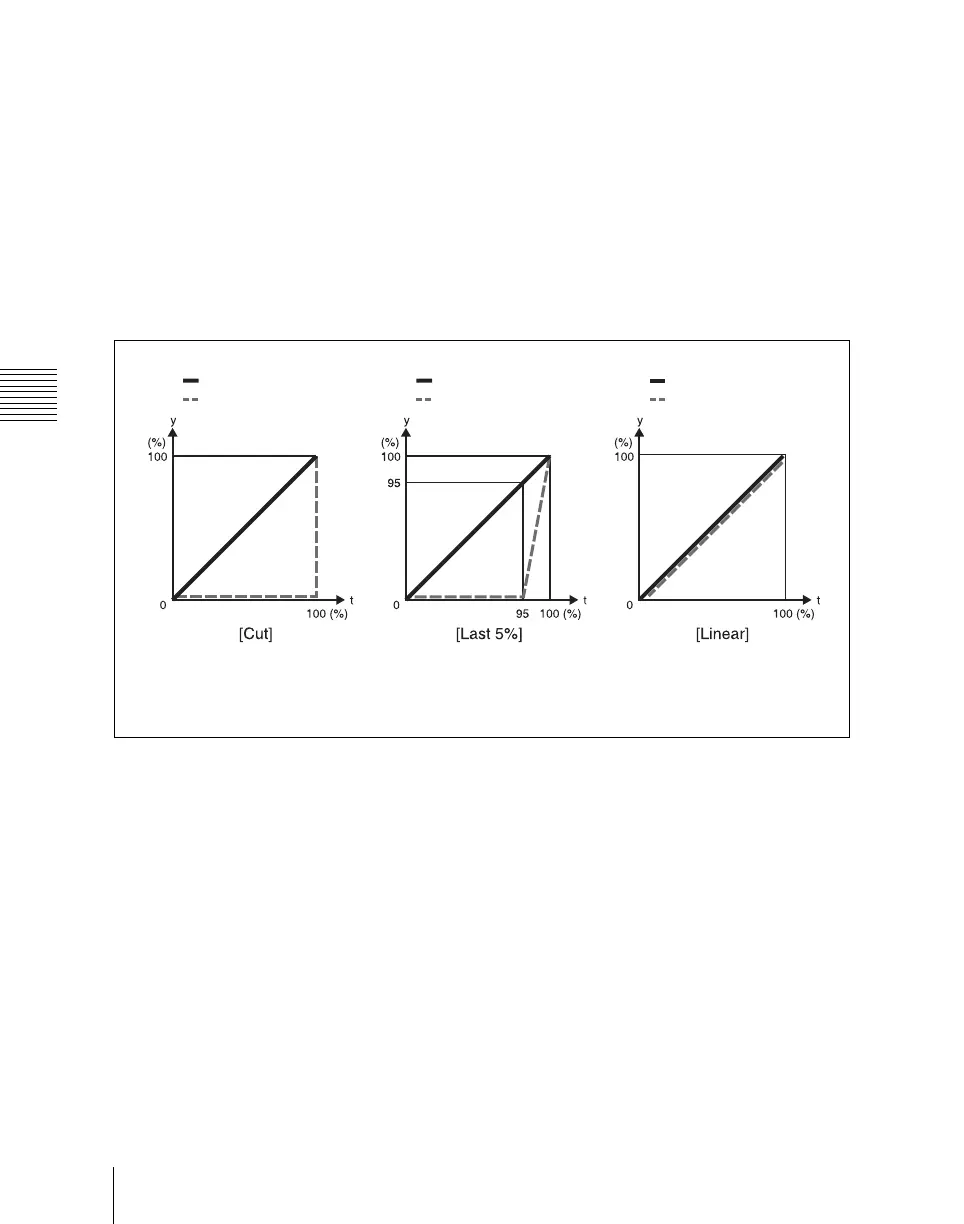
In the <Crop Transition> group, select the execution mode for the DME
wipe crop transition.
Cut: Cut mode. The cropping does not change during the transition, but at
the end point of the transition the cropping is removed (enlarges).
Last 5%: The cropping is maintained for the first 95% of the transition,
and is progressively removed during the last 5% of the transition
(enlarges).
Linear: The cropping is removed linearly through the whole course of the
transition (enlarges).
Setting the timing of transition completion
When the execution mode for a DME wipe crop transition is set to [Last 5%],
you can select the timing of transition completion from 70% ([Last 30%]), 95%
([Last 5%]), and 100% ([Off]).
1
In the M/E 1 >DME Wipe menu, select HF5 ‘Modify.’
The Modify menu appears.
2
In the <Crop Mode> group select [Remove From Begin].
The Remove From Begin menu appears.
3
In the <Release Transition> group, select the timing of transition
completion.
Transition
Cropping
Transition
Cropping
Transition
Cropping
t: transition execution time
y: change in transition and cropping amount














 To Next Page