42 Installation and Setup
2005995 Rev O – 210712
VIDEO: Connecting an Ink Cartridge
To see a video of this procedure, click this link:
https://youtu.be/zSjTfhCmU8M?t=159
Or scan the QR code at right using the camera app on your
mobile device.
View Time: 2:39 – 4:11
VIDEO: Connecting the Ink Lines
To see a video of this procedure, click this link:
https://youtu.be/zSjTfhCmU8M?t=405
Or scan the QR code at right using the camera app on your
mobile device.
View Time: 6:45 – 9:07
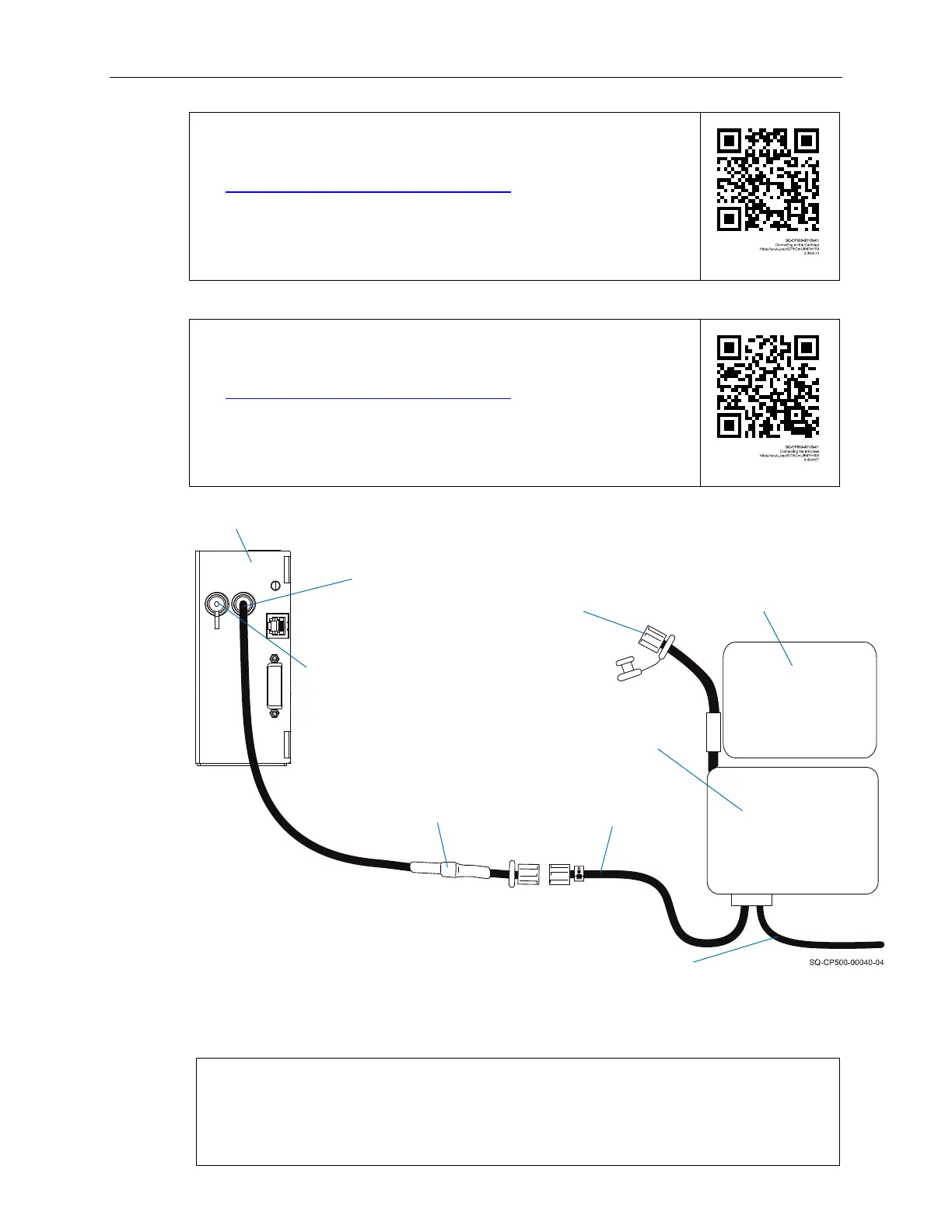
7. Make sure that the Reservoir Vent Tube (Part Number 2001069 for Oil, Part Number
2001070 for Solvent) is uncapped for operation.
NOTE: The Reservoir Vent Tube must be uncapped during operation to allow air
to flow into the Ink Reservoir. However, when the system is not in use, the
Reservoir Vent Tube should be capped to prevent debris from entering the system.
It should also be capped when moving the system to prevent ink from escaping.
Connecting the Printhead and Ink Reservoir
Reservoir Vent Tube
(uncapped for operation)
Ink
Reservoir
Printhead
Ink
Cartridge
Printhead Purge Tube
(capped for operation)
Ink Line
IN
Inline Check
Valve
Ink Line from
Reservoir
Low Ink Signal Wire
(connected to Controller)



 To Next Page