VARI❋LITE - VL4000 BEAMWASH LUMINAIRES SERVICE MANUAL
16 02.9704.6010 0
Fixed Color Wheel Filter Removal and Installation
To remove and replace fixed color filters:
Step 1. Before removing power from luminaire, move Edge towards front of luminaire with control
console or via luminaire menu system.
WARNING: Remove power from luminaire and allow luminaire to cool completely before
performing this procedure.
Step 2. Remove power from luminaire and allow luminaire to cool completely.
Step 3. Depending on which color filter wheel you need to access, do the following:
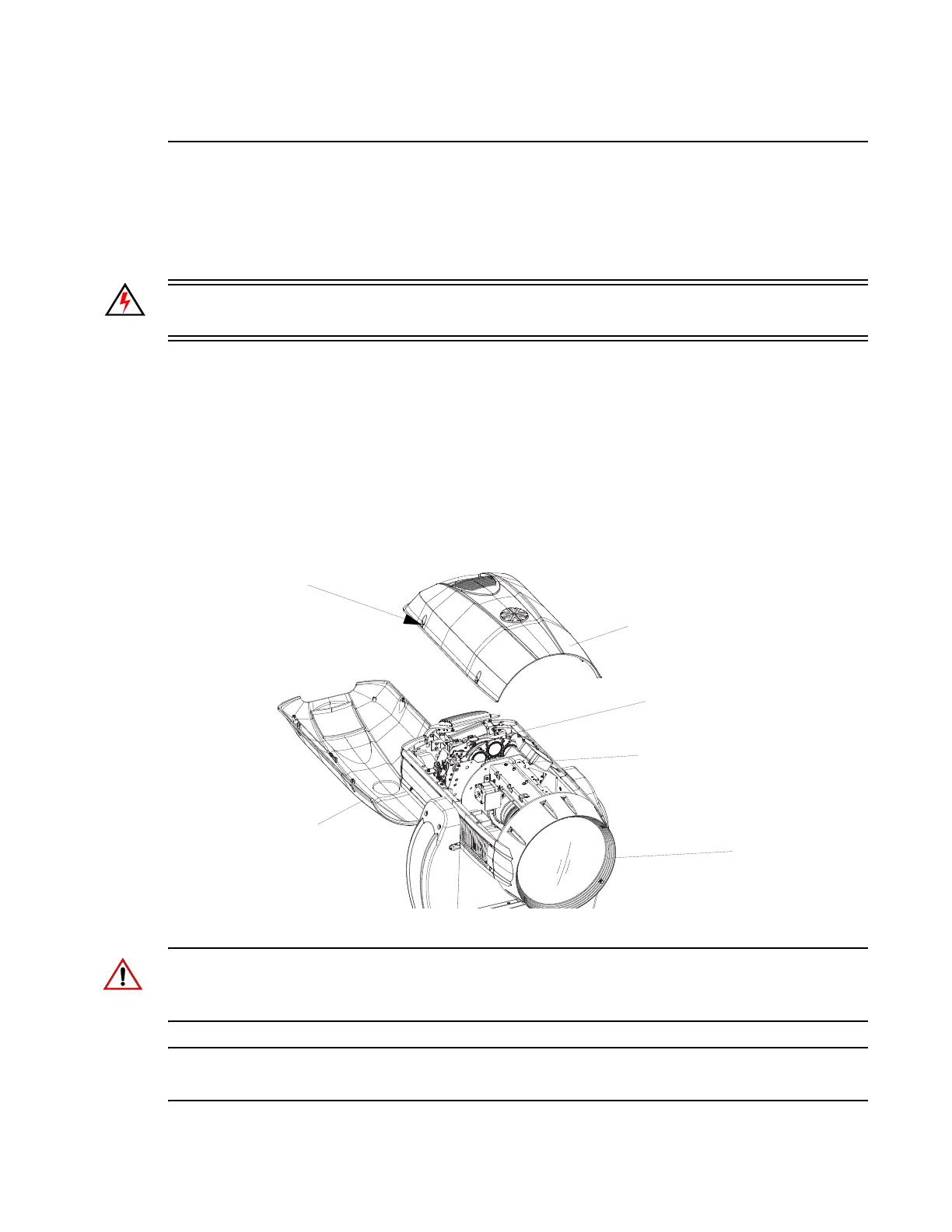
a. For Fixed Color Wheel 1 (closest to the rear of luminaire), remove head cover assembly
as indicated in Figure 2-4 by loosening four captive screws and lifting cover away from
luminaire head. Note, head cover is attached by a safety tether.
b. For Fixed Color Wheel 2 (closest to the front of luminaire), remove head cover
assembly as indicated in Figure 2-4 by loosening our captive screws and lifting cover
away from luminaire head. Note, head cover is attached by a safety tether.
Figure 2-4: Replacing Fixed Color Filters
CAUTION: Wear protective gloves or other protective covering while handling filters to avoid
leaving fingerprints. Filters are extremely fragile and can break if not handled carefully. If dirty, clean
with isopropyl alcohol and a soft, lint-free cloth.
Note: For standard fixed color filters, refer to “Fixed Color Wheel 1” on page 30 or “Fixed Color
Wheel 2” on page 31
Luminaire Head
Head Cover Assembly
to access Color Wheel 2*
CYM / Fixed Color Assembly
(closest to lamp)
Assembly
Gobo Assembly
(closest to front lens)
* Each head cover is secured with a tether.
Head Cover Assembly
to access Color Wheel 1*
Captive Phillips
Screws (x4)


 To Next Page