ROUTINE MAINTENANCE : ANIMATION WHEEL REMOVAL AND INSTALLATION
02.9704.6010 0 21
2
Animation Wheel Removal and Installation
To remove and replace animation wheel:
Step 1. Before removing power from luminaire, move Edge towards front of luminaire with control
console or via luminaire menu system.
WARNING: Remove power from luminaire and allow luminaire to cool completely before
performing this procedure.
Step 2. Remove power from luminaire and allow luminaire to cool completely.
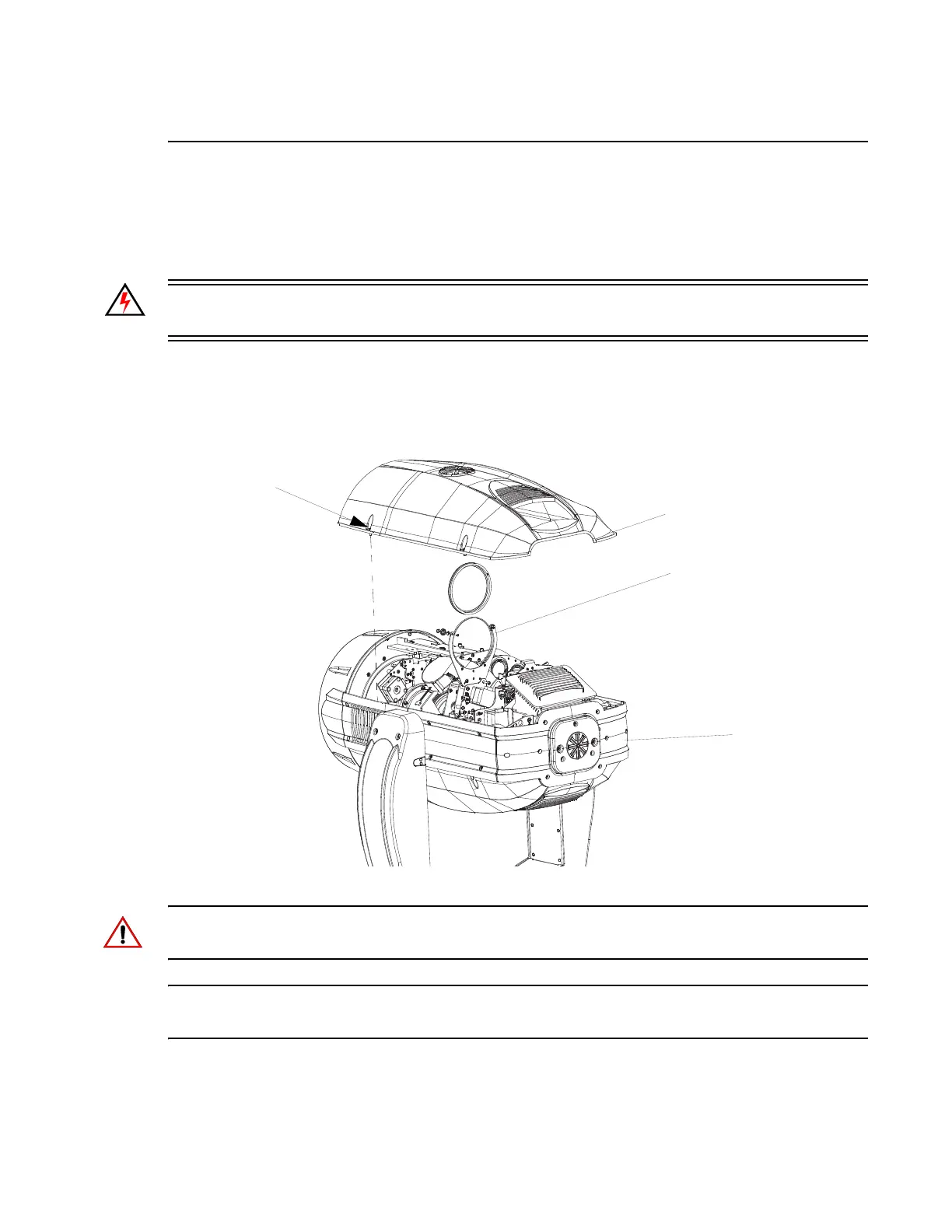
Step 3. Remove head cover assembly as indicated in Figure 2-10 by loosening four captive screws
and lifting cover away from luminaire head. Note, head cover is attached by a safety tether.
Figure 2-10: Replacing Animation Wheel
CAUTION: Wear protective gloves or other protective covering while handling the animation wheel
to avoid leaving fingerprints. If dirty, clean with isopropyl alcohol and a soft, lint-free cloth.
Note: For the standard load of the animation wheel, refer to “Animation Wheel - Concurrent” on
page 34 or “DMX Operation” on page 35.
Step 4. Loosen screw on bulkhead so animation arm can swing out
Step 5. Remove one screw from animation frame.
Luminaire Head
Head Cover Assembly*
Assembly
* Head cover is secured with a tether.
Captive Phillips
Screws (x4)
Animation Wheel
Assembly


 To Next Page