ROUTINE MAINTENANCE : FIXED COLOR WHEEL FILTER REMOVAL AND INSTALLATION
02.9704.6010 0 17
2
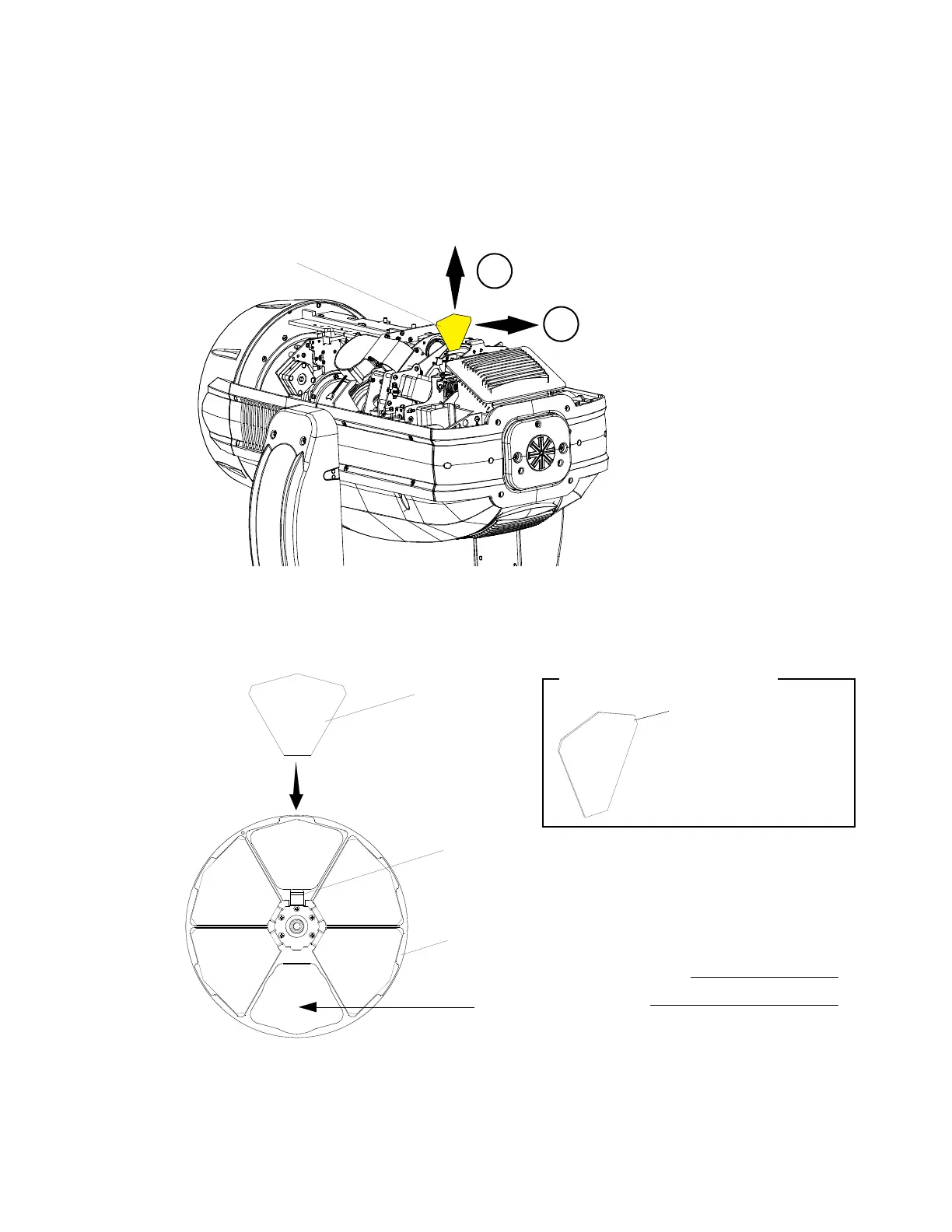
Step 4. At fixed color wheel, slowly rotate wheel by hand until filter to be removed is visible on
assembly as shown in Figure 2-5.
Step 5. At filter to be removed, (1) press filter out of fixed color wheel with fingers and (2) guide
filter up and away from fixed color wheel.
Figure 2-5: Removing Fixed Color Filters
Step 6. Install replacement filter into slot. Note orientation of fixed color filter as indicated in Figure
2-6. Make sure filter is inserted and secured by fixed color wheel retaining clip as shown in
Figure 2-6.
Figure 2-6: Installing Fixed Color Filters
Step 7. After filter is installed, reinstall head cover(s).
Pull filter straight up and away
from wheel assembly
Push filter from front of wheel to
dislodge it from wheel assembly
Fixed Color Filter
1
2
Fixed Color Filter
Fixed Color Filter Orientation
VERY IMPORTANT!
Rear of filter is the REFLECTIVE
side and MUST be towards
lamp.
Fixed Color Filter
Fixed Color Wheel Assembly
Fixed Color Filter Retaining Clip
Note:
Assembly shown for clarity.
Open Position
(no filter)


 To Next Page