142
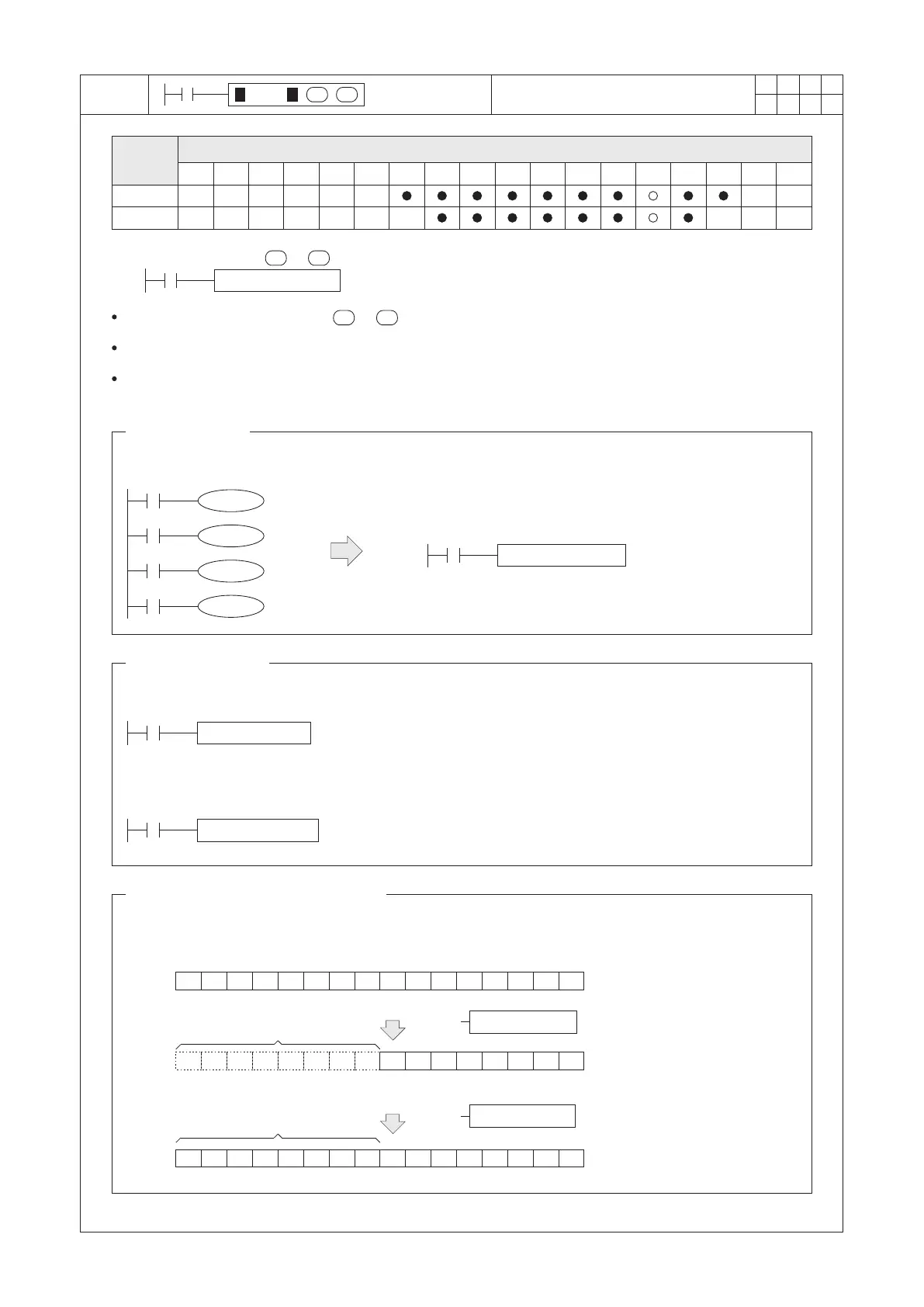
The content value of D100 will be copied to D200 when X20=“ON”.
Y20
Y21
Y22
Y23
X0
X1
X2
X3
MOV K1X0 K1Y20
M9000
The instruction should be headed with a “D” when a 32-bit instruction is used.
If the transfer source or destination device is a 32-bit counter, the instruction should be headed with a “D”.
32-bit Data Transfer
When X21=“ON”, move the present value of C200 (32 bits) to (D11, D10).
DMOV C200 D10
X21
When X20=“ON”, move the content value (D1, D0) to (D101, D100).
DMOV D0 D100
X20
MOV D100 D200
X20
S
D
S
D
When using the MOV instruction to transfer data between words and bits, those bits should be organized by
the unit of “Nibble”. For example, (that K2 in the program means 2 Nibbles)
Data Transfer Between Word and Bits
The status of bit data remains
Execute
Fill up with “0”
MOV D0 K2M0
1
0
1
0
1
0
1
0
K2M0
MOV K2M0 D1
0 0 0 0 0 0 0 0
1
0
1
0
1
0
1
0
M15 M14 M13 M12 M11 M10 M9 M8 M7 M6 M5 M4 M3 M2 M1 M0
0
1
0
1
0
1
0
1 1
0
1
0
1
0
1
0
b15
b0
b15 b0
D0
D1
D M O V P
D
S
1
2
M
3
○ ○ ○○
X Y M S
D.b R.b
KnX KnY
KnM KnS
T C
D,R
V,Z
UnG
K,H
E
" $"
S
D
FNC
12
Operand
Devices
Move
S : the source device to be transferred
D : the destination device
To copy the designated value from to .
When X20 turns from “ON” to “OFF”, the instruction is inactive besides the content value of D200 will remain as
same as the value before it is disabled.
Bit Data Transfer
To perform the program of left diagram, which can be achieved by the right side.
Execute


 To Next Page