370
7-3 Communication Types
7-3-1 Selections of Communication Types
Since the CP1~CP5 are multi-functional communication ports, the operation type of each port must be set precisely
before use.
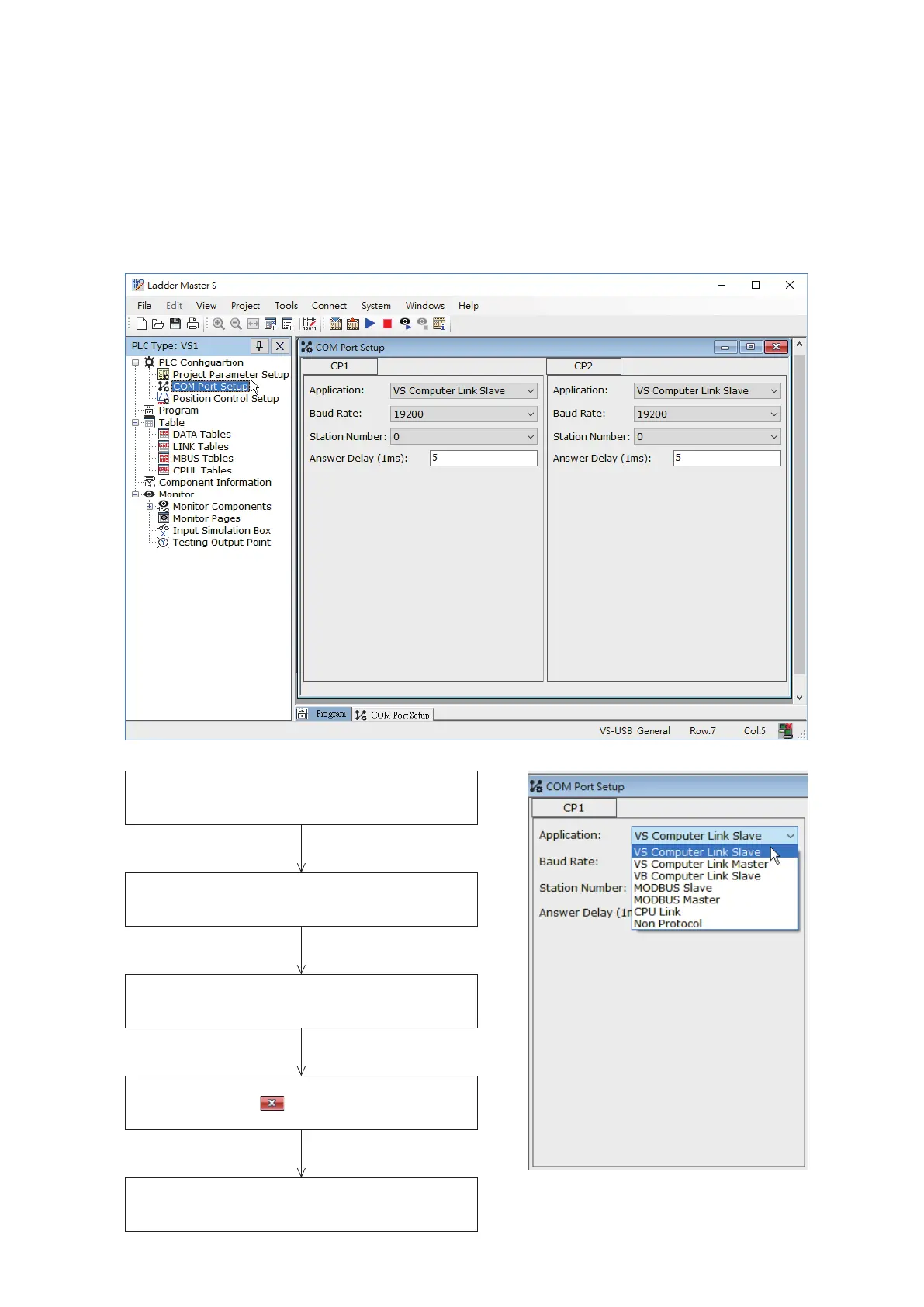
The operation types of communication ports are specied from the Ladder Master S programming software. The setting
procedure is shown below:
The VS Series PLCs have a complete selection of communication functions. They can be connected with a maximum
of ve communication ports CP1~CP5. Furthermore, each one is a multi-functional communication port and can be
applied separately to a variety of communication application types. Each communication operating type will be
introduced below.
Select “COM Port Setup” from the Navigation Pane of
the Project
A sheet as shown in the right diagram will appear,
select an application type according to the request
There are corresponding items for each application
type, which will guide user to set relevant parameters
After the settings of all communication ports are
completed, click the on the upper corner at the
setup window to nish and close it.
After the setup is completed, should run the
“Write Project to PLC” function. Then, the parametes
take effect on the PLC.


 To Next Page