ptg
197
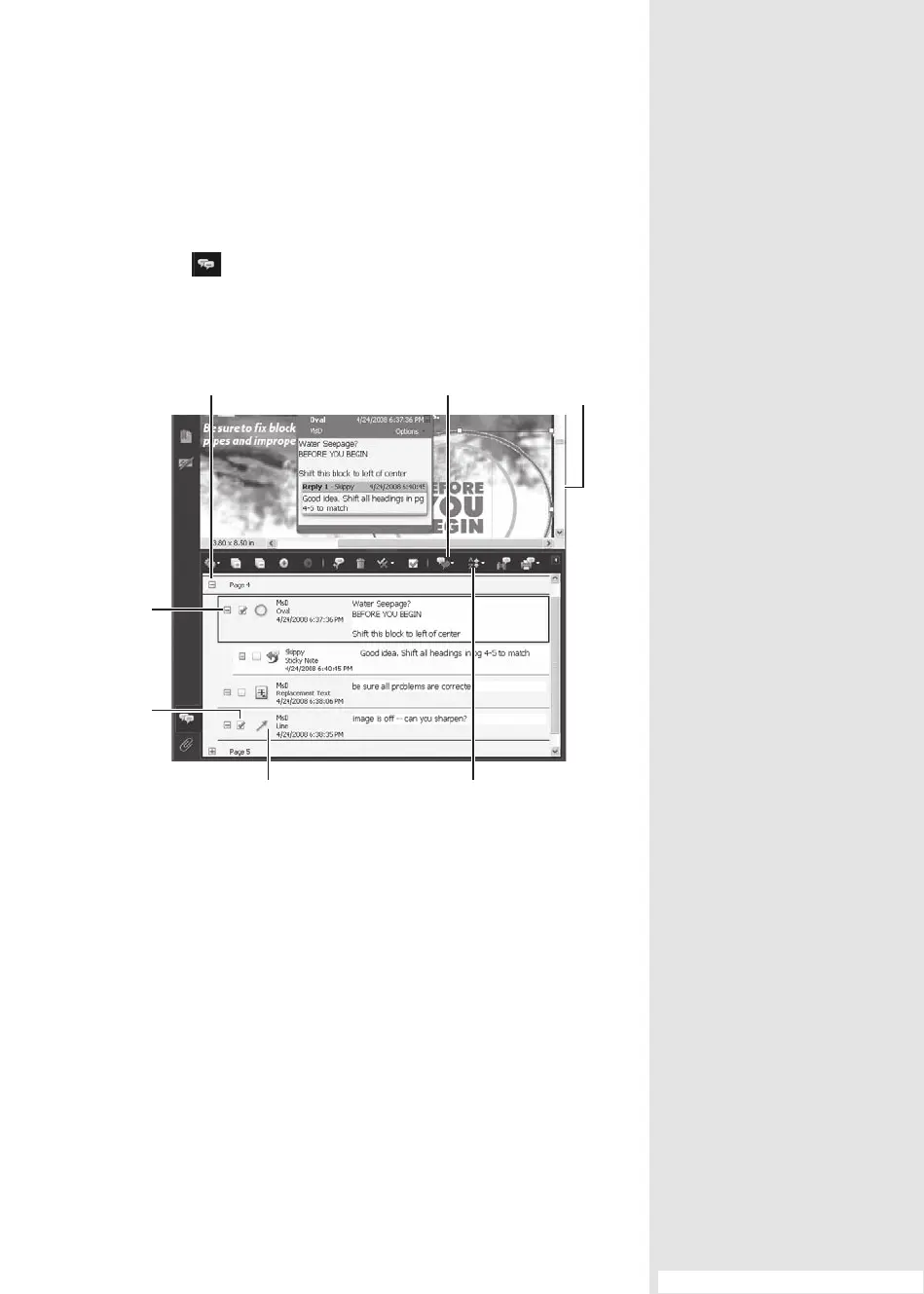
Each comment added to a document is stored in the Comments List,
which is one of the panes displayed in Acrobat 9 by default. Click the
Comments icon in the Navigation pane of the program window to
open it. Unlike most other panes that open to the left of the Document
pane, the Comments List is displayed horizontally below the document
(Figure 75).
Sort options
Open comments for page Choose a filter Grouped
comment
Manage
comments with
check marks
Type of comment
and author
Open comment
contents
Figure 75 The Comments List displays horizontally below the Document pane.
The plus sign (+) to the left of a page number indicates that the page
contains comments. Click a comment in the list. If the comment is located
in the portion of the document that is displayed in the Document pane,
it is highlighted.
Comments are organized in levels within the Comments List. Here are
some tips for viewing comments:
•
A multipage document lists comments based on page number. Click a
page’s plus sign to open the page and display the comments.
#75: Working with the Comments List
Working with the
Comments List
#
75
(continued on next page)
From the Library of Daniel Dadian



 To Next Page