Testing Machine and Electronic Control Functions
Thermistor Temperature Test
This option displays the temperature sensed
at
the
thennistor in 5°F increments.
To
start test, control must
be
in the Testing Mode.
Refer to
"How
to
Enter
Testing
Feature" at the
beginning
of
this section.
To
enter, press the START (enter) keypad. The display
will show "Fxxx"
or
"Cxxx". The
"F"
will show
Fahrenheit, the
"C"
will show Celsius and the "xxx"
will show degrees.
If
control senses a shorted
thermistor, the display will show
"SH".
If
the control
senses an open thermistor, the display will show
"oP".
To
exit this test, press the MED TEMP «) keypad.
The control will return to the testing mode.
Machine Configuration Display
#1
Test
This option shows the machine configuration values.
To
start test, control must
be
in the Testing Mode.
Refer to
"How
to
Enter
Testing
Feature" at the
beginning
of
this section.
To
enter, press the START (enter) keypad. The display
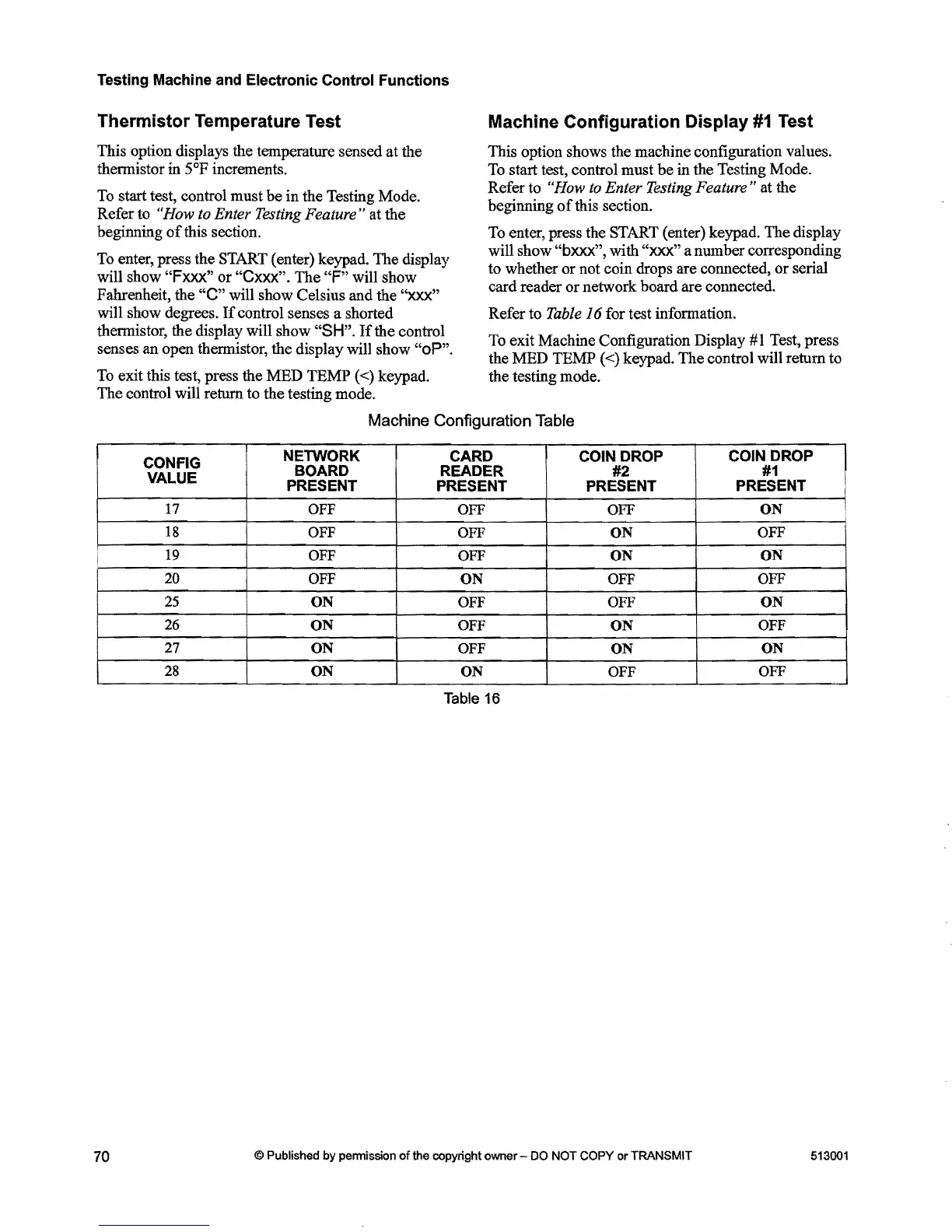
will show "bxxx", with "xxx" a number corresponding
to whether
or
not coin drops are connected,
or
serial
card reader
or
network board are connected.
Refer to
Table
J6 for test information.
To exit Machine Configuration Display
#1
Test, press
the MED TEMP
«)
keypad. The control will return to
the testing mode.
Machine Configuration Table
CONFIG
VALUE
NElWORK
BOARD
PRESENT
CARD
READER
PRESENT
COIN DROP
#2
PRESENT
COIN DROP
#1
PRESENT
17
OFF
OFF OFF
ON
18
OFF
OFF
ON
OFF
i
19
OFF
OFF
ON
ON
20
OFF
ON
OFF
OFF
25
ON
OFF OFF
ON
26
ON
OFF
ON
OFF
27
ON
OFF
ON
ON
28
ON
ON
OFF
OFF
Table
16
70
@ Published by permission
of
the copyright owner -
DO
NOT
COpy
or TRANSMIT
513001



 To Next Page