Opening the Service Door
Stacked Washers and Dryers, Front Control
Washers and Coin Rear Control Washers
Manual programming requires the user to open and
close the service door. Opening and closing the service
door trips a switch allowing access to various
programming options, diagnostics, and audit
capabilities.
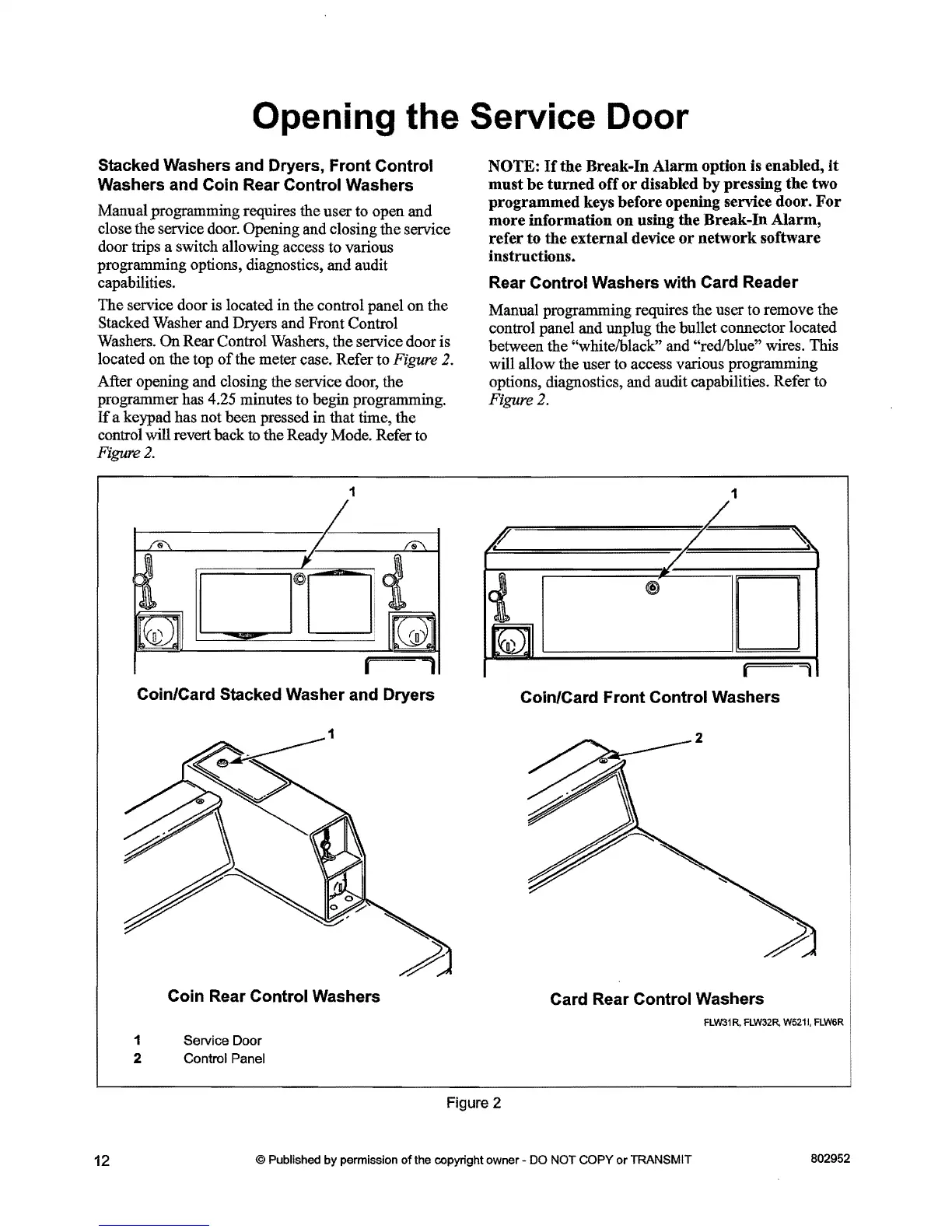
The service door is located in the control panel on the
Stacked Washer and Dryers and Front Control
Washers. On Rear Control Washers, the service door is
located on the top
of
the meter case. Refer to Figure 2.
After opening and closing the service door, the
programmer has
4.25 minutes to begin programming.
If
a keypad has not been pressed in that time, the
control will revert back
to
the Ready Mode. Refer to
Figure
2.
1
r==1
Coin/Card Stacked Washer and Dryers
Coin Rear Control Washers
1 Service Door
2 Control Panel
NOTE:
If
the
Break-In
Alarm
option
is enabled,
it
must
be
turned
off
or
disabled
by
pressing
the
two
programmed
keys before opening service door.
For
more
information
on
using
the
Break-In
Alarm,
refer
to
the
external
device
or
network
software
instructions.
Rear Control Washers with Card Reader
Manual programming requires the user to remove the
control panel and unplug the bullet connector located
between the
"whitelblack" and "redlblue" wires. This
will allow the user to access various programming
options, diagnostics, and audit capabilities. Refer to
Figure 2.
1
r=,
Coin/Card Front Control Washers
2
Card Rear Control Washers
FLW31R, FLW32R,
W521
I,
FLW6R
Figure 2
12
© Published by permission
of
the copyright owner - DO NOT COPY
or
TRANSMIT
802952



 To Next Page