9.4.4 The control terminal shows a spread rate error.
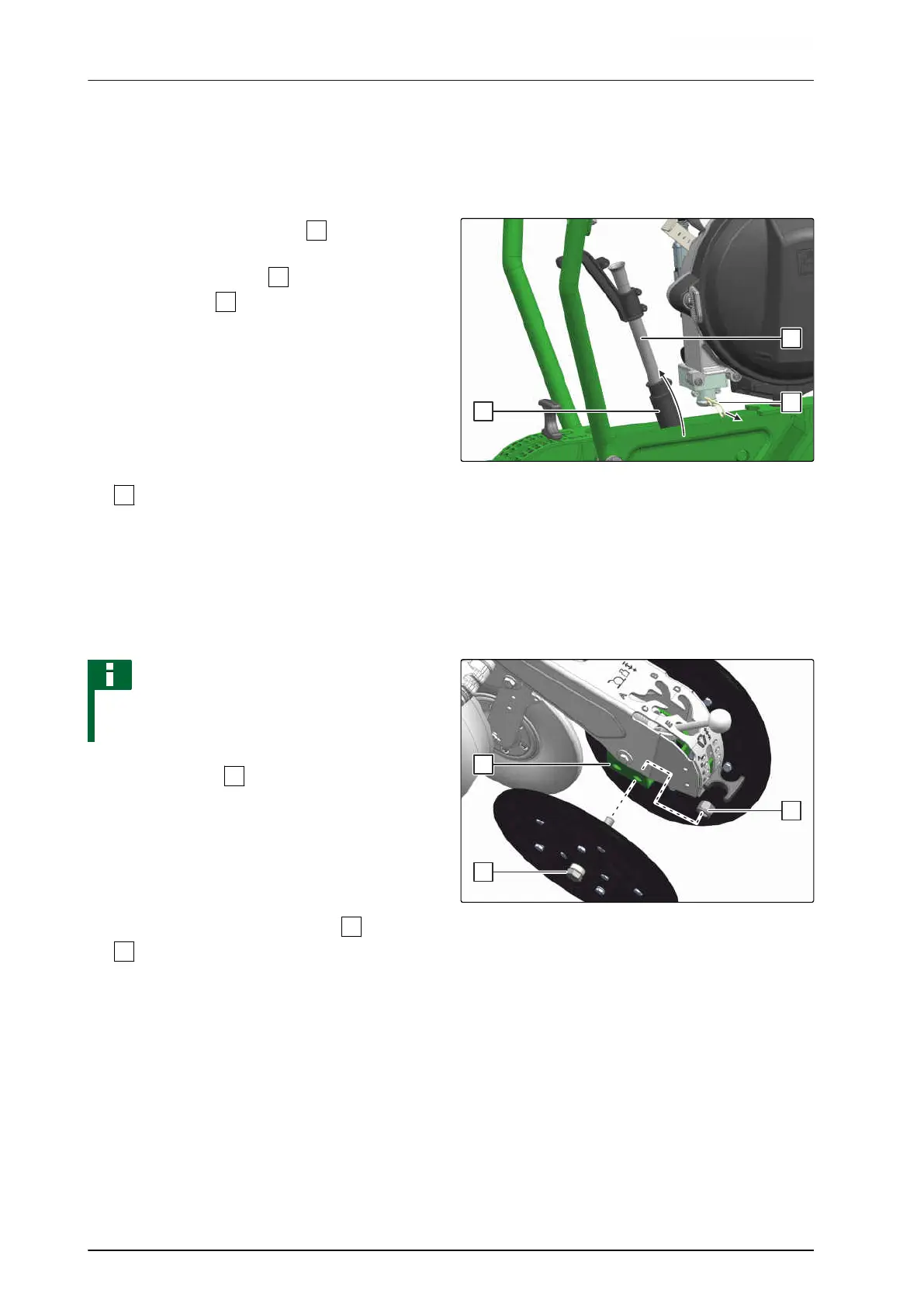
The shot channel is blocked.
1. Remove the spring cotter pin
.
2. Press the shot channel
down against the
spring element
.
3. Remove the shot channel upwards.
4. Clean the shot channel.
5. Install the shot channel.
6. Secure the shot channel with a spring cotter pin
.
CMS-I-00002040
9.4.5 Press rollers get blocked.
Clods or stones get jammed between the press rollers.
NOTE
Offset installation is not possible in conjunction
with disc closers.
1. Unscrew the nut
and remove it.
2. Remove the press roller.
3. To increase the throughput on the press rollers,
install the press roller with offset.
4. Install the press roller with the bolt
in the hole
.
5. Put on the nut and tighten it.
CMS-I-00002041
CMS-T-00002348-B.1
CMS-T-00002373-B.1
9 | Repairing the machine
Eliminating faults
MG6660-EN-II | D.1 | 27.09.2021
230





 To Next Page