Chapter 4 Remote Controller 65
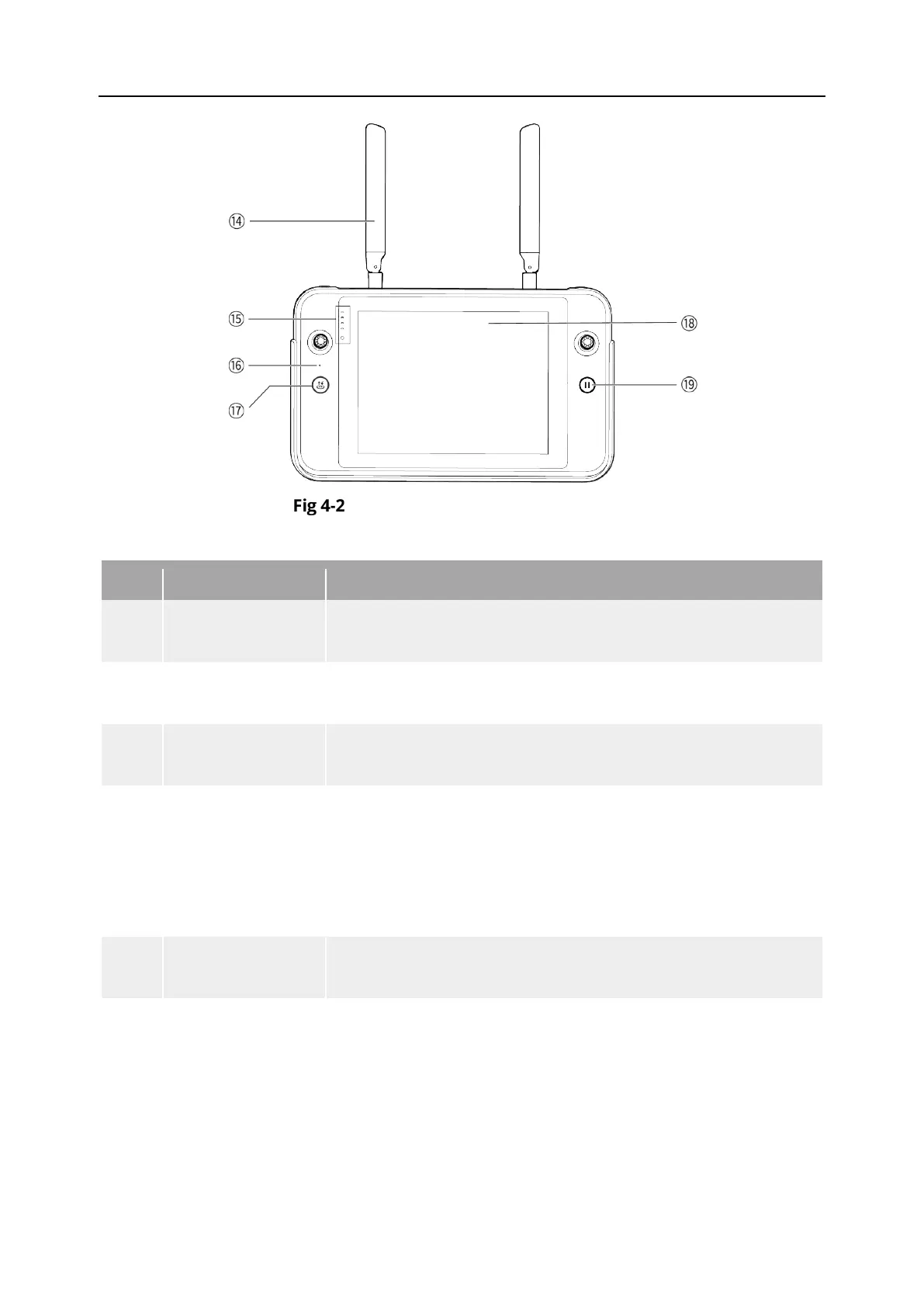
Remote Controller Front View
Table 4-2 Remote Controller Front View Details
14 Antenna
Transmits the control signals of the remote controller and
receives the image transmission information of the aircraft.
15
Displays the remaining battery level of the remote controller.
16 Audio Input
Receives information from an external audio source near the
17
Take-off/Return-to-
Home Button
When the aircraft is turned on but not taking off, press and
hold the button for 2 seconds, and the aircraft will take off and
hover at an altitude of 1.5 meters above the ground.
When the aircraft is flying, press and hold the button for 2
seconds, and the aircraft will automatically begin the return-to-
18 Display
Displays real-time image transmission views. with 2048×1536
resolution. Touch operation is supported.
19 Pause Button
When the aircraft is in autonomous flight mode, short press
this button to control the aircraft to suspend autonomous
flight and hover in place or resume autonomous flight; press
and hold this button for 2 seconds to exit the autonomous












 To Next Page