NOTE You can set your URSA Cine to stop recording if dropped frames are detected.
See the ‘recordsettings’ section in this manual for more information. This feature is
user selectable as you may be able to get away with brief periods of ‘burst’ recording
at higher frame rates or resolutions when shooting to slower media.
Status LCD Controls
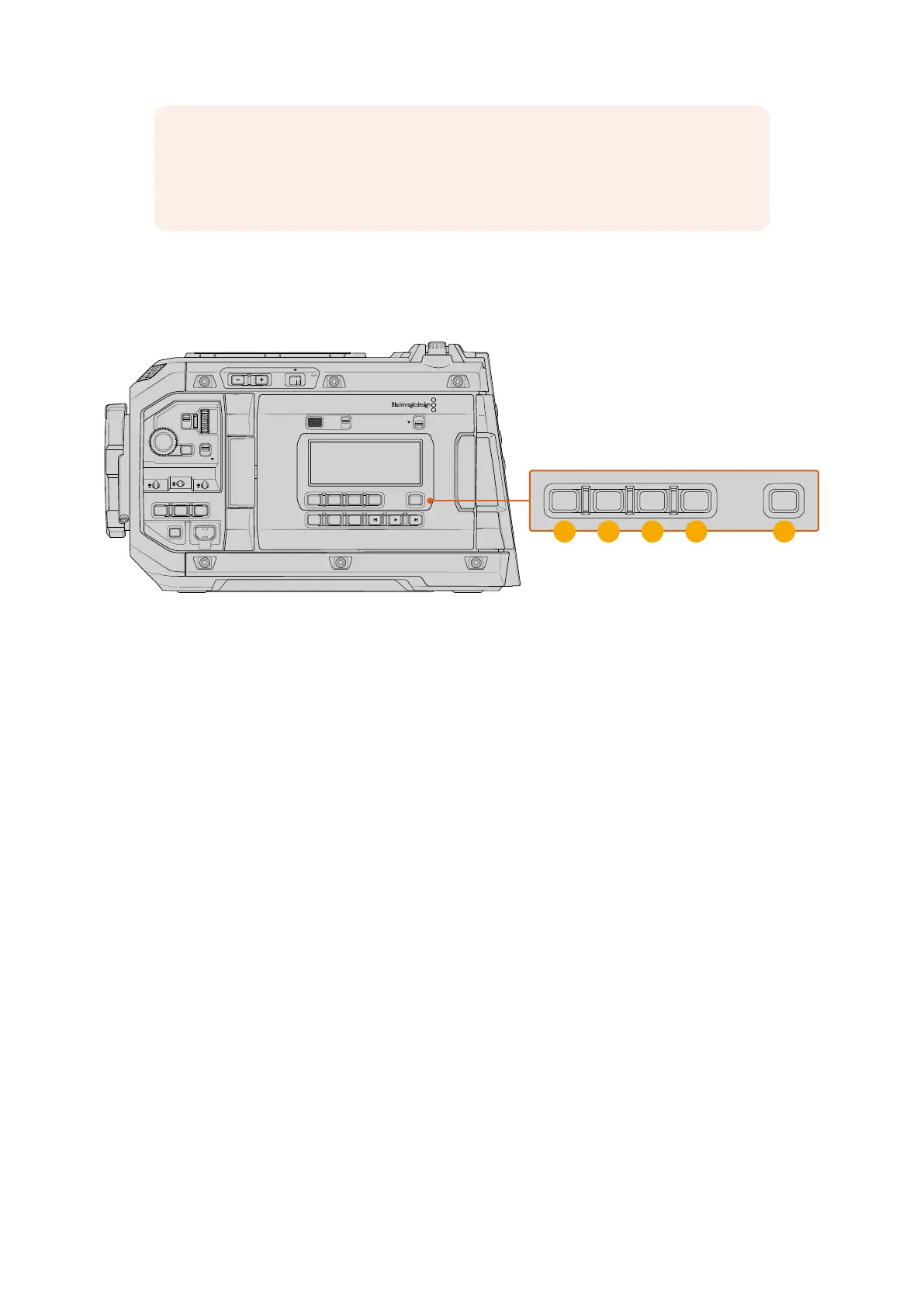
The control buttons underneath the status LCD let you capture a still frame, set timecode,
adjustthe brightness of the status LCD and backlit button LEDs.
LOCKBACKMENU
H PHONE
MONITOR
IRIS
SHUTTERISO / GAIN WHITE BAL
MENU
REC
F1 F2 HFR
OFF ON
LOCK
CH1/2
CH3/4
IRIS FOCUS
PGM
RESET
HOLD TC BRGT
STILL
1 2 3 4 5
URSA Cine status LCD controls
1 Reset
The reset button allows you to reset the timecode to 00:00:00:00 when you are setting
your preset timecode.
2 Hold
Use this button to temporarily hold the main status LCD timecode when the timecode is
in free running time of day code. The timecode will continue to run in the background and
return to its actual position when you release the ‘hold’ button. While holding you can take
note of the timecode for a particular event. This can be useful in electronic news gathering
or documentary situations for noting key timecode points.
3 Timecode
Press the ‘timecode’ button to toggle the main timecode display’s format between clip
duration and timecode. By default the timecode will be free running time of day code as this
is the most frequently used. If you press and hold the ‘timecode’ button for five seconds
it will switch the camera into record run timecode and the first two digits of the timecode
counter will flash. This indicates that you are now editing your preset timecode and allows
you to set a specific timecode number for your preset timecode.
Pressing ‘reset’ at this stage will zero the timecode and then you can turn and press
themenu wheel to set the desired value starting with hours, minutes, seconds and then
frames. When you are happy with the timecode, press and hold the ‘timecode’ button
again for three seconds to set this as your preset timecode point. You will notice that the
timecode generator now shows this value and will only increment when the camera is
recording giving you continuous ascending timecode values. To switch your timecode back
to free running time of day code, press the ‘timecode’ and ‘hold’ buttons simultaneously for
three seconds and release.
71Control Buttons



 To Next Page