Fax (D1180/D1170/D1150)
6-6
Introduction to Using Fax Functions
FaxTel
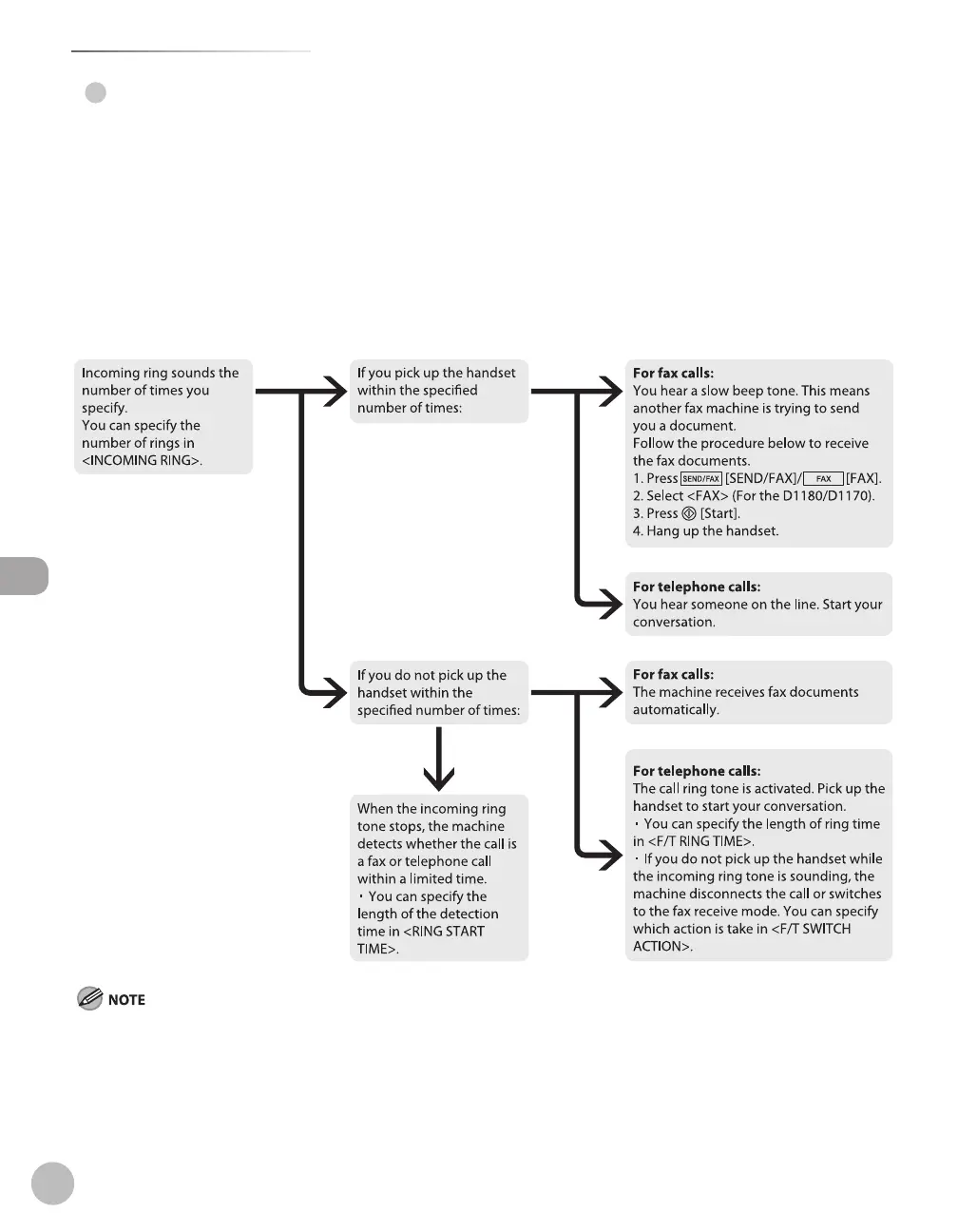
In this mode, the machine receives documents automatically for fax calls and the external telephone
connected to the machine rings for telephone calls. (If <INCOMING RING> is set to <ON>, the external
telephone rings for both fax and telephone calls. To set the telephone to ring only when a telephone call is
received, set <INCOMING RING> to <OFF>.)
Before using this mode
Make sure to do the following:
Connect your external telephone to the machine. (See “Make Fax Settings,” in the Starter Guide.)
Set the receive mode to <FaxTel>. (See “Selecting the Receive Mode,
” on p. 6-10.)
When an incoming call is received
If you want to change <RING START TIME>, <F/T RING TIME>, or <F/T SWITCH ACTION>, see “Optional Settings for FaxTel Mode,” on
p. 6-51.
If you want to change <INCOMING RING>, see “Setting the Incoming Ring,” on p. 6-54.
●
●
–
–
●
–
–















 To Next Page