FI002K0018v1530hUK – THS/21 Instruction manual for installation, use and maintenance
5
MAINTENANCE
ORIGINAL INSTRUCTION 179
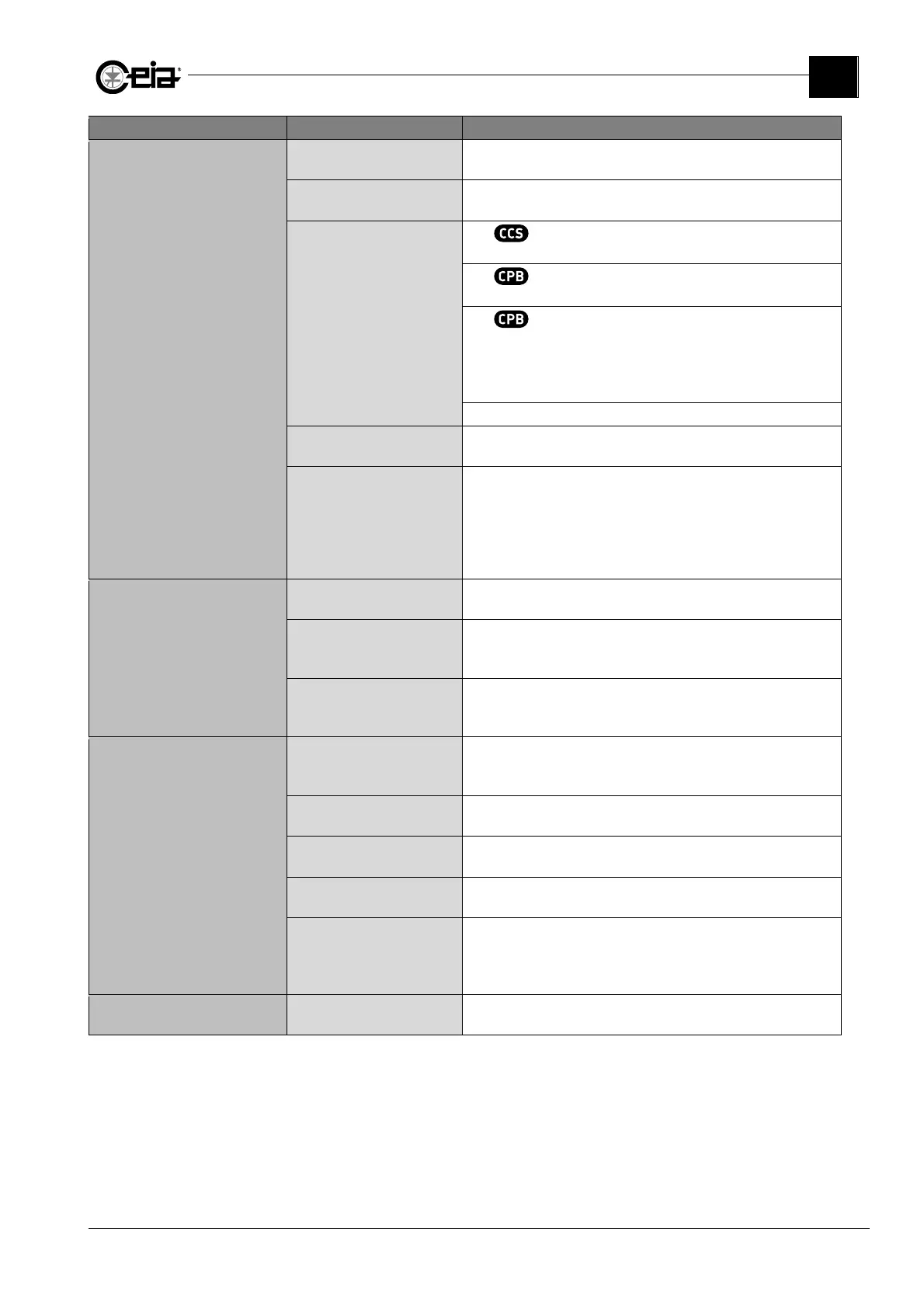
Problem Possible causes Solutions
NO alarms
when one or more test samples
are used
Incorrect selected Product
Check that the correct Product has been selected, according to
the one to be inspected.
Incorrect Test Sample/s
Check that all Test Samples used, are the ones established b
the
Head of Quality Control, for the current product.
Transit speed not compatible
with speed settings
With , check that the Test Samples have been made to
pass at the BS nominal speed of the conveyor belt.
With with encoder, check that the transit speed of the Test
Samples is compatible with the set BL-BM range or vice versa.
With without encoder, check that the transit speed of the
Test Samples is compatible with the set BL-BM range and equal
to the vaule set on BS or vice versa.
On free-falling applications, in case the transit speed is higher
than the maximum value of BS, reduce the height of fall.
See also, on Programming Manual, parameter ADS.
Sensitivity value too low
Increase the Sensitivity level, according to the operative
conditions, until all Test Samples are correctly detected.
Incorrect Detection
parameters
Set the DEFAULT product, create a new one and perform a new
Autolearn with the product, setting to ON all parameters for the
automatic selection of Sensitivity, Detection Mode or Band.
Where a belt contamination is probable, perform the Autolearn
passing the product with the conveyor belt stopped, and then
check also for a possible belt contamination (see 5.5.4).
Metal Detector ALARM
when transport stopped
Adjacent Metal Detector
interference
Check that adjacent Metal Detectors are set to different
transmission channels.
Electrical/mechanical noise
generated by other devices
connected in line
Perform the General Comptibility Check procedure in order to
reveal possible noise sources and to eliminate the causes or to
reduce their effects.
Metal Detector fault
Check all electrical connections inside the Probe and the correct
assembly and tightening of its panel.
If the problem persists, contact Assistance Service.
Metal Detector ALARM
ONLY when transport is active
Electrical/mechanical noise
generated by the transport
system
Perform the General Comptibility Check procedure in order to
reveal possible noise sources and to eliminate the causes or to
reduce their effects.
Conveyor belt (if present)
contamination
Perform the Belt Contamination Check procedure. In case, clean
the conveyor belt or replace it.
Sensitivity value too high
Decrease the Sensitivity level, according to the requested value to
correctly detect all Test Samples.
Incorrect selected Product
Check that the correct Product has been selected, according to
the one to be inspected.
Incorrect Detection
parameters or product
conditions not uniform
Set the DEFAULT product, create a new one and perform a new
Autolearn with the product, setting to ON all parameters for the
automatic selection of Sensitivity, Detection Mode or Band.
In order to obtain more accuracy, increase the requested transits.
System NOT resettable
after and ALARM or a FAULT
Transport stopped before the
end of the ejection cycle
Start the transport again, until the end of the ejection cycle, then
reset the alarm.



 To Next Page