5
FI002K0018v1530hUK – THS/21 Instruction manual for installation, use and maintenance
MAINTENANCE
172 ORIGINAL INSTRUCTION
5.2.3.2 THS-FBV
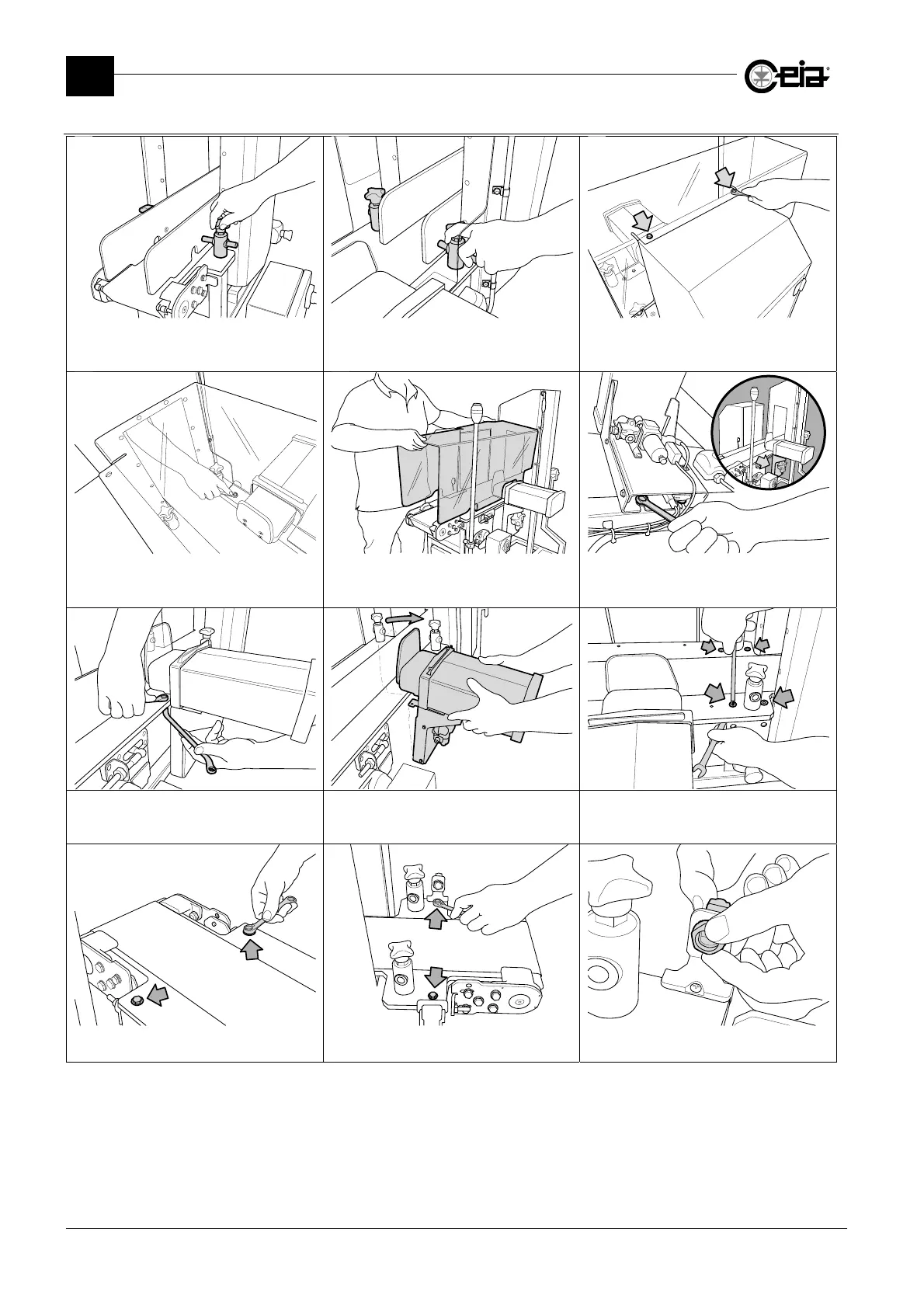
Unblock the sideboards on input side, by
loosening the indicated knobs.
Unblock the sideboards on output side,
by loosening the indicated knobs.
Remove the two sideboards.
Using a N.10 wrench remove the two
cover fixing screws shown above
Using the same N.10 wrench, remove all
the cover fixing screw
The cover is now free.
Remove it from its position.
Using a N.13 wrench, loosen the two bolts
in the bottom part of the ejector support,
without removing them.
Using two N.10 wrenches, remove the
two bolts fixing the ejector to the
sliding surface.
Slightly tilt the ejector group back,
in order to release the belt.
Using a N.13 Wrench and a N.5 Allen
wrench, remove the 4 sliding surface
fixing screws indicated above.
Using a N.10 wrench, remove the 2 sliding
surface fixing screws indicated above.
With the same N.10 wrench, remove the
two input sliding surface fixing screws.
Manually dismount the synchronization
photocell and remove it from its support.



 To Next Page