EasyManua.ls Logo

CENNTRO LOGISTAR 100 - Steering Tie Rod Joint

Default Icon
468 pages
Print Icon
To Next Page IconTo Next Page
To Previous Page IconTo Previous Page
Loading...
Steering system
223
10.2.10 Steering tie rod joint
Removal
Schematic diagram
Steps
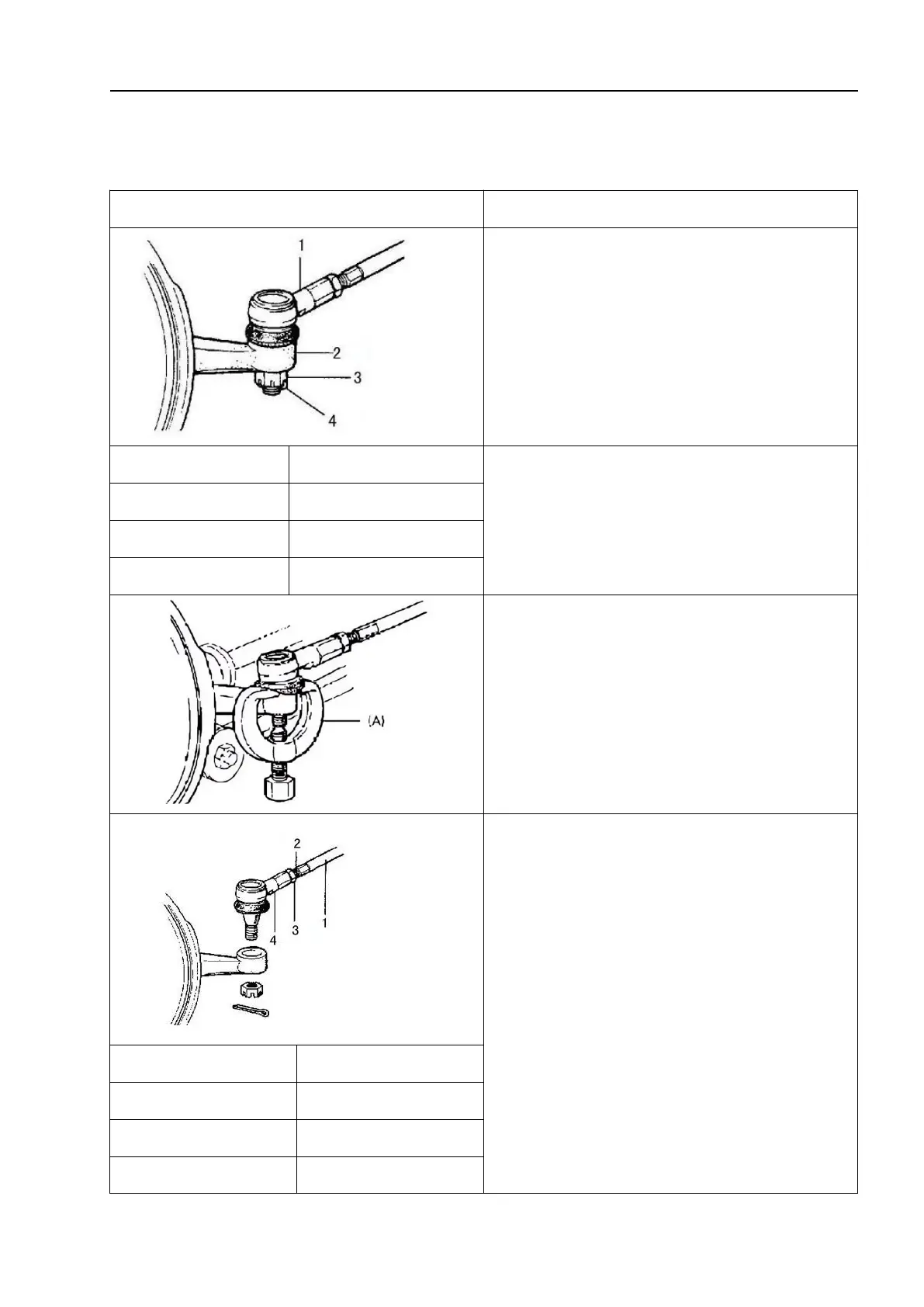
1. Remove the wheel.
1
Tie rod joint
2. Remove the split pin and steering tie rod
ball pin slotted nut from the steering knuckle.
2
Steering knuckle
3
Hexagon nut
4
Split pin
3. Use the special tool to remove the steering
tie rod joint from the steering knuckle. Special
tool: (A): 09913-65210
4. To facilitate adjustment after installation,
mark the lock nut of the steering tie rod joint on
the thread of the steering tie rod joint. Then
loosen the lock nut and remove the steering tie
rod joint from the steering tie rod.
1
Tie rod
2
Mark on thread
3
Tie rod lock nut
4
Tie rod joint

Table of Contents