64
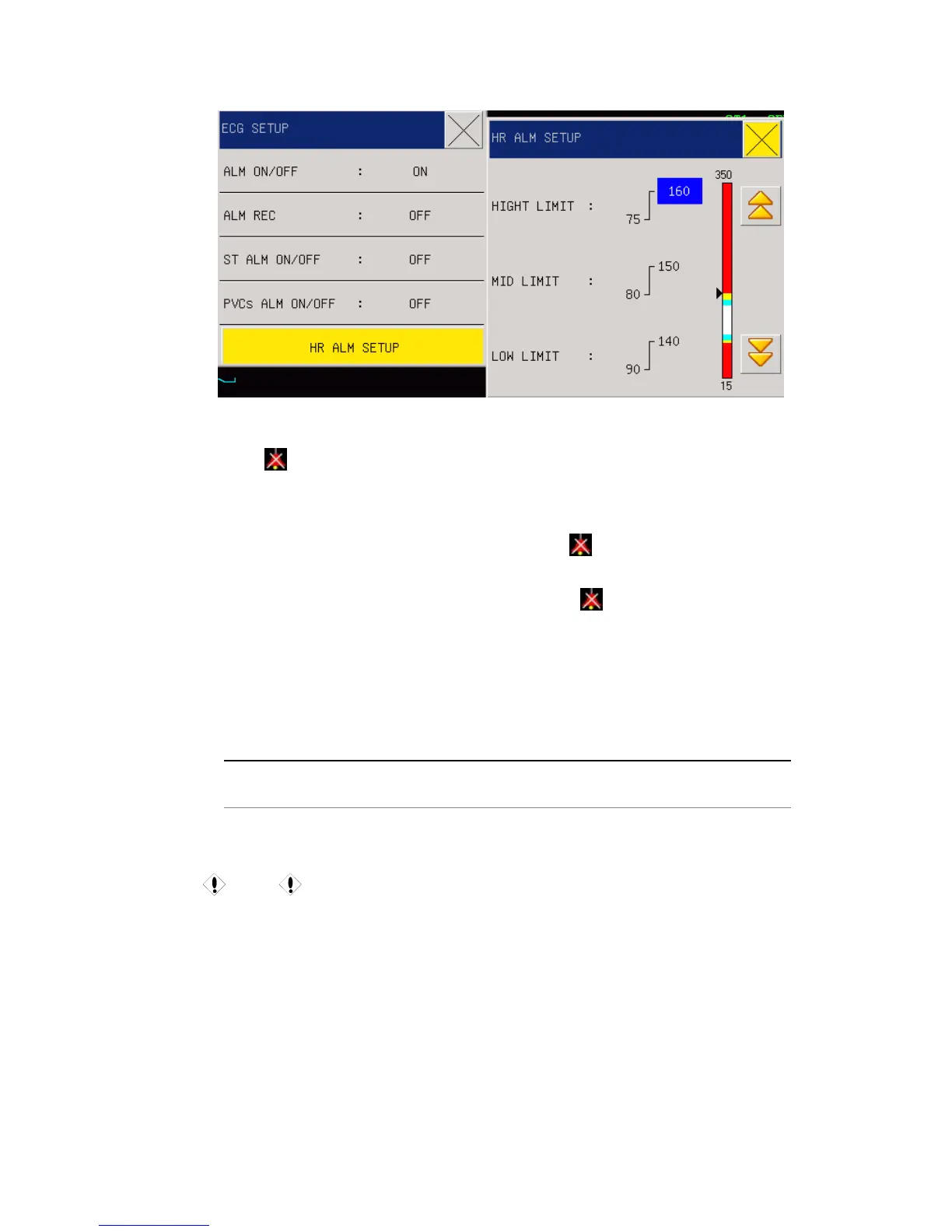
Fig 10-5 ECG Setup
Alarm ON/OFF: Select “ON” to give alarm prompt and storage when the heart rate alarm
happens.
will be prompted beside ECG.
Alarm record: Users can select “On” to print HR alarms when they happen
ST ALM ON/OFF: Select "ON” in the event of ST1 or ST1 overrun alarm prompt and
storage, select the "OFFs not an alarm, and ST1 next have "
” pompt.
PVCs ALM ON/OFF: Select "ON” in the event of PVCs or PVCs overrun alarm prompt and
storage, select the "OFFs not an alarm, and PVCs next have "
” pompt.
HR ALM SETUP: setup heart rate hight limit ,middle limit ,low limit of the upper and lower
limits .
Alarms will happen once the HR values exceed the upper or lower limit.
Adjustable ranges for HR alarm upper & lower limits are as follows:
Name
Highest upper limit Lowest lower limit
Adjustment step
length
Big /small 350 15 1
Caution
Users should set the alarm upper & lower limits based on the clinical conditions of
every patient. Setting of the HR alarm upper limit is very important, and users should
not set it too high but consider fluctuation factors. The set HR alarm upper limit should
not be over 20 beats/ minutes than patient HR.
11.5.2 ECG setting in waveform area
Turn the knob to waveform area,press the knob to enter ECG waveform setting



 To Next Page