66
11.5.3 ECG setting in measurements
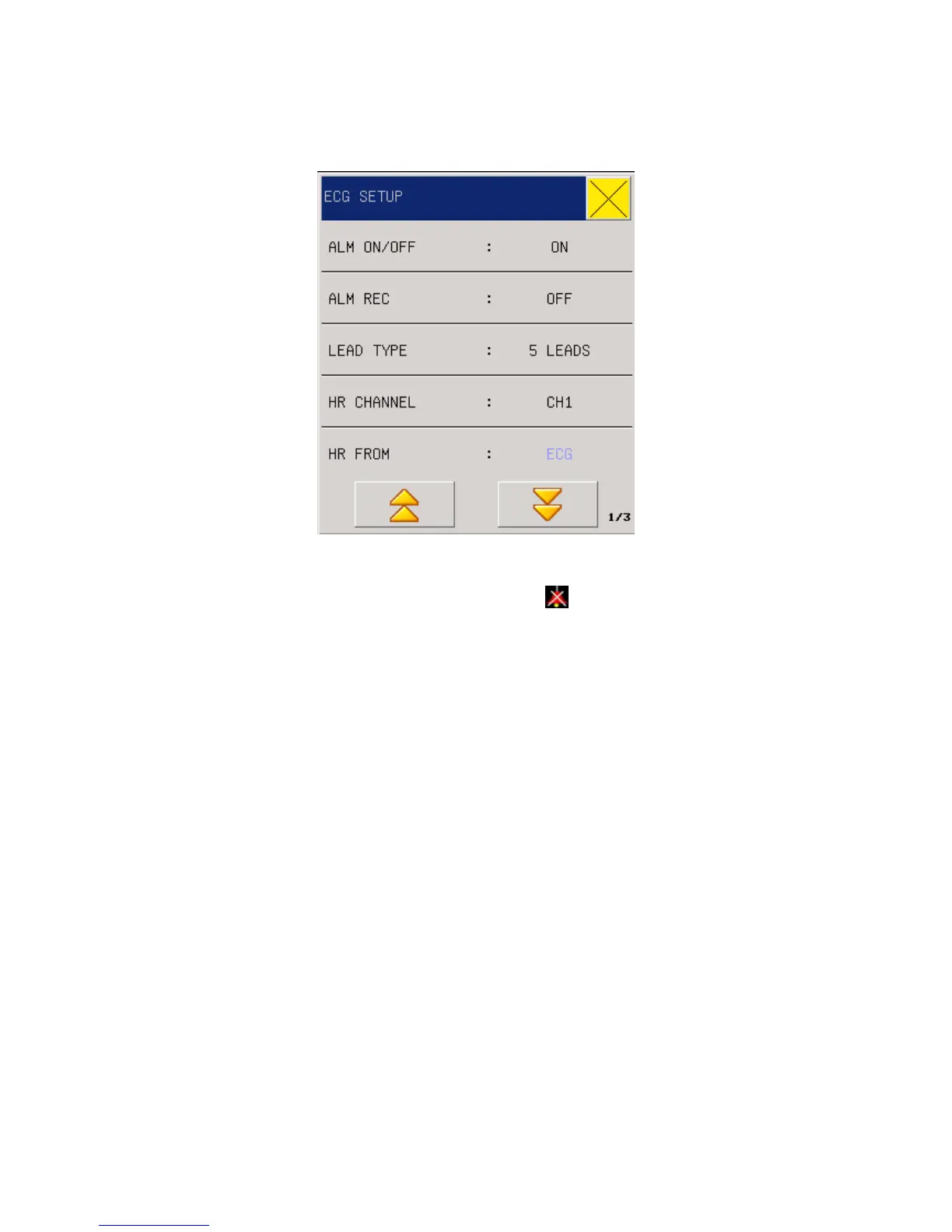
Fig 10-7 ECG Setting menu
1. When the heart rate alarm happens. Select “OFF”
will be prompted beside ECG.
2. Alarm record: Users can select “On” to print HR alarms when they happen
3. Lead type: 5-lead or 3-lead
4. HR CHANNEL(Selection of HR calculation channel)
“Channel 1” means the HR is calculated according to the first ECG waveform data.
“Channel 2” means the HR is calculated according to the second ECG waveform data.
“Auto” means the monitor will automatically select the channel of calculating HR.
5. HR FROM(HR Source)
Users can select to check HR through ECG or PLETH (blood-oxygen volume
recording waveform); if users select “Automatic”, the monitor will decide HR source
based on signal quality; if users select “All”, the monitor will concurrently display HR
and PR. In case PLETH is taken as the HR source, the PULSE reminder will be
displayed together with pulse voice.
In case PLETH is taken as HR source, no alarm judgment on HR but alarm judgment
on PR will be conducted. In case “All” is selected, PR measurement values will be
displayed in the right to SpO2 on the main screen, and HR & PR make alarms at the
same time. Pulse voice will give priority to HR, as long as there is HR data, voice
reminder will be there; only when there is no HR data, voice reminder will be subject



 To Next Page