147
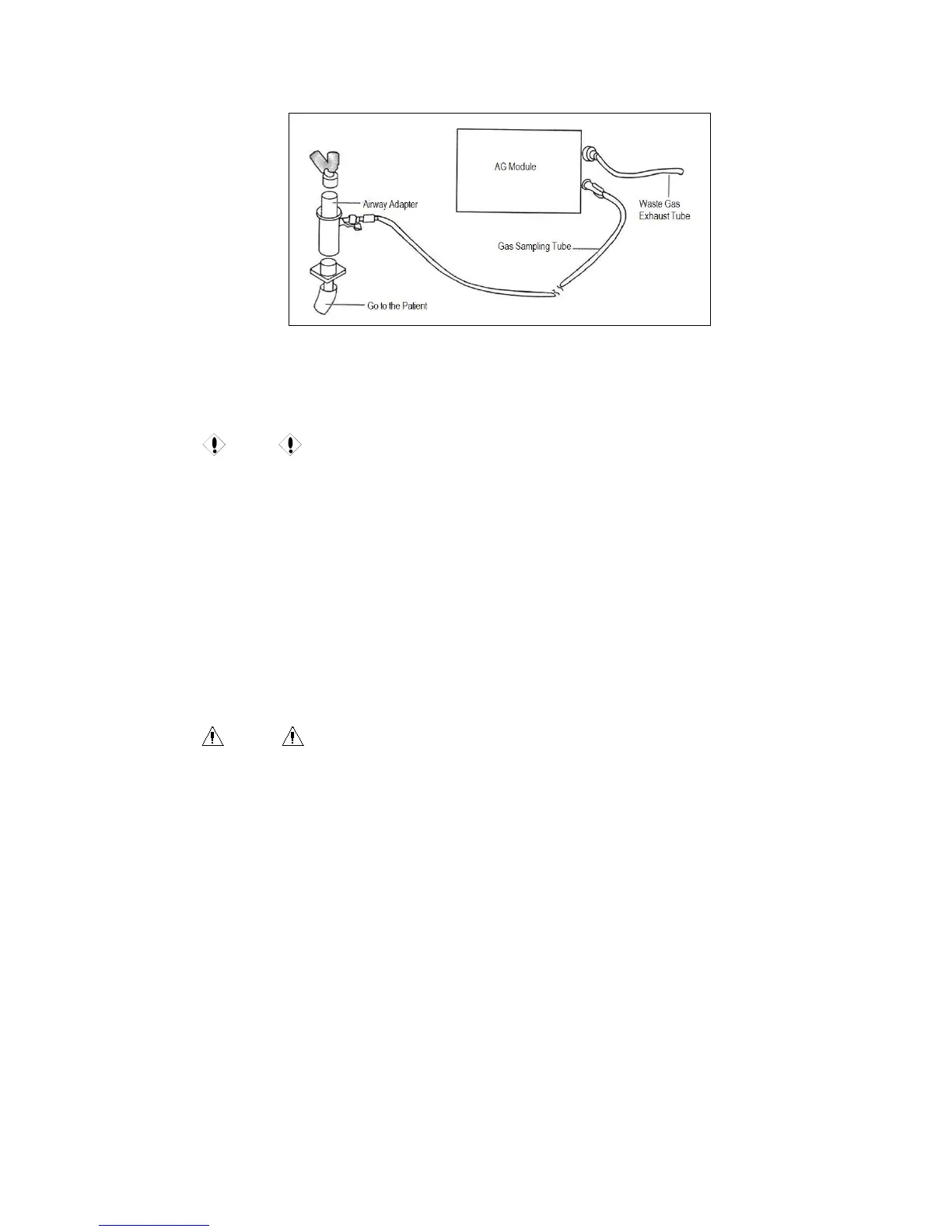
Fig. 17-2 Connection Diagram for Preparations
5. Select “Measurement Setup” from the main menu or menu bar to enter “AG CO2”
and “AG N2O”, and set the operation mode as “Measure” to enable AG.
Caution
The end of the airway adapter connected to gas sampling tube should face up, in order
to prevent condensed water drops entering and blocking the gas sampling tube.
The water tank is used to collect the condensed water drops from the sampling airway
and prevent them entering the module. Please pour the water in the water tank when it
reaches a certain amount, or the airway could be blocked.
The water tank contains filtering materials to prevent the bacteria, moisture or
patient’s secretions entering the module. After a long-time use, the dusts or other
external objects will reduce the air permeability of the filtering materials, which could
block the airway if serious. In this case, please replace the water tank. It is better to
replace the water tank every other month.
Warning
The water tank for adults is not applicable to any newborn patient, or it could hurt the
patient.
Make sure all connections are secure and reliable. Any leakage could cause reading
errors since the breathing gas for the patient is mixed with the ambient air.
18.6 AG Setup
18.6.1 CO2 Settings
1. CO2 Settings in Parameter Area
In the AG interface, rotate the shuttle button to move the cursor on the display interface to the



 To Next Page