Chapter 6 RAID Group Management
6.2 Functions in the Action Area for RAID Group
ETERNUS Web GUI User’s Guide
117
Copyright 2011 FUJITSU LIMITED P2X0-1090-02ENZ0
6.2 Functions in the Action Area for RAID Group
When using functions in the Action area, select the desired function from the Action area that is
displayed in the status display screen.
The functions in the Action area for RAID group can be performed from the following display
functions:
6.2.1 Create RAID Group
This function creates RAID groups.
A RAID group is a group of drives that configure a RAID level.
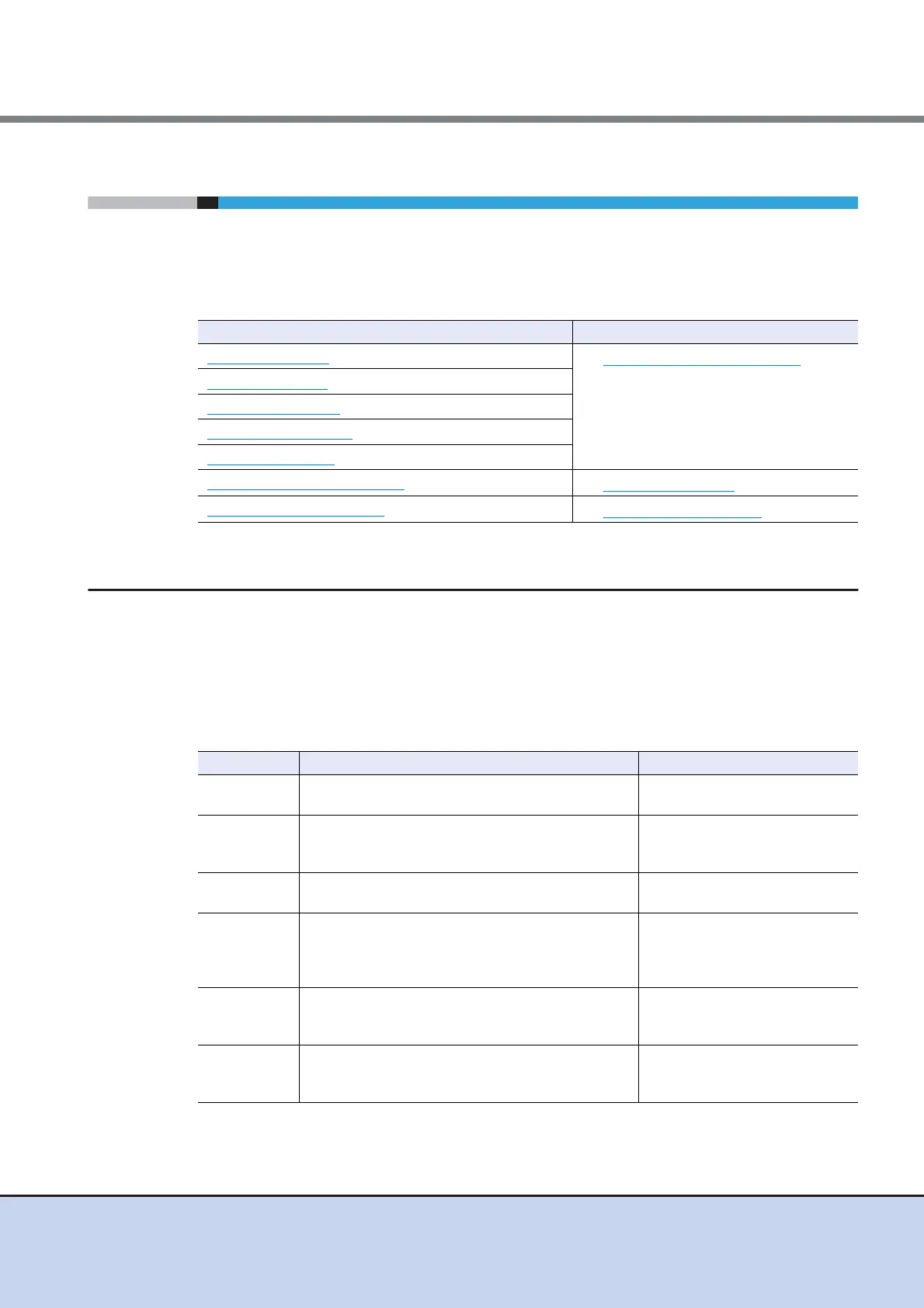
Features and required number of drives for each RAID level
The following table shows the features and the required number of drives for each RAID level.
(D: Data drives, P: Parity drives)
Functions in the Action area for RAID Group Display function
Create RAID Group
• RAID Group (Basic Information)
Delete RAID Group
Rename RAID Group
Change Controlling CM
Expand RAID Group
Modify RAID Group Parameters
• RAID Group (Tuning)
Assign ECO Mode Schedule
• RAID Group (ECO Mode)
RAID level Feature Required number of drives
RAID1+0
The high I/O performance of RAID0 (striping) is
combined with the reliability of RAID1 (mirroring).
2D+2D - 16D+16D
RAID5
Data divided into units of blocks and allocated
across multiple drives together with parity
information created from the data.
2D+1P - 15D+1P
RAID6
The use of double parity allows the full recovery of
lost data even in the event that two of the drives fail.
3D+2P - 14D+2P
RAID5+0
Multiple RAID5 volumes are RAID0 striped. For
large capacity configurations, use of RAID5+0
instead of RAID5 results in enhanced performance,
improved reliability, and shorter rebuilding times.
(2D+1P) x 2 - (15D+1P) x 2
RAID1
Data is mirrored to two drives.
If one drive fails, the other drive continues operation
(mirroring).
1D+1M
RAID0
Data is split in unit of blocks and stored across
multiple drives (striping).
RAID0 has no data redundancy.
2D - 16D



 To Next Page