使用说明书 Operation Instruction
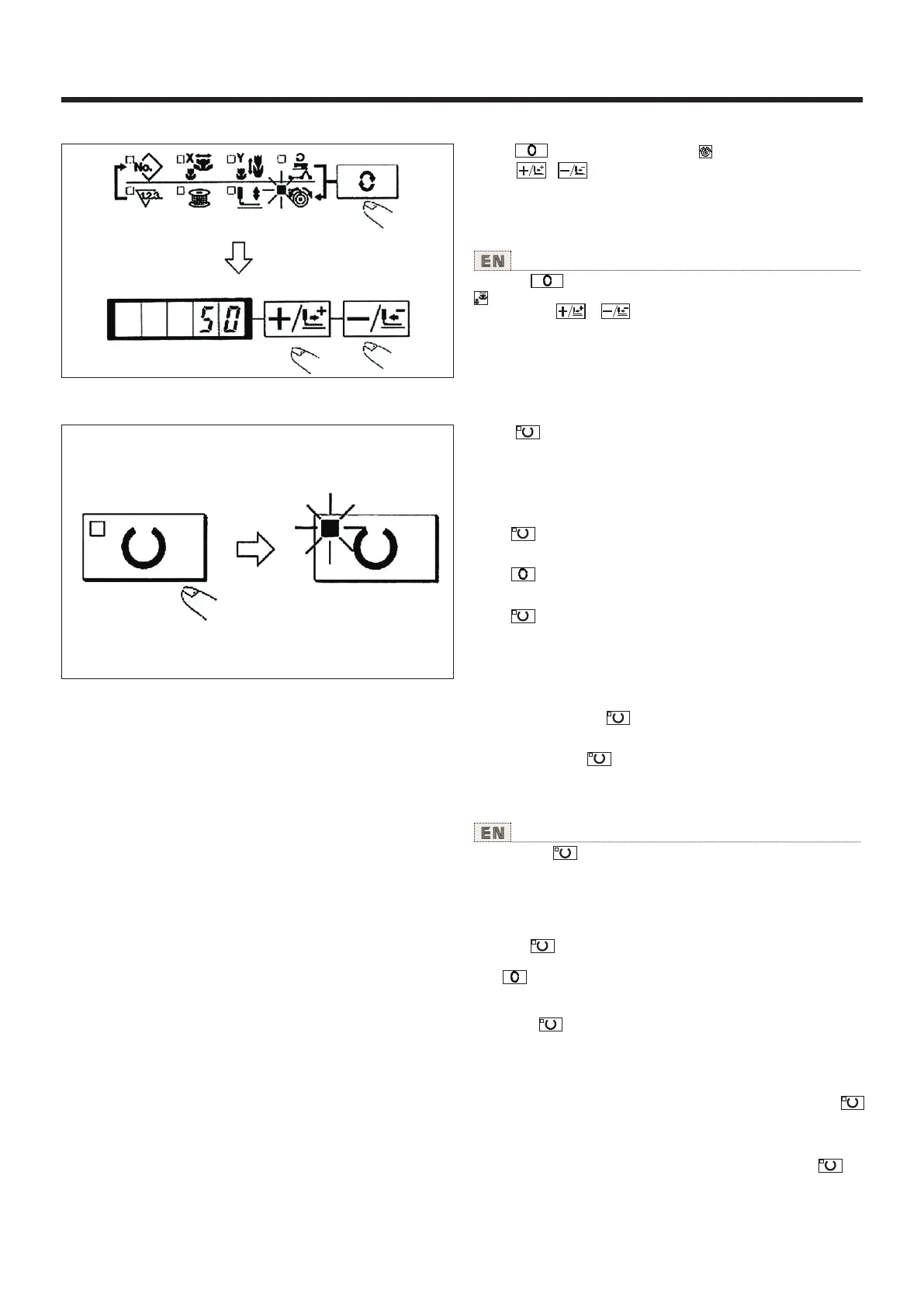
(5) 线张力的设定 Setting of the thread tension
1) Press key to indicate the item “THREAD TENSION”
.
2) Press the or key to indicate "50" .(0 to200 can be
set.)
1)按 键,设定为[线张力] 的显示项目。
2)用 、 键,让缝纫机显示出[50]。(可以在
0-200的范围 进行设定)
X
(6) 设定结束 Finish of setting
1)按 键。
2)压脚移动 上升后,缝制LED亮灯,成为 可以缝
制的状态。
(注意)压脚 上升时,压脚首 先下降然后 在移动,
因此请注意不 要夹到手。
* 按 键之后,图案NO.、XY扩大缩小率等设定
值被记忆。
* 按 键之后,可以重新确认个设定项目,但
是缝制LED亮灯 的状态不能 变更。
* 按 键之后,准备LED灭灯。个项目的设定值
可以变更。
* 线张力在缝制LED亮 灯时也可以 变更。线张力
用开始SW也可以 记忆。
* 确认了图案NO.之后 再使用,在 图案NO.0显示
(出货状态) 按 键之 后,会显示 异常E-10。
此时,请重新 设定图案NO .。
(注意)不按 开关,关掉电源后 ,图案NO.、
XY扩大缩小率 、最高转速 、线张力的 设定均不能
被记忆。
1) Press the key.
2) After the work clamp feet. have moved and gone up, the
sewing LED lights up, and the sewing is ready.
(NOTE) When the presser is raised, be careful that fingers are
not caught in the presser since the presser moves after having
lowered.
* When key is pressed, the set values of pattern No., X/Y
scale, etc. are memorized.
* If key is pressed, you can make sure of the respective
setting items again. However, the items can not be changed
in the state that the SEWING LED is lit up.
* When key is pressed, the READY LED goes off. Set
values of the respective iiems can be changed.
* Thread tension can be changed even when the sewing LED
lights up. Thread tension can be momorized with the start
switch as well.
* Use the machine after confirming the pattern No. When
key is pressed while pattern No. is indicated "0" (state at the
time of delivery), error display E-10 appears. At this time, reset
the pattem No.
(NOTE) When turning OFF the power without pressing key,
the set values of pattern No., X/Y scale, number of max.
rotation, and thread tension are not memorized.
18



 To Next Page