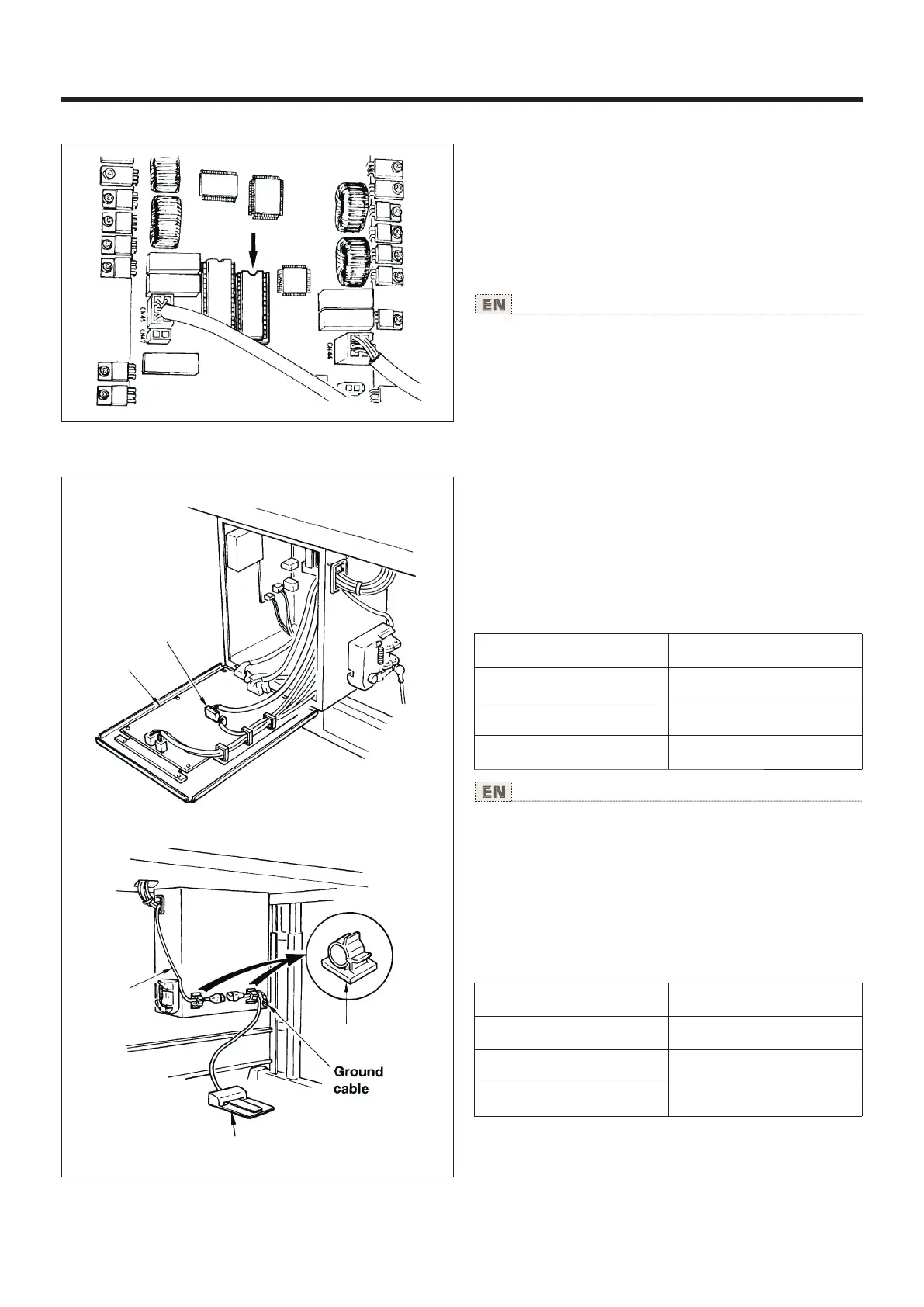
5.LK-1900数据ROM LK-1900 data ROM
使用说明书 Operation Instruction
LK-1900数据ROM在插上MAIN电路板上的IC插头之
后使用。
(注意)
1)请注意插入当箱。
2)EEPROM不能使用。
3)图案NO.与标准图案相同时,数据ROM内的图案优
先。
※ 可以使用的ROM是27C256 EPROM
Insert LK-1900 data ROM to the IC socket on MAIN p.c.b for
use.
1) Be careful of the insetting direction.
2) EEPROM cannot be used.
3) When the pattern No. is the same as that of the standard
pattern, the pattern in the data ROM is prior to other pattern.
ROM which can be used : 27C256 EPROM
6.选购品踏板的连接方法 onnection of the optional pedalC
1)把PK-57变换电缆线②连接到MAIN电路板①的CN41。
2)在控制箱背面,建接PK-57 电缆线和PK-57变换
电缆线②,用黏贴线夹④固定到2个地方。
另外,请如图所示那样把PK-57的地线用螺丝固定好。
③
1) Connect PK-57 change cable ② with CN41 of MAIN circuit
board ① .
2) Connect the cord of PK-57 ③ with the PK-57 change cable
at the rear face of the control box.
Then clamp two places with adhesive clamp ④,
In addition, tighten with a screw the PK-57 ground cable as
illustrated in the figure.
3) Set the memory switches as follows.
③
④
①
②
②
Part No. GPK570010BO
Part No. GPK570010BO
Part No. E9607603000
PK-57:
PK-57 change cable:
Adhesive clamp:
Memory switch No. Set value
19 2
20 1
24 1
PK-57:
PK-57变换电缆:
黏贴夹:
货号GPK570010BO
货号E9607603000
货号E9607603000
3 存储器开关的设定如下。)
存储器开 关No. 设 定值
19 2
20 1
24 1
55



 To Next Page